Technology
Gadgets, tools, and the small obsessions of a life lived through good hardware. Enthusiasm, applied responsibly.
Ghost Themes
A living gallery of the best, updated as new ones ship. 444 demos from 112 publishers.

100 Posts
100 posts, 12 years, 3 restarts.
It has been more than a decade since I put my first website online. Well, four websites.
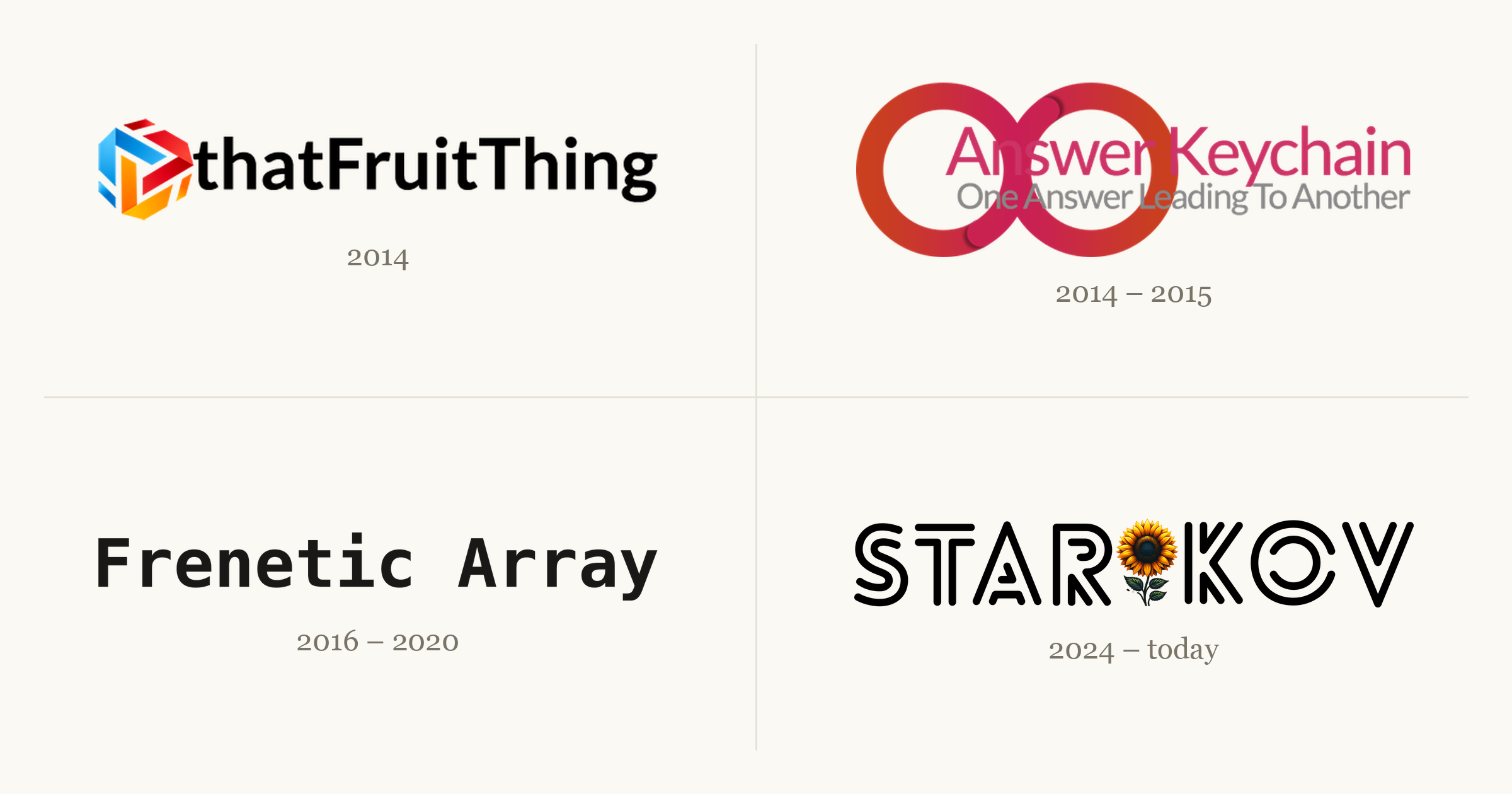
Each one taught me something the next one needed. A couple went live to a small thrill and then went quiet; one I took down myself, the night a friend found it. The fourth is the one you're reading. This is the story of all four, and the 99 posts that came before this one.
(On this site, anyway. The other three didn't all make the move; thatFruitThing alone ran to about 40 posts that never got ported. Count every site and it clears 140.)
Humble Beginnings
I started writing on the internet in 2014: a curious freshman with a new laptop and an itch to build something. So I did.
thatFruitThing
2014–2016. Around 40 posts about Apple, one WordPress install, and most of the web development I know.

thatFruitThing was where I wrote about Apple. I was living through an interesting era: iPhone 6 and 6 Plus, Apple Watch, Apple Pay, the 12-inch MacBook. I'd gotten my first iPhone and Mac the year before, and I wanted to document all of it. Over two years it grew to around 40 posts, most of them short takes on whatever Apple had just shipped.
My friend Amit walked me through the first server: WordPress on Bluehost. I geeked out. I read the plugin marketplace at 2am chasing features I wanted, and tuned the design well past the point of reason. Pretty much all of my web development experience comes from here.
Then the shine wore off. As I moved through my computer science degree, I wanted to write about what I was learning, and my interest had spread from one company to a whole industry. None of that fit tidily under a name like thatFruitThing.
The ending was abrupt. A friend found me in the cafeteria, told me he'd discovered the site, and called me an Apple fanboy. He wasn't wrong. But it knocked something loose. The site wasn't getting the attention it deserved, and I decided it was better to take it down than let it rot. It came down that night.
A few of those posts survived the move here:
- Into the Rabbit Hole of Markdown Editors
- Apps of 2014
- Apple Keynote: September 9th, 2014
- Breakdown of My Homescreen
- iOS 8 Guide
Answer Keychain
2014–2015. Quiz answers traded for ad money: $5 a month out, under $20 in two years, never enough to cash out.
Answer Keychain came out of the freelance work I was doing around the same time. I was on oDesk, which ran certification quizzes you could take to earn badges for your profile. When I finished one, I'd post the answers here. (I was also playing a lot of Trivia Crack.)
I hoped it might cover my server costs, so it became my first experiment with ads. The site cost $5 a month to run. Over two years it made less than $20, which isn't even enough to get paid: AdSense doesn't release a cent until you clear $100. I spent my days refreshing the analytics and the ads dashboard to watch a handful of visitors trickle in. I was trying to ride the Google search wave, in a crowded niche, with no promotion. It was built to fail. But it was a side project, and it taught me I needed a better approach.
My freelance career stalled after a summer, and the site stalled with it. Both petered out for the same reason: my heart wasn't in it. I'd put in the hours, learned the lesson, and was ready to move on.
Frenetic Array
2016–2020. A couple dozen posts on computer science, the Ghost-on-DigitalOcean stack I never left, and one rewrite I never finished.

Frenetic Array was a reflection of its time: a computer science student halfway through his coursework, leaving no intellectual stone unturned. And did I have opinions to share.
By then I was comfortable with web tech, and I wanted to spend my time on the writing instead of the plumbing. So I moved to the stack I still use today: Ghost on a DigitalOcean server. Ten years later, both are still here. This is where I learned to explain a hard idea in plain language, which turned out to be the most durable skill the site ever gave me.
Its downfall was self-inflicted. My Ghost install went stale, two major versions behind. My theme was being deprecated and needed a port to something current. I wanted to move from FreneticArray.com to starikov.co. So I decided to start over from scratch. And never finished. Seriously. RIP.
The best of it, in rough order:
- On Being Passionate About Tools
- An Evolutionary Approach to Problem Solving
- On Understanding, Not Just Memorizing
- The Monty Hall Problem
- Painting Gabriel's Horn
The Blog Lives On
2024–today. The one that stuck. A post a week, a month of backlog, and a streak I won't break.
This blog has an odd origin. At work, I set up an internal page for the things I kept sharing: my resume, links to Ukrainian donation funds, a few documents people kept asking for. I figured I'd take it down if I ever left.
Then the tech layoffs started, and it occurred to me that leaving isn't always your call. I rethought what belonged on company infrastructure, and personal content wasn't it. It took a year, but I moved all of it here. (The work material now lives in a Google Doc, shared with my current and former teams.) These are my own words, not my employer's; the disclosures page covers the rest. After the move, the site sat parked and untouched for another year.
It's no accident that most of my writing lines up with the moment I started using coding agents. Not because I use them to write the posts, because I don't. The opposite, really. I love writing; I hated publishing. Writing is the pure part. Publishing was a pile of clicks in a CMS: copy the content over, set every field, check it twice. I automated everything except the writing, which means I get to write more.
Starting a blog the same season those tools matured felt like cheating. A feature I wanted took a day or two instead of a weekend. When something annoyed me, I no longer had to hunt through CSS to patch it. The site is more polished than I could have made it alone, which freed me to focus on the part that matters: writing.
For every project before this one, I never shared the work anywhere, so traffic was roughly nobody. This time I knew I had to do it differently. I had to promote my own writing: to get it in front of people now, to bring in subscribers over time, and to build the slow, compounding pile of backlinks that search engines reward. The promotion adds up, and I've watched it pay off. It's genuinely good to see something you wrote land for someone, big or small. That, to me, is what the writing is for.
A few of those promotions found an audience I never expected:
- 850 pages of my CS notes, on r/learnprogramming
- the zero-width space, on r/webdev
- a Ukraine donation one-pager, on r/ukraine
- RSS as my everything app, on r/rss
It's been an emotional roller coaster. The highs are real: honest feedback, a reader who enjoyed the thing, proof that what you wrote mattered. But I could never guess which post would do well. The ones I was sure were bangers sank without a trace, which stings. It gets me down sometimes. I bounce back.
One thing is certain: it has paid off.
Since I started writing consistently, from April 2025 to today, the numbers look like this:
- 14k users
- 35k views
- 20 members
To me, that points to a bright future. I think I'm keeping this one.
Lessons Learned
Every website was a lesson. They stack into the site you're reading now.
thatFruitThing
Start anything. Write like nobody's watching. At first it all feels like it isn't good enough. But you don't need everything figured out at the start — you're a beginner, like I was. You work it out as you go.
Start anywhere. The opening decision paralysis is real: CMS, host, domain, registrar, on and on. What matters is that you start somewhere. Anywhere. You'll refine the stack until it fits.
Answer Keychain
It's not about the metrics. Refreshing the analytics and ad dashboards got me nothing but a slower pulse. What I should have refreshed was the writing, asking what moved the needle for me instead of for the search algorithm. Which leads to:
Do what you love. Just because you can do a thing, should you? When I'm unsure whether to commit to a project, I sleep on it. A good idea today is still a good idea tomorrow.
Frenetic Array
Have fun. Frenetic Array was fun, which is why it outlasted the rest. I wrote whatever I wanted, whenever I wanted. That's what writing should be: your own expression. Not every essay has to be a greatest hit; it just has to matter enough to you to share.
STAR🌻KOV
Consistency is key. Pick a cadence and hold it. thatFruitThing was a post a day, and I burned out. Frenetic Array was a post a week, each one heavily academic, and I burned out. Now it's a post a week on whatever I want, with about a month of backlog. That's sustainable. Some weeks I don't write at all, but the schedule holds, and there's a streak to keep.
Self-promote. This was the hardest one for me. It feels like a needle of joy in a haystack of rejection. But it's a signal worth reading. What worked? What got clicks? It's learning in production. Don't be shy. Show people what you've got.
My Next Milestone
Someday I'd like to reach 1,000 posts here. At a post a week, that's about 17 years out. Yikes. I'll check back in before then.
The next milestone is simpler: write one post a week until I can't.

Stock Ticker
Add a ticker once, find it there forever.
Your tickers
Your ticker list is empty. Type a ticker above, or start with a few:
The watchlist
The page opens on five defaults: Meta, Apple, Nvidia, Google, Microsoft. Make it yours. The field above the list searches about 9,500 US-listed stocks, funds, FX pairs and crypto by ticker or company name; pick a match and it lands in the list. Each symbol gets its own cell: price, day change, a sparkline. The row of ranges above the cells, 1D through ALL, redraws every sparkline at that span. The header checkbox turns the scrolling strip off.
Tap a cell and it pushes a detail screen: the day's numbers, market cap, P/E, EPS, dividend yield, and a bigger chart with its own range tabs from one day to everything. The address bar carries #s=NASDAQ:AAPL while the screen is open, and that link reopens the same screen, on any symbol, listed or not.
Housekeeping lives behind Edit. It reveals × to remove and ≡ to reorder: drag with a pointer, or on the keyboard, where space lifts a row, arrows move it, and space drops it. Edit is also where watchlists are managed. Up to eight named lists, one showing at a time; the switcher stays out of the way until a second list exists.
The lists live in localStorage. They survive reloads and restarts in this browser, on this device, and go no further: no account, no sync, no database on my end. Clearing site data clears them. There is no export either, so a list built on a laptop stays on that laptop.
None of which makes it private from TradingView. Every symbol you add is passed to them to draw, so they see the list, your address, and the page you came from. The honest version of the claim is that nothing reaches a server of mine, because I don't have one.
Symbol formats
Search covers the US listings, cap-ranked so the match you meant comes up first. The same field still takes anything TradingView can resolve, typed raw: exchange-prefixed forms like NYSE:BRK.B and AMEX:VOO, FX pairs (EURUSD), crypto (BTCUSD, COINBASE:ETHUSD). A bare ticker the directory knows is upgraded to its listed form on the way in: aapl becomes NASDAQ:AAPL.
Outside the directory, bare tickers are first match, not canonical, and the first match is not always the famous one. SPX gets you SpaceX, not the S&P 500. Index and futures symbols mostly don't resolve at all on the free tier: ask for SP:SPX or CME_MINI:ES1! and the cell says the symbol is only available on TradingView, which is their way of saying that data costs money. TradingView's search gives the canonical form.
The cap is 25 symbols a list. That is a rendering budget, not a philosophy: each one is its own frame.
Where the numbers come from
TradingView, through its free embeddable widgets. No key, no account. That is also the constraint. US equity prices run about fifteen minutes behind, more on some exchanges, and TradingView decides what happens inside the frames. This is a glance, not a trading desk, and not advice.
Every free quote API I checked, Alpha Vantage and Finnhub and Polygon and Twelve Data, either restricts redisplaying quotes on a public page or charges for the right. An embed is the honest way to do this for nothing.
If the quotes don't load
A short note takes the place of the quotes. Usually that means a privacy extension or a network filter is blocking TradingView. It can also mean this site's content-security-policy hasn't been told to allow them, which is my fault rather than yours. Either way your saved symbols are untouched, and they come back when the quotes do.

devfetch
neofetch is for machines. devfetch is for developers.
Most GitHub profiles open with a wave: a README that says hello, a short bio, a row of pinned repositories. Mine boots a terminal. There's an ASCII portrait of my face on the left and a column of key: value rows on the right, and it repaints itself every night in whichever TokyoNight my reader is wearing.
This is the whole build, and it's small enough to steal in an afternoon. Every block of source below is pulled live from the repository, so nothing here can drift from what actually runs on my profile. Take it, change the parts marked TODO, and point it at yourself.

That card is live, straight from my profile: two self-contained SVGs that swap by prefers-color-scheme (flip your system theme and watch). The idea isn't mine. I first saw it on Andrew6rant's profile and rebuilt it from scratch, since that project carries no license. The whole thing is about 600 lines across three Python scripts and a workflow.
One File, Two Faces
GitHub has no setting for "show a different image in dark mode," so the entire README is one <picture> element:
Loading README.md…The tempting approach, one SVG with a @media (prefers-color-scheme) block inside it, works in a browser and fails on GitHub, because README images render through an <img> tag and GitHub's camo proxy, and the mobile apps ignore the query outright. <picture> moves the decision up a layer, into HTML that GitHub controls: dark is the <source>, light is the fallback <img>.
That same camo proxy blocks every external fetch, which is why the two SVGs have to be fully self-contained: the font is a Fira Code subset embedded as a base64 data-URI, with no network calls and no working links anywhere in the card.
Drawing a Terminal
The card is drawn by hand, not templated. A single Python script places text on an exact monospace grid (every run pinned to its own x-coordinate so nothing shears if the embedded font falls back), with dotted-leader key: value rows, three macOS traffic-light dots, a title bar, and a TokyoNight palette. It emits both themed SVGs.
Loading src/generate_svg.py…The rows in build_info() are the only personal part: your name, editor, keyboards, contact. That's the first thing you'll change.
A Face You Draw by Hand
The portrait is the part people ask about, and it's the one step that can't be fully automated: you pick your own photo and tune it by eye. Start with a head-and-shoulders shot, cut the background out, and matte it onto black so the subject reads against the dark card:
uvx --python 3.11 --from "rembg[cpu,cli]" rembg i you.jpg you_nobg.png
magick you_nobg.png -background black -flatten you_black.png
Then luminance becomes glyphs (each pixel's brightness picks a character from a 70-glyph ramp), and a second pass walks the same photo cell by cell, converts each to HSV, and snaps it to a theme color. Two rules carry the whole look: pastel blues are forced to stay blue (the shirt), and warm skin-and-hair tones are pushed to silver so the shirt is the only real color in the frame.
Loading src/ascii_portrait.py…Re-render with different --contrast / --gamma / --sharpen until the face reads. This is hand-work; every photo is different, and there's no recipe that fits them all.
Counting Yourself
A card that brags should at least be honest, so the stats are real, pulled from GitHub's GraphQL API every night. Repos, stars, and followers are one query. The other two fight back: all-time commits need a year-by-year walk of contributionsCollection (it only spans a year at a time, and you have to fold in restrictedContributionsCount for private work), and honest lines-of-code means walking each repo's history yourself, since the REST stats endpoint is stale, 202s while it computes, and approximates on big repos. Each repo's result is cached against its branch-head SHA, so an unchanged repo costs zero API calls the next night.
Loading src/fetch_stats.py…The Nightly Heartbeat
None of this is worth doing by hand twice, so a GitHub Action runs it on a cron, redraws the SVGs, and commits them back as a bot only when something changed. The token you give it decides what it can see: the default GITHUB_TOKEN counts public data; a personal access token with private scope (README_TOKEN) counts everything.
Loading the workflow…The last step is the one I'd urge you to keep. The card that inspired mine had its update cron die quietly in 2025, and by the time anyone noticed it had been frozen for the better part of a year. A heartbeat you can't hear isn't a heartbeat, so mine files an issue against its own repo the moment a run fails. The card is allowed to go stale for a day; it is not allowed to go stale for a year without telling me.
Make It Yours
Everything you'd change is marked TODO in the source above. Clone the repo and grep for it:
grep -rn TODO src/
- Your GitHub username:
fetch_stats.py, theUSERline. - Every card row:
build_info()ingenerate_svg.py(labels and values both). - The
user@hosttitle and theme colors: alsogenerate_svg.py. - The portrait: your own photo, per the section above.
Then run python3 src/fetch_stats.py and python3 src/generate_svg.py, commit the two SVGs, and drop the <picture> from the root README onto your profile. src/README.md has the full setup, dependencies, and run order.
Credit
The concept belongs to Andrew6rant, whose profile card I admired for a while before building my own. Every line here is an original re-implementation rather than a fork, but the idea, a profile that reads like a terminal and keeps itself current, is his. Mine just adds the thing his was missing: a pulse that screams when it stops.
The full source is at github.com/IllyaStarikov/IllyaStarikov. A profile README is the one page on GitHub that's entirely yours; I'd rather it say something than wave.

The Vanishing Keystrokes Bug
How a faceless background agent ate my typing, and the script that caught it.
A few days into an uptime, deep in something, my Mac would stop listening. Not a crash, not a freeze. The cursor still moved, windows still highlighted under it, I could click anything. But the keyboard went dead: I'd type a whole sentence into a window that looked focused and watch zero characters land. Clicking didn't help. Sometimes it cleared after a few seconds; sometimes I rebooted and bought another day or two of quiet.
A bug that only shows up after hours of uptime, never on a cold boot, and clears on reboot is the worst kind. You can't reproduce it on demand, so you can't poke at it. I finally cornered it, and the culprit wasn't what I assumed.
The Symptoms
If your Mac does this too, start here. The shape of the failure tells you where to look.
- The mouse works. The keyboard doesn't. Pointer moves, clicks land, but no window accepts text.
- It's system-wide, not one app. Every window is dead, whichever one you click into.
- It builds up over uptime. Fine on a fresh boot, more frequent the longer the machine stays awake.
- A reboot fixes it. Temporarily. It always comes back.
- The focused window looks slightly de-focused, title bar greyed out, as if nothing is frontmost.
That combination rules a lot out. It isn't a hardware keyboard fault: the mouse and keyboard share enough of the input stack that a real HID failure takes both. It isn't one misbehaving app. It points at the part of the OS that decides where keystrokes go, and at something that corrupts that decision the longer you stay logged in.
Two Kinds of "Front"
macOS tracks "in front" in two places that are supposed to agree.
- The active application (LaunchServices and
NSWorkspace). Apple definesfrontmostApplicationbluntly: the app that receives key events.lsappinforeports it. - The key window (WindowServer). Within the active app, keys flow to the key window, then to its first responder, the text field your cursor sits in. No window that can become key means no key window, and nowhere for text to land.
A third notion, Accessibility's AXFrontmost (what AppleScript's System Events reports), tracks the app whose UI is actually up front.
On a healthy Mac all three agree and you never think about it. The bug lives in the gap: if LaunchServices says one app is active while Accessibility says another, the OS routes your keystrokes to an app you aren't looking at. If that app has no window, they evaporate.
Bug Catcher
Check both notions from the terminal, especially while the bug is happening:
# LaunchServices: who owns key events?
lsappinfo info -only name "$(lsappinfo front)"

# Accessibility: who's actually up front?
osascript <<'EOF'
tell application "System Events"
  name of first application process whose frontmost is true
end tell
EOF
Healthy, these match. Mine didn't:
LaunchServices : "Logitech G HUB Agent"
Accessibility  : wezterm-gui
LaunchServices thought a faceless agent, the Logitech G HUB Agent, was the active app receiving key events, while the app I was clicking into was my terminal. My keystrokes were routing to an agent with no window.
Two commands catch it if your timing is lucky. The bug is intermittent, so I wrote a monitor that shouts the moment the two disagree.
focus-spy
It polls both notions once a second, logs every change, and flags MISMATCH when the PIDs differ. Drop it in your $PATH, chmod +x it, run it.
#!/usr/bin/env bash
# focus-spy - find out what's stealing keyboard focus on macOS.
#
# macOS tracks "the frontmost app" in two places that should agree:
#   * LaunchServices / NSWorkspace - the app that RECEIVES KEY EVENTS
#       (what `lsappinfo front` reports)
#   * Accessibility (AXFrontmost)  - the app whose UI is up front
#       (what System Events reports)
# When a background agent shoves itself into the first one without a
# real window, the two disagree, and your keystrokes fall in the gap.
# This logs both once a second and shouts when their PIDs differ.
#
# Usage:
#   focus-spy             # watch (Ctrl-C to stop)
#   focus-spy mark NOTE   # mark the instant typing dies
#   focus-spy report      # print the timeline, sorted

set -uo pipefail
LOG="${FOCUS_SPY_LOG:-$HOME/.local/state/focus-spy.log}"
mkdir -p "$(dirname "$LOG")"

ts() { date '+%Y-%m-%d %H:%M:%S'; }

# LaunchServices' frontmost (the key-event owner) as "name#pid".
# Compare by PID, not name: the two APIs spell the same app
# differently ("WezTerm" vs "wezterm-gui"); only the PID is identity.
ls_front() {
  local asn name pid
  asn="$(lsappinfo front 2>/dev/null)"
  name="$(lsappinfo info -only name "$asn" 2>/dev/null)"
  name="${name#*=}"; name="${name//\"/}"
  pid="$(lsappinfo info -only pid "$asn" 2>/dev/null)"
  pid="${pid##*=}"
  printf '%s\n' "${name:-?}#${pid:-?}"
}

# Accessibility's frontmost (the visible app) as "name#pid". First run
# may prompt your terminal for Automation access to System Events.
ax_front() {
  osascript 2>/dev/null <<'OSA'
tell application "System Events"
  set p to first application process whose frontmost is true
  return (name of p) & "#" & (unix id of p)
end tell
OSA
}

watch() {
  echo "focus-spy: watching (Ctrl-C to stop). Log: $LOG"
  local prev="" ls ax line tag
  while :; do
    ls="$(ls_front)"; ax="$(ax_front)"
    line="ls=[$ls]  ax=[$ax]"
    if [[ "$line" != "$prev" ]]; then
      [[ "${ls##*#}" == "${ax##*#}" ]] && tag="ok      " || tag="MISMATCH"
      printf '%s\n' "$(ts)  $tag  $line" | tee -a "$LOG"
      prev="$line"
    fi
    sleep 1
  done
}

case "${1:-watch}" in
  watch)  watch ;;
  mark)   shift
          printf '%s\n' "$(ts)  MARK      >>> ${*:-typing died} <<<" \
            | tee -a "$LOG" ;;
  report) sort "$LOG" 2>/dev/null || echo "no log yet" ;;
  *)      echo "usage: focus-spy [watch|mark NOTE|report]"; exit 1 ;;
esac
Leave focus-spy watch running in a spare terminal. The instant the keyboard dies, run focus-spy mark "typing died" in any shell, then focus-spy report. Look for a MISMATCH line: whatever sits on the ls= side is your thief. Every one of mine read ls=[Logitech G HUB Agent].
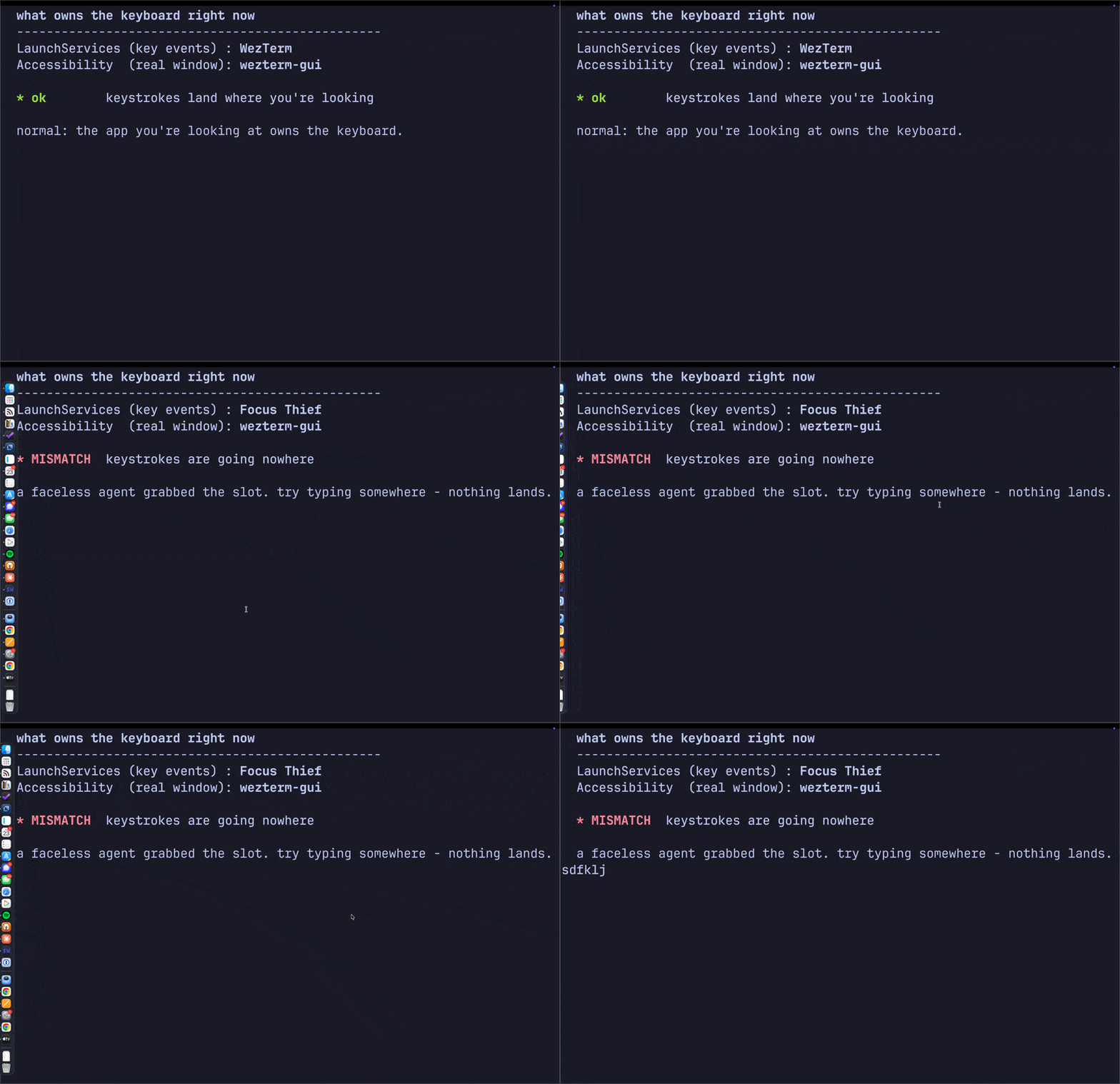
The two fronts diverging on demand. A faceless stand-in agent (built to reproduce the bug) seizes the LaunchServices slot while the terminal keeps Accessibility focus, so the status flips to MISMATCH, then back the instant it exits.
The Smoking Gun
A monitor tells you who; a kill test tells you whether you're right. The LaunchServices front process read Logitech G HUB Agent more than twenty samples in a row. So I killed the stack and watched it the instant it died:
killall lghub_agent lghub_system_tray lghub
lsappinfo info -only name "$(lsappinfo front)"
The active app snapped back to WezTerm and held. Both notions agreed. Typing was solid. G HUB's agent had been parking itself in the active-app slot and never letting go.
Why It Breaks
The active app receives key events, routed to its key window's first responder. An agent app (LSUIElement, no Dock icon) can still become the active app, and the old SetFrontProcess API was deprecated for NSRunningApplication.activate, which developers have long reported is easy to leave in an inconsistent state. G HUB falls into exactly that: it activates itself, probably an unbalanced activate on a device-poll loop, and becomes the active app without a window that can become key. The keyboard now points at a process with no first responder, so keystrokes are dropped, not stolen, just discarded, until you click into a real app. The mouse still works because mouse events are hit-tested by pointer location, not by which app is active. (Don't confuse it with Secure Input, where an app legitimately swallows every keystroke and forgets to stop; there both notions of "front" still agree. The mismatch is the tell.)
You're not imagining it, either. Another engineer built the same kind of monitor and clocked G Hub grabbing focus 47 times in four minutes. A MacRumors thread nails it: G Hub "keeps trying to get focus ... since it only runs in the background and has no window to receive the focus, the frontmost app of the system loses focus." Logi Options+ does the same. The trigger looks like wake and device re-enumeration, which fits why it snowballs over uptime and resets on reboot. The lesson: when you finally name a weird bug, search the name. You're rarely the first to hit a real defect.
The Fix
Right now, quit it:
killall lghub_agent lghub_system_tray lghub
Permanently: a launch agent restarts it at login (/Library/LaunchAgents/com.logi.ghub.plist, RunAtLoad). Move it aside, reversible:
sudo mv /Library/LaunchAgents/com.logi.ghub.plist \
  ~/Documents/backup/com.logi.ghub.plist
Then check System Settings, General, Login Items & Extensions for any Logitech entry. If you don't use Logitech G gaming gear, uninstall G HUB outright; Logi Options+ already covers a normal mouse.
My Mac types again. Now when focus feels off, I reach for focus-spy watch in a corner terminal, because the next thief trips the same wire.
