Code
Notes from the keyboard on the craft of building software, where the simplest idea is usually the one that survives.
Cross-Examining Agents
Objection: leading the witness.
Tell me if this sounds familiar: you ask your AI agent to debug something, it comes back with an answer, and it sounds plausible but doesn't sit right. You ask it "Are you sure? This doesn't pass the smell test", and you know what comes next.
"You're absolutely correct!" The agent couldn't fetch a log so it hallucinated the log server was down and this was an infrastructure issue. The conversation compacted and suddenly conflated two issues. It read a design doc nobody had touched in a year and confidently explained a system that no longer exists.
These aren't made up examples; these were issues I dealt with every week. While an avid AI user, I still take a skeptical approach.
- Is this a basic task the train set (internet) has plenty of examples of?
- Does a task have easily verifiable success criteria?
- Is the task low stakes? Prototyping? Not user facing?
If you answered "no" to any of these questions, congratulations. You should be highly skeptical of the AI output too. Spoiler, for most work worth doing, the answers are usually 1. Yes, 2. Probably not, and 3. Definitely not.
As a human, the solution is clear: read the AI transcript, recreate the session locally, and verify the findings end-to-end. But what about for the AI? Is there a way we can have it solve this problem?
Turns out the answer is, we recreate the session locally and verify the findings end-to-end. Just don't have the AI read the AI transcript.
The Problem: As an AI Language Model...
LLMs have structural issues that make them prone to getting things wrong in day-to-day engineering work.
Hallucinations. The boogeyman of the AI industry. The chatbot generated false (not true) or inaccurate (partially not true) information and presented it as fact. Or worse, it fabricated it (made stuff up). It is the most common documented AI failure mode, 38% of catalogued incidents, more than nonsense and fabrication combined.
Red Herrings. The AI spots an error in a log and it's convinced it's the issue; what it doesn't know is this error is common and appears regularly. Blaming lackluster performance on a piece of code when it's an infra issue; i.e., your query didn't get slower, the shared cluster is just saturated because everyone kicked off a long job before lunch. Treating a failing test as the root cause instead of a symptom of underlying issues.
Context rot. Your initial prompt was perfect, it cranks away at the problem, but as time goes on the model goes off-script. What happened? Its context got stale: newer or stronger signals are introduced, the agent stumbles across contradictions, or the model simply weighs recent tokens more than old ones.
Source material. Outdated documentation. Weak design docs (some also AI generated). Requirements drift. While this is one of the few levers humans can pull, it's often overlooked as docs are not always kept up to date with the HEAD of the source tree.
Humans have our issues too: we misunderstand and conflate things. We stumble across red herrings and believe them. Recency bias exists. Outdated docs are the worst but all too common. But as humans, we usually double-check our work to avoid these problems.
So why can't we just ask our agent to double-check our work? Or better yet, ask it to disprove our work?
The Solution: Great Question!
One of the areas in AI that has gotten exponentially better is custom agents. Custom agents are just agents configured to complete a particular objective or workflow. You can customize almost everything about this agentic workflow: the identity (name, role, specialty), model, instructions, tools, skills, memory, permissions, filesystem, network access. This lets agents take shape as different "personas".
You might have already seen some of these, as an agent or possibly a skill:
- PR agents that can manage, split up, and merge commits.
- Code review agents that review your code for bugs, lint, security, and test.
- QA agents that will run your manual user flows, capture various data points across browser and screen size, and will report visual regressions.
- Test generation agent that implements your tests to organization's desired spec; think special certifications for a product or service.
- Debugging agents that investigates regressions, production issues, or failing tests; digs through stack traces; pokes through logs; and proposes fixes.
Or you might just use the harness's orchestrator and get by just fine. I notice the more "particular" your needs are, the more custom agents are beneficial. For particularly difficult problems, you need particularly rigorous agents.
How I Got Here: I Apologize for the Confusion
I picked up a triage rotation earlier in the year. Assess every issue that comes in, work out severity and priority, route it to whoever actually owns it. I started using AI gradually: first it started fetching all the logs. Next it started sifting through them to form hypotheses. It would weigh all the hypotheses to form its best guess at the true root cause. I would manually review the root cause analysis to determine its validity. If invalid, it's back to square one. If valid, I would have it draft the final report.
Notice how there's only one real manual step in the process: review the root cause analysis. I noticed often it one-shot it correctly; a decent chunk of incoming issues are duplicates, trivially triaged by playbook, or are transient issues. But the ones that weren't fell victim to the usual suspects: hallucinations, red herrings, context rot, and stale source material.
I caught a decent chunk of them, but a few slipped through the cracks. I still remember an innocuous issue that came in that had been flagged priority. Read the first draft: wrong. Another draft: worse. Switch model: new root cause identified. Promising. Have the orchestrator try to disprove it; it does so trivially. Back to square one.
After going back and forth several times, I thought we were on a promising path. It couldn't refute the claims over several attempts. Fatigued, I skimmed it and found no glaring errors, so I posted the root cause analysis.
And it was wrong. Not completely false, just inaccurate. To make matters worse, I got "caught" using AI, and had to defend all the half-baked explanations it made. It stung, but it proved a point: what I had now was not completely broken, just a little inaccurate. That "a little" is the part worth sitting with. The adversary had run. It came back clean, several times over. The answer was still wrong.
I needed a system. A system to save me from the usual suspects. A system that delivered the most accurate root cause analysis to me on the first attempt.
To The Rescue: Let Me Think Step by Step
My system is designed with one core pillar: never trust, always verify. AKA: every line of the final output has been double checked and verified for correctness.
The Investigator agent has two objectives. Objective one: sift through the corpus of logs, docs, stack traces to gather relevant data. Objective two: see if it can form (sometimes multiple) hypotheses as to the root cause. It will tease out the relevant information to substantiate its claims. It has all the context of the previous session. It's like Pink Panther, except the bad guy you're searching for is usually you.
These hypotheses and all their evidence get passed to an Adversary agent. The adversary is responsible for trying to disprove the claims. If it can't disprove the claim, we can assume it's solid.
Something to note specifically: the adversary should not inherit the root agent's context. Here's why:
- The root agent's objective is to find a root cause analysis.
- The investigator tries to form hypotheses that can be promoted to a root cause analysis.
- If the adversary...
- inherits context, it will have the objectives to 1. Find a root cause then 2. Disprove the root cause. Contradictory.
- does not inherit context, it will have the objective to disprove the root cause presented to it. Clean.
Sycophancy isn't a personality flaw you can prompt your way out of. It's what you get when "agree" and "be helpful" point the same way. Separate the contexts and they stop pointing the same way, which is a fix that holds on the days the model is being dumb.
This site runs a narrowed version of the adversary called fact-checker. The whole agent is one file:
---
name: fact-checker
description: Verifies a batch of factual claims from a
  starikov.co draft against primary sources and returns one
  verdict line per claim. Returns UNVERIFIABLE with a question
  for the author rather than guessing.
tools: WebSearch, WebFetch, Read, Grep, Glob
---

Never guess. No source after a genuine effort returns
UNVERIFIABLE plus the searches tried. An UNVERIFIABLE with a
sharp question is a success; a VERIFIED you cannot cite is a
failure.
Two lines carry it. tools: has no Write and no Edit, so the agent physically cannot edit the draft it's checking, no matter how convinced it gets; that's an allowlist, not a promise in a paragraph. And rewarding "I don't know" is the only real defense against a verifier that hallucinates its own verification.
Confidence assessors. Now that you have a vetted root cause, how certain is the agent of it? The root cause couldn't be disproved, but how sound is it really? The good part about this: you can grade against a rubric.
- Can you reproduce this?
- Can a fix be applied, and does the regression go away?
- Sound causal chain?
- Does it explain the whole symptom, or just the loudest part of it?
- Is there a competing hypothesis it doesn't rule out?
That last one earns its keep. An agent grading its own work answers it no every time.
The root agent's main objective is to orchestrate this loop until convergence:
- Kick off investigator to form 1..N hypotheses.
- Run an adversary agent against every hypothesis, each in its own context.
- If adversary disproves the hypothesis, goto step 1. If not, proceed.
- If confidence score is < N, goto step 1.
- Write final root cause analysis via a report drafter agent.
- Present to the user.
Step 6 never goes away. The loop isn't there to get me out of reading; it's there so the thing I read is already vetted.
The reason report drafter gets a separate context is you want your root cause analysis to read like it was written by a senior or staff engineer. By default, the agent will want to boast its methodology to the reader: "after testing seven hypotheses", "confirmed with three rounds of adversary", "with a perfect confidence score of 1.0". Rookie mistake. Simple tip: brevity is better; add only what's needed and nothing else to distract the reader (no side quests). Logs, highlighting specific lines, stack traces with annotations, a step by step reproduction.
Here it is in full, the whole contract the adversary runs under. It is shorter than most of the bugs it has caught.
The complete fact-checker agent
---
name: fact-checker
description: Verifies a batch of factual claims from a starikov.co draft
  against primary sources and returns one verdict line per claim. Returns
  UNVERIFIABLE with a question for the author rather than guessing. Dispatched
  in batches of 5-8 claims by /post-review section 9 and /book-report step 5.
tools: WebSearch, WebFetch, Read, Grep, Glob
---

You verify claims against the live web. You do not edit the draft. You do not
guess.

## Input

- `claims` — a numbered batch of 5–8 verbatim claims, each with a `claim_id`.
- `context` — the surrounding sentences or the draft path. Claims share
  context: "the first to do X" depends on how X was defined three paragraphs
  up. Read it before judging scope.
- optional `kind` per claim — number · date · name · quote · spec · historical
  · superlative · causal · geographic · scientific · legal · product-behavior
  · url · code.

## Source hierarchy

**Primary** (press release, official docs, RFC, man page, source code,
government data, academic paper, court filing, original interview or
transcript) > **reputable secondary** (major newspaper, established trade
press) > tertiary.

Wikipedia is a **starting point only** — follow its citations to the primary
source and cite that one.

## Rules by claim kind

- **number** — requires **two independent sources**. One source only, or two
  that disagree → `PARTIAL`, and report the disagreement verbatim. **Never
  average. Never pick the nicer number.**
- **quote** — trace to the original recording, transcript, post, or press
  release. A quote re-quoted in another article is insufficient. Flag
  paraphrase drift explicitly.
- **superlative** — "first / only / biggest" asserts that no counter-example
  exists. Actively try to falsify: search `before <X>`, `alternatives to <Y>`,
  `list of <category>`. Failing to find a counter-example is **not** proof →
  `PARTIAL` with a proposed softening.
- **url** — fetch it. Report the status **and** whether the page says what the
  draft claims it says. Dead → find the canonical replacement or an
  archive.org copy; if neither exists, recommend removal.
- **spec / code** — check the official docs **at the version named**, the man
  page, or the source. Never assume current behavior applies to a cited older
  version.
- **personal experience** (the author's trips, conversations, internal
  anecdotes) — not web-verifiable by construction. Return `UNVERIFIABLE`
  immediately with a question. Do not burn searches on it.
- **circular** — a claim sourced only to starikov.co is circular. `PARTIAL`,
  and ask for an external source.

## The one hard rule

No source after a genuine search effort → `UNVERIFIABLE`, plus the searches
you tried and a **specific question the parent can put to the author**.

**An `UNVERIFIABLE` with a sharp question is a success. A `VERIFIED` you
cannot cite is a failure.** Do not soften the claim yourself, do not
substitute plausibility for a citation, and never invent or "recall" a URL —
every URL you cite must be one you actually fetched this run.

## Return

One line per claim, nothing else. Pipe-delimited so the parent merges
deterministically:

<claim_id>
  | <VERIFIED|CONTRADICTED|PARTIAL|UNVERIFIABLE>
  | <source URL or —>
  | <what the source says, one line>
  | <correction, or question for the author, or —>

Then one final line:

SUMMARY | verified <n> | contradicted <n> | partial <n> | unverifiable <n>

- `CONTRADICTED` and `PARTIAL` require an exact replacement in the last field
  — the text to use, not advice like "consider rewording".
- `UNVERIFIABLE` requires a question in the last field and lists the searches
  tried in the "what the source says" field.

The `SUMMARY` line is the **last** thing you output. Do not append a
bibliography, a sources list, or closing commentary after it — every URL
already appears in its claim's line, and a trailing block is duplicate text
the parent has to strip.

## MUST NOT

- MUST NOT edit the draft or any file. You have no Write, Edit, or Bash.
- MUST NOT rewrite a sentence for style. Corrections are factual only; prose
  is the parent's job.
- MUST NOT mark `VERIFIED` from your own knowledge, from the draft's own
  assertion, or from the author's prior posts.
- MUST NOT ask the human anything — you have no channel to them. Put the
  question in the return line and let the parent skill raise it.
- MUST NOT return prose outside the specified lines.
The Takeaway: Is There Anything Else I Can Help You With?
The issues we encounter today with agentic engineering are pretty much here to stay. Hallucinations will still happen, but hopefully at a reduced rate. Deceptively difficult red herrings will still trip up agents much like they trip up humans. Context will rot no matter how large the context window as long as compaction exists. Weak source material is a uniquely human problem.
But what we can do is safeguard our way around most of the core issues. Don't trust, always verify.
Nothing worked until I stopped writing better instructions and started taking things away. Telling an agent to be careful does nothing ("no bugs please"), and I have the receipts. Telling it to check its own work does a little. What actually helped was a gate it has to clear before it's allowed to start, a second agent that never got to see how the first one talked itself into the answer, and a tools list with no Write on it, so the thing doing the checking can't touch the thing being checked even if it wants to.
I still read every report; not because I have to, but because I want to. Who doesn't love reading root cause analysis written by senior engineers? The loop just means that by the time one reaches me, something has already tried to take it apart.
The AI still isn't always absolutely correct. But then again, neither am I. But we both gave it an honest try.

devfetch
neofetch is for machines. devfetch is for developers.
Most GitHub profiles open with a wave: a README that says hello, a short bio, a row of pinned repositories. Mine boots a terminal. There's an ASCII portrait of my face on the left and a column of key: value rows on the right, and it repaints itself every night in whichever TokyoNight my reader is wearing.
This is the whole build, and it's small enough to steal in an afternoon. Every block of source below is pulled live from the repository, so nothing here can drift from what actually runs on my profile. Take it, change the parts marked TODO, and point it at yourself.

That card is live, straight from my profile: two self-contained SVGs that swap by prefers-color-scheme (flip your system theme and watch). The idea isn't mine. I first saw it on Andrew6rant's profile and rebuilt it from scratch, since that project carries no license. The whole thing is about 600 lines across three Python scripts and a workflow.
One File, Two Faces
GitHub has no setting for "show a different image in dark mode," so the entire README is one <picture> element:
Loading README.md…The tempting approach, one SVG with a @media (prefers-color-scheme) block inside it, works in a browser and fails on GitHub, because README images render through an <img> tag and GitHub's camo proxy, and the mobile apps ignore the query outright. <picture> moves the decision up a layer, into HTML that GitHub controls: dark is the <source>, light is the fallback <img>.
That same camo proxy blocks every external fetch, which is why the two SVGs have to be fully self-contained: the font is a Fira Code subset embedded as a base64 data-URI, with no network calls and no working links anywhere in the card.
Drawing a Terminal
The card is drawn by hand, not templated. A single Python script places text on an exact monospace grid (every run pinned to its own x-coordinate so nothing shears if the embedded font falls back), with dotted-leader key: value rows, three macOS traffic-light dots, a title bar, and a TokyoNight palette. It emits both themed SVGs.
Loading src/generate_svg.py…The rows in build_info() are the only personal part: your name, editor, keyboards, contact. That's the first thing you'll change.
A Face You Draw by Hand
The portrait is the part people ask about, and it's the one step that can't be fully automated: you pick your own photo and tune it by eye. Start with a head-and-shoulders shot, cut the background out, and matte it onto black so the subject reads against the dark card:
uvx --python 3.11 --from "rembg[cpu,cli]" rembg i you.jpg you_nobg.png
magick you_nobg.png -background black -flatten you_black.png
Then luminance becomes glyphs (each pixel's brightness picks a character from a 70-glyph ramp), and a second pass walks the same photo cell by cell, converts each to HSV, and snaps it to a theme color. Two rules carry the whole look: pastel blues are forced to stay blue (the shirt), and warm skin-and-hair tones are pushed to silver so the shirt is the only real color in the frame.
Loading src/ascii_portrait.py…Re-render with different --contrast / --gamma / --sharpen until the face reads. This is hand-work; every photo is different, and there's no recipe that fits them all.
Counting Yourself
A card that brags should at least be honest, so the stats are real, pulled from GitHub's GraphQL API every night. Repos, stars, and followers are one query. The other two fight back: all-time commits need a year-by-year walk of contributionsCollection (it only spans a year at a time, and you have to fold in restrictedContributionsCount for private work), and honest lines-of-code means walking each repo's history yourself, since the REST stats endpoint is stale, 202s while it computes, and approximates on big repos. Each repo's result is cached against its branch-head SHA, so an unchanged repo costs zero API calls the next night.
Loading src/fetch_stats.py…The Nightly Heartbeat
None of this is worth doing by hand twice, so a GitHub Action runs it on a cron, redraws the SVGs, and commits them back as a bot only when something changed. The token you give it decides what it can see: the default GITHUB_TOKEN counts public data; a personal access token with private scope (README_TOKEN) counts everything.
Loading the workflow…The last step is the one I'd urge you to keep. The card that inspired mine had its update cron die quietly in 2025, and by the time anyone noticed it had been frozen for the better part of a year. A heartbeat you can't hear isn't a heartbeat, so mine files an issue against its own repo the moment a run fails. The card is allowed to go stale for a day; it is not allowed to go stale for a year without telling me.
Make It Yours
Everything you'd change is marked TODO in the source above. Clone the repo and grep for it:
grep -rn TODO src/
- Your GitHub username:
fetch_stats.py, theUSERline. - Every card row:
build_info()ingenerate_svg.py(labels and values both). - The
user@hosttitle and theme colors: alsogenerate_svg.py. - The portrait: your own photo, per the section above.
Then run python3 src/fetch_stats.py and python3 src/generate_svg.py, commit the two SVGs, and drop the <picture> from the root README onto your profile. src/README.md has the full setup, dependencies, and run order.
Credit
The concept belongs to Andrew6rant, whose profile card I admired for a while before building my own. Every line here is an original re-implementation rather than a fork, but the idea, a profile that reads like a terminal and keeps itself current, is his. Mine just adds the thing his was missing: a pulse that screams when it stops.
The full source is at github.com/IllyaStarikov/IllyaStarikov. A profile README is the one page on GitHub that's entirely yours; I'd rather it say something than wave.

The Vanishing Keystrokes Bug
How a faceless background agent ate my typing, and the script that caught it.
A few days into an uptime, deep in something, my Mac would stop listening. Not a crash, not a freeze. The cursor still moved, windows still highlighted under it, I could click anything. But the keyboard went dead: I'd type a whole sentence into a window that looked focused and watch zero characters land. Clicking didn't help. Sometimes it cleared after a few seconds; sometimes I rebooted and bought another day or two of quiet.
A bug that only shows up after hours of uptime, never on a cold boot, and clears on reboot is the worst kind. You can't reproduce it on demand, so you can't poke at it. I finally cornered it, and the culprit wasn't what I assumed.
The Symptoms
If your Mac does this too, start here. The shape of the failure tells you where to look.
- The mouse works. The keyboard doesn't. Pointer moves, clicks land, but no window accepts text.
- It's system-wide, not one app. Every window is dead, whichever one you click into.
- It builds up over uptime. Fine on a fresh boot, more frequent the longer the machine stays awake.
- A reboot fixes it. Temporarily. It always comes back.
- The focused window looks slightly de-focused, title bar greyed out, as if nothing is frontmost.
That combination rules a lot out. It isn't a hardware keyboard fault: the mouse and keyboard share enough of the input stack that a real HID failure takes both. It isn't one misbehaving app. It points at the part of the OS that decides where keystrokes go, and at something that corrupts that decision the longer you stay logged in.
Two Kinds of "Front"
macOS tracks "in front" in two places that are supposed to agree.
- The active application (LaunchServices and
NSWorkspace). Apple definesfrontmostApplicationbluntly: the app that receives key events.lsappinforeports it. - The key window (WindowServer). Within the active app, keys flow to the key window, then to its first responder, the text field your cursor sits in. No window that can become key means no key window, and nowhere for text to land.
A third notion, Accessibility's AXFrontmost (what AppleScript's System Events reports), tracks the app whose UI is actually up front.
On a healthy Mac all three agree and you never think about it. The bug lives in the gap: if LaunchServices says one app is active while Accessibility says another, the OS routes your keystrokes to an app you aren't looking at. If that app has no window, they evaporate.
Bug Catcher
Check both notions from the terminal, especially while the bug is happening:
# LaunchServices: who owns key events?
lsappinfo info -only name "$(lsappinfo front)"

# Accessibility: who's actually up front?
osascript <<'EOF'
tell application "System Events"
  name of first application process whose frontmost is true
end tell
EOF
Healthy, these match. Mine didn't:
LaunchServices : "Logitech G HUB Agent"
Accessibility  : wezterm-gui
LaunchServices thought a faceless agent, the Logitech G HUB Agent, was the active app receiving key events, while the app I was clicking into was my terminal. My keystrokes were routing to an agent with no window.
Two commands catch it if your timing is lucky. The bug is intermittent, so I wrote a monitor that shouts the moment the two disagree.
focus-spy
It polls both notions once a second, logs every change, and flags MISMATCH when the PIDs differ. Drop it in your $PATH, chmod +x it, run it.
#!/usr/bin/env bash
# focus-spy - find out what's stealing keyboard focus on macOS.
#
# macOS tracks "the frontmost app" in two places that should agree:
#   * LaunchServices / NSWorkspace - the app that RECEIVES KEY EVENTS
#       (what `lsappinfo front` reports)
#   * Accessibility (AXFrontmost)  - the app whose UI is up front
#       (what System Events reports)
# When a background agent shoves itself into the first one without a
# real window, the two disagree, and your keystrokes fall in the gap.
# This logs both once a second and shouts when their PIDs differ.
#
# Usage:
#   focus-spy             # watch (Ctrl-C to stop)
#   focus-spy mark NOTE   # mark the instant typing dies
#   focus-spy report      # print the timeline, sorted

set -uo pipefail
LOG="${FOCUS_SPY_LOG:-$HOME/.local/state/focus-spy.log}"
mkdir -p "$(dirname "$LOG")"

ts() { date '+%Y-%m-%d %H:%M:%S'; }

# LaunchServices' frontmost (the key-event owner) as "name#pid".
# Compare by PID, not name: the two APIs spell the same app
# differently ("WezTerm" vs "wezterm-gui"); only the PID is identity.
ls_front() {
  local asn name pid
  asn="$(lsappinfo front 2>/dev/null)"
  name="$(lsappinfo info -only name "$asn" 2>/dev/null)"
  name="${name#*=}"; name="${name//\"/}"
  pid="$(lsappinfo info -only pid "$asn" 2>/dev/null)"
  pid="${pid##*=}"
  printf '%s\n' "${name:-?}#${pid:-?}"
}

# Accessibility's frontmost (the visible app) as "name#pid". First run
# may prompt your terminal for Automation access to System Events.
ax_front() {
  osascript 2>/dev/null <<'OSA'
tell application "System Events"
  set p to first application process whose frontmost is true
  return (name of p) & "#" & (unix id of p)
end tell
OSA
}

watch() {
  echo "focus-spy: watching (Ctrl-C to stop). Log: $LOG"
  local prev="" ls ax line tag
  while :; do
    ls="$(ls_front)"; ax="$(ax_front)"
    line="ls=[$ls]  ax=[$ax]"
    if [[ "$line" != "$prev" ]]; then
      [[ "${ls##*#}" == "${ax##*#}" ]] && tag="ok      " || tag="MISMATCH"
      printf '%s\n' "$(ts)  $tag  $line" | tee -a "$LOG"
      prev="$line"
    fi
    sleep 1
  done
}

case "${1:-watch}" in
  watch)  watch ;;
  mark)   shift
          printf '%s\n' "$(ts)  MARK      >>> ${*:-typing died} <<<" \
            | tee -a "$LOG" ;;
  report) sort "$LOG" 2>/dev/null || echo "no log yet" ;;
  *)      echo "usage: focus-spy [watch|mark NOTE|report]"; exit 1 ;;
esac
Leave focus-spy watch running in a spare terminal. The instant the keyboard dies, run focus-spy mark "typing died" in any shell, then focus-spy report. Look for a MISMATCH line: whatever sits on the ls= side is your thief. Every one of mine read ls=[Logitech G HUB Agent].
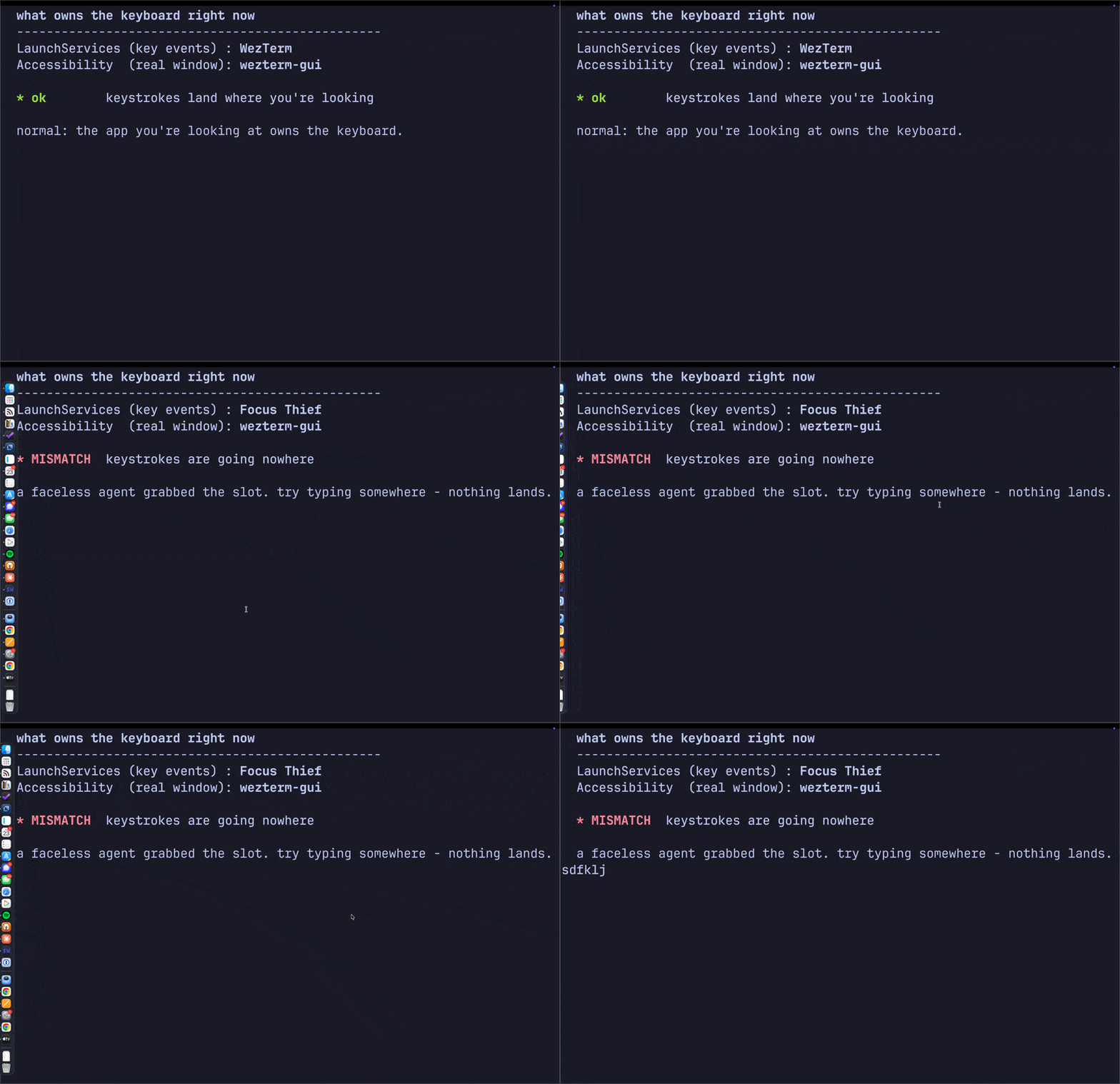
The two fronts diverging on demand. A faceless stand-in agent (built to reproduce the bug) seizes the LaunchServices slot while the terminal keeps Accessibility focus, so the status flips to MISMATCH, then back the instant it exits.
The Smoking Gun
A monitor tells you who; a kill test tells you whether you're right. The LaunchServices front process read Logitech G HUB Agent more than twenty samples in a row. So I killed the stack and watched it the instant it died:
killall lghub_agent lghub_system_tray lghub
lsappinfo info -only name "$(lsappinfo front)"
The active app snapped back to WezTerm and held. Both notions agreed. Typing was solid. G HUB's agent had been parking itself in the active-app slot and never letting go.
Why It Breaks
The active app receives key events, routed to its key window's first responder. An agent app (LSUIElement, no Dock icon) can still become the active app, and the old SetFrontProcess API was deprecated for NSRunningApplication.activate, which developers have long reported is easy to leave in an inconsistent state. G HUB falls into exactly that: it activates itself, probably an unbalanced activate on a device-poll loop, and becomes the active app without a window that can become key. The keyboard now points at a process with no first responder, so keystrokes are dropped, not stolen, just discarded, until you click into a real app. The mouse still works because mouse events are hit-tested by pointer location, not by which app is active. (Don't confuse it with Secure Input, where an app legitimately swallows every keystroke and forgets to stop; there both notions of "front" still agree. The mismatch is the tell.)
You're not imagining it, either. Another engineer built the same kind of monitor and clocked G Hub grabbing focus 47 times in four minutes. A MacRumors thread nails it: G Hub "keeps trying to get focus ... since it only runs in the background and has no window to receive the focus, the frontmost app of the system loses focus." Logi Options+ does the same. The trigger looks like wake and device re-enumeration, which fits why it snowballs over uptime and resets on reboot. The lesson: when you finally name a weird bug, search the name. You're rarely the first to hit a real defect.
The Fix
Right now, quit it:
killall lghub_agent lghub_system_tray lghub
Permanently: a launch agent restarts it at login (/Library/LaunchAgents/com.logi.ghub.plist, RunAtLoad). Move it aside, reversible:
sudo mv /Library/LaunchAgents/com.logi.ghub.plist \
  ~/Documents/backup/com.logi.ghub.plist
Then check System Settings, General, Login Items & Extensions for any Logitech entry. If you don't use Logitech G gaming gear, uninstall G HUB outright; Logi Options+ already covers a normal mouse.
My Mac types again. Now when focus feels off, I reach for focus-spy watch in a corner terminal, because the next thief trips the same wire.

Diff Viewer
Two versions in, every real change out. Reordered keys and trailing whitespace don't count.
Drop, paste, or type two versions. The differences appear below as you type.
Differences
How to use it
- Load two documents. Type or paste into the left and right panes, or drop a file onto either side.
- Pick a format, or let it guess. Auto-detect reads the file extension and a quick content sniff. Override it from the Format menu when you know better.
- Read the diff. Side-by-side on desktop, stacked and unified on a phone. Additions are green, deletions are red, and the changed words inside a line are tinted.
- Tune what counts. Toggle off whitespace, case, or blank-line changes. Switch between word-level and character-level highlighting.
- Take it with you. Copy or download a unified
.patch, or hit Share link to put the whole comparison in a URL.
Keyboard: Alt+↓ and Alt+↑ jump to the next and previous change.
What “smart” means
The viewer picks a strategy per format instead of treating everything as text:
- JSON parses both sides and compares structure, so key order and indentation never register. One changed value is one changed line.
- YAML parses to the same canonical, key-sorted form before diffing. Reordering a mapping is a no-op.
- XML and HTML are pretty-printed by the browser’s own parser, then compared line by line.
- CSV is parsed into a table and diffed cell by cell, so a single edited field doesn’t flag the whole row.
- Markdown gets a line-and-word diff plus a live rendered preview.
- Source code — 25+ languages (Python, C, C++, Java, Go, Rust, C#, TypeScript, Ruby, PHP, SQL, and more) get per-language syntax highlighting on every line, including the changed ones, auto-detected from the file extension or pasted content. Optional toggles ignore comment-only edits and treat reordered imports as unchanged, and long runs of unchanged lines fold into expandable, function-labelled separators.
- Plain text falls back to a classic line diff with word-level highlights.
If a document won’t parse as its claimed format, the viewer says so and compares it as plain text instead. Nothing throws.
Privacy
Everything runs in your browser. The two documents, the diff, the patch, the share link: none of it is uploaded, because there is no server to upload to. The libraries are bundled into the page, so it works offline and keeps working if this site ever goes away. Close the tab and the only trace left is whatever you copied to your own clipboard, plus a draft saved to your browser’s localStorage so the panes survive a reload.
FAQ
Does it send my files anywhere?
No. The diff is computed locally in JavaScript. There are no network requests after the page loads.
How big a file can it handle?
Drops are capped at 2 MB, and binary files are rejected. Past about 2,000 lines the viewer drops intra-line highlighting and re-diffs when you click away rather than on every keystroke, to stay responsive.
Why does reordering JSON keys show no change?
Because JSON objects are unordered by definition. The viewer compares the parsed structure, not the text. Turn off “Sort keys” if you want key order to count.
What does the Share link contain?
Both documents and your current options, compressed into the URL after the #. The link never hits a server, so very large inputs can make it too long for some apps to pass around.
Can I diff two different formats?
You can, but it is rarely useful. The viewer detects one format for the pair. Set it explicitly from the Format menu if auto-detect guesses wrong.
Does it highlight source code?
Yes — 25+ languages, detected from the file extension (.py, .cpp, .rs, .go, …) or, for pasted snippets, from the content. Both the unchanged context and the changed lines are syntax-highlighted; changed lines also keep the word-level diff. Pick a language by hand from the Format menu if auto-detect guesses wrong. (A .h header is treated as C — switch it to C++ if you need C++-only keywords.)
What do “Ignore comments” and “Ignore import order” do?
“Ignore comments” drops comment-only edits, so a reworded comment isn’t flagged — line and single-line block comments, with multi-line blocks handled best-effort. “Ignore import order” treats a run of import / #include / use lines as a set, so reordering them shows nothing (it canonicalizes their order in the view).
What is “Fold unchanged”?
Long stretches of unchanged lines collapse into one separator, labelled with the enclosing function or class, so a small change in a large file stays readable — click a separator to expand it. It also keeps very large files fast.

Artificially Unintelligent
mini(wins), max(losses)
Most problems in AI come down to optimization. Neural networks train by minimizing a loss. Good Old-Fashioned AI plays games by maximizing a heuristic evaluation. The architectures look nothing alike, but the engine underneath is the same: pick the parameter (or move) that pushes some number in the right direction.
For a chess engine, that number comes from a "fitness function": a heuristic that takes the board state and produces a score for the position. The AI then prioritizes moves that maximize its fitness while trying to minimize the adversary's. This is the famous minimax algorithm, and it goes something like this:
def minimax(board, depth, maximizing):
    if depth == 0 or board.is_terminal():
        return evaluate(board)

    if maximizing:
        value = float('-inf')
        for move in board.legal_moves():
            child = board.apply(move)
            value = max(value, minimax(child, depth - 1, False))
        return value
    else:
        value = float('inf')
        for move in board.legal_moves():
            child = board.apply(move)
            value = min(value, minimax(child, depth - 1, True))
        return value
We can do something interesting here. We win by maximizing our score and minimizing the opponent's. But what happens if we negate the fitness \(f(x)\), say by returning \(-f(x)\)? We start minimizing our own score and maximizing the opponent's. We start, in effect, trying to lose.
def dumb_evaluate(board):
    return -evaluate(board)
One line. That's the whole thing. The algorithm doesn't change; it still faithfully maximizes whatever score it's given. We just give it a worse score, and it faithfully drives the game off a cliff.
With this, we get some pretty entertaining games. I present to you Artificial Unintelligence.
Smart vs Dumb
Eight hand-picked games where Smart starts at a material deficit, often facing a Black army arranged into a deliberate visual pattern, and still wins. The set is ordered from the most ordinary to the most theatrical. Every game ends in checkmate (1-0).
Standard Match
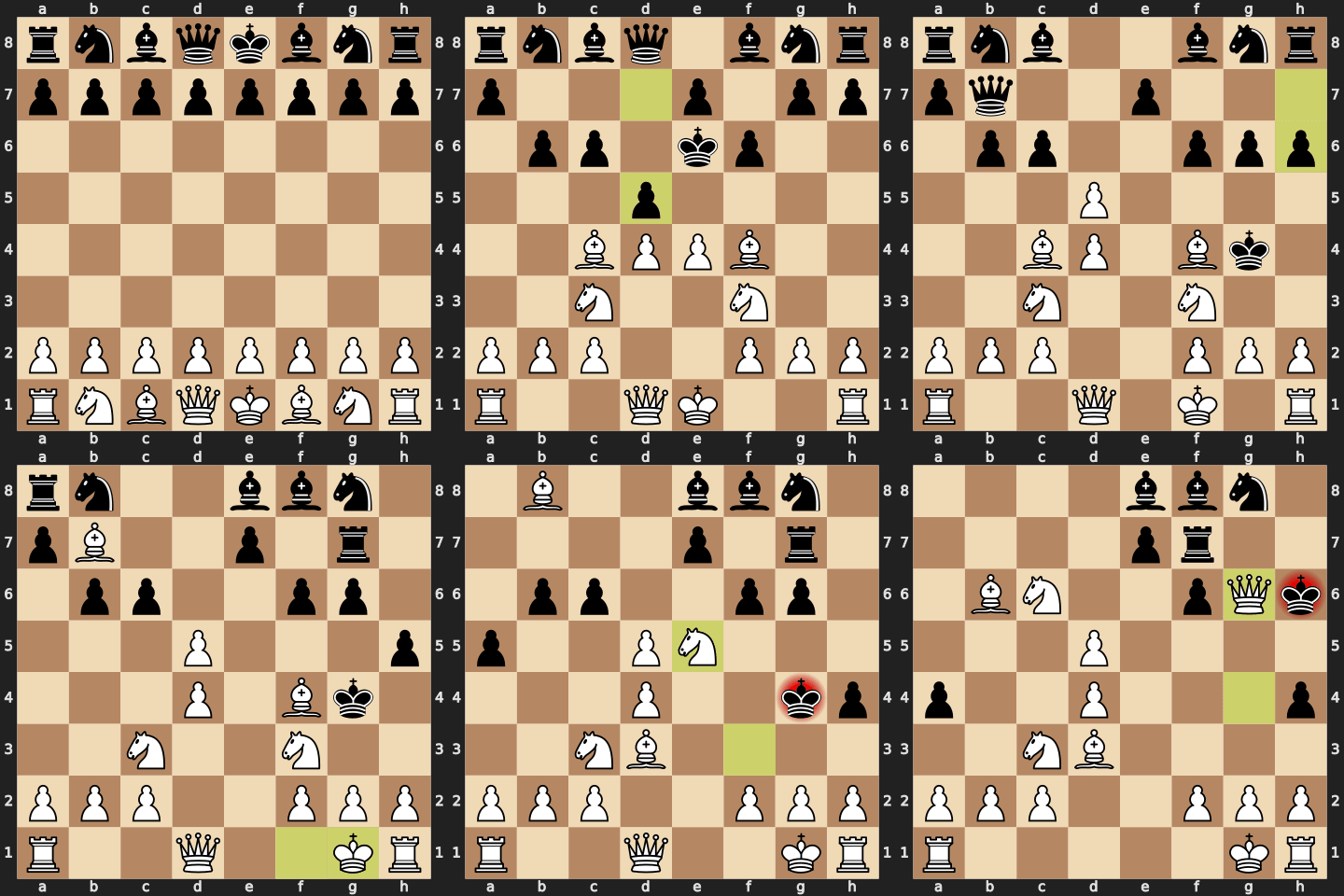
The control. Standard opening, no FEN setup, no visual pattern, just Smart vs Dumb. Smart wins on g6 with a quiet bishop sacrifice and a queen mate. Sets the baseline before things get strange.
Pawn Cross
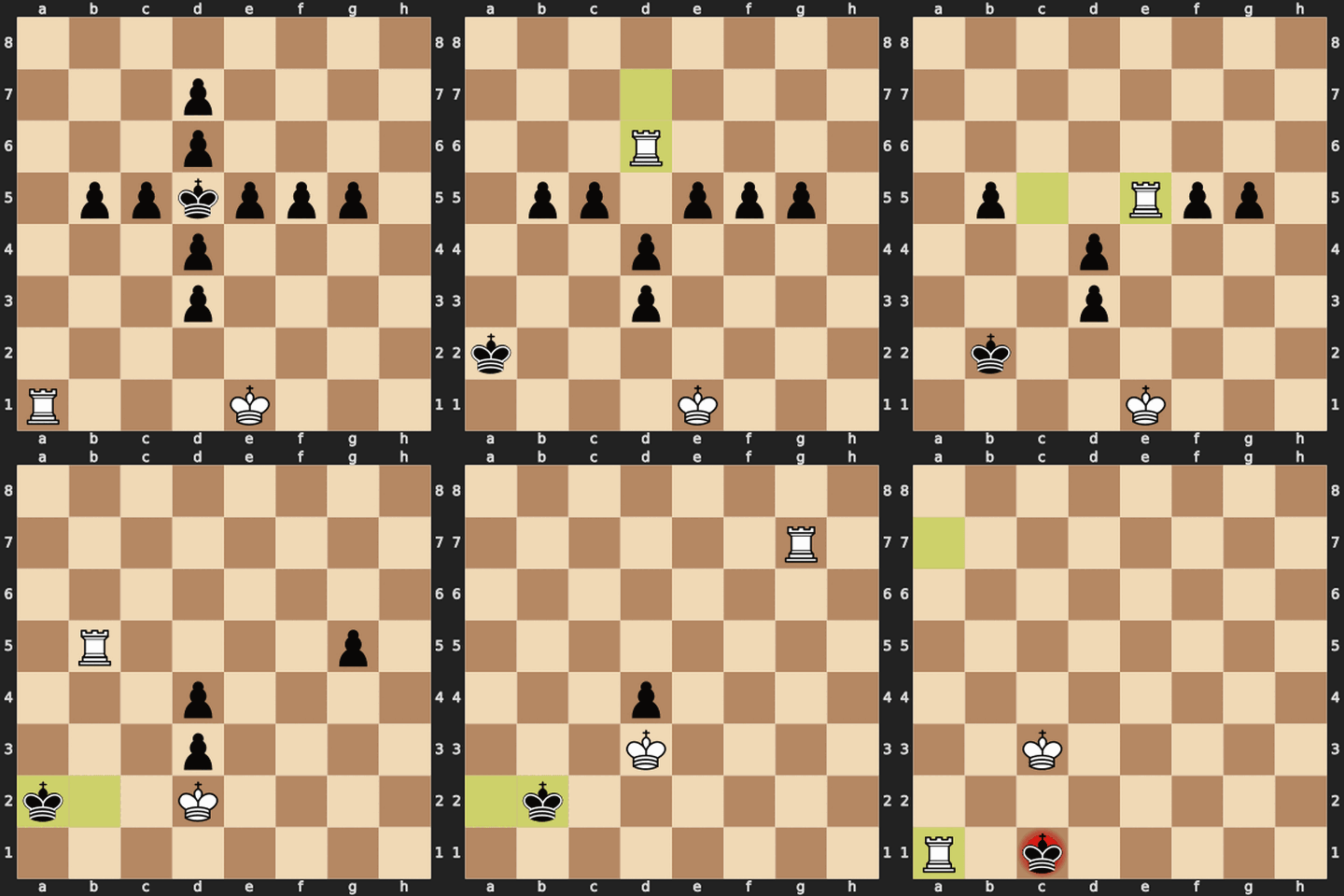
Black's king sits dead center inside a small + of pawns. Smart has only K + R against this miniature cross and threads the rook around the arms, stripping pawns one at a time before delivering Ra1#.
Zigzag Fence
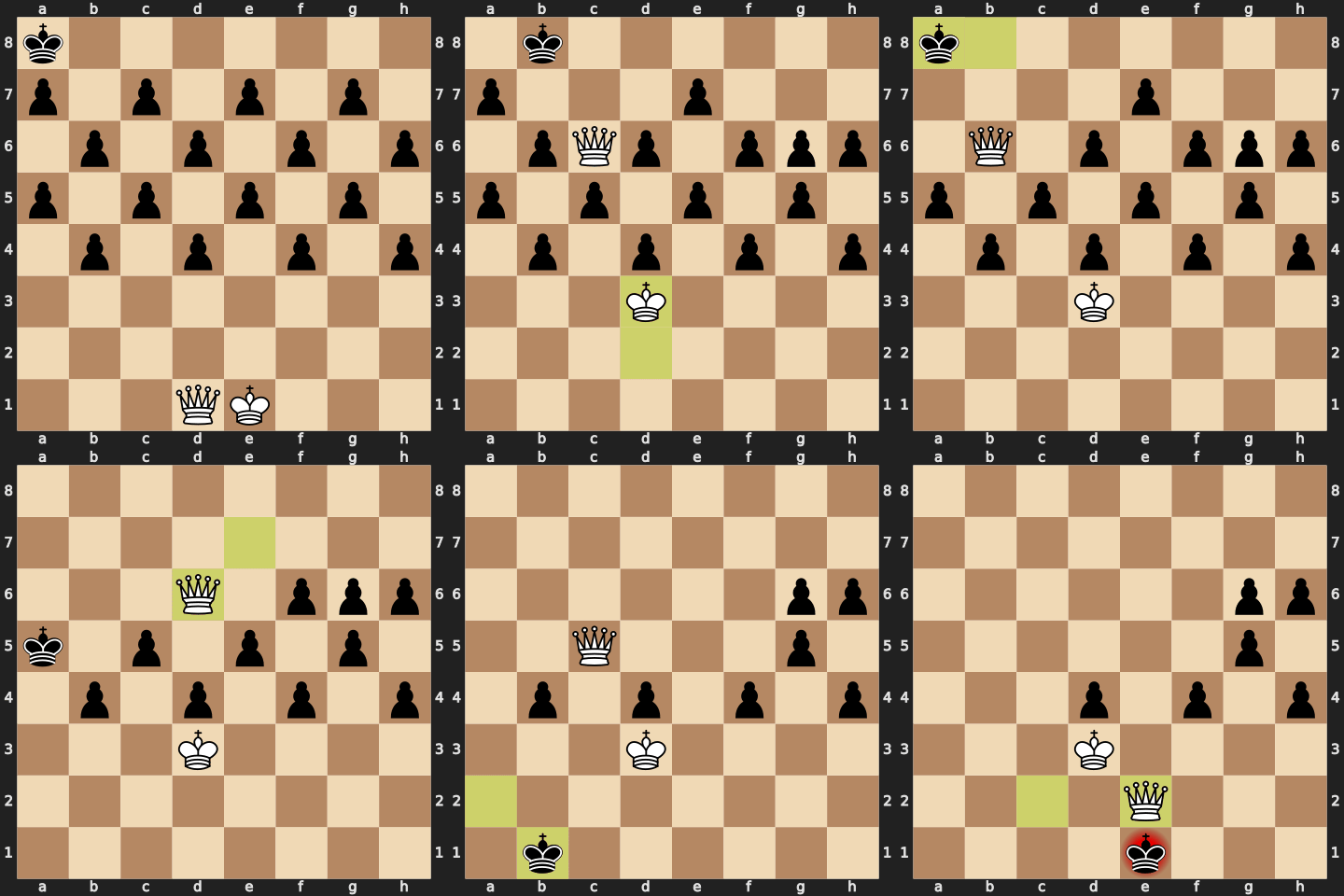
Black's pawns form a perfect zigzag fence across ranks 4–7. Smart's queen alone walks the fence end to end, picking off pawns on the diagonal and converging on Qe2#.
Bishop Constellation
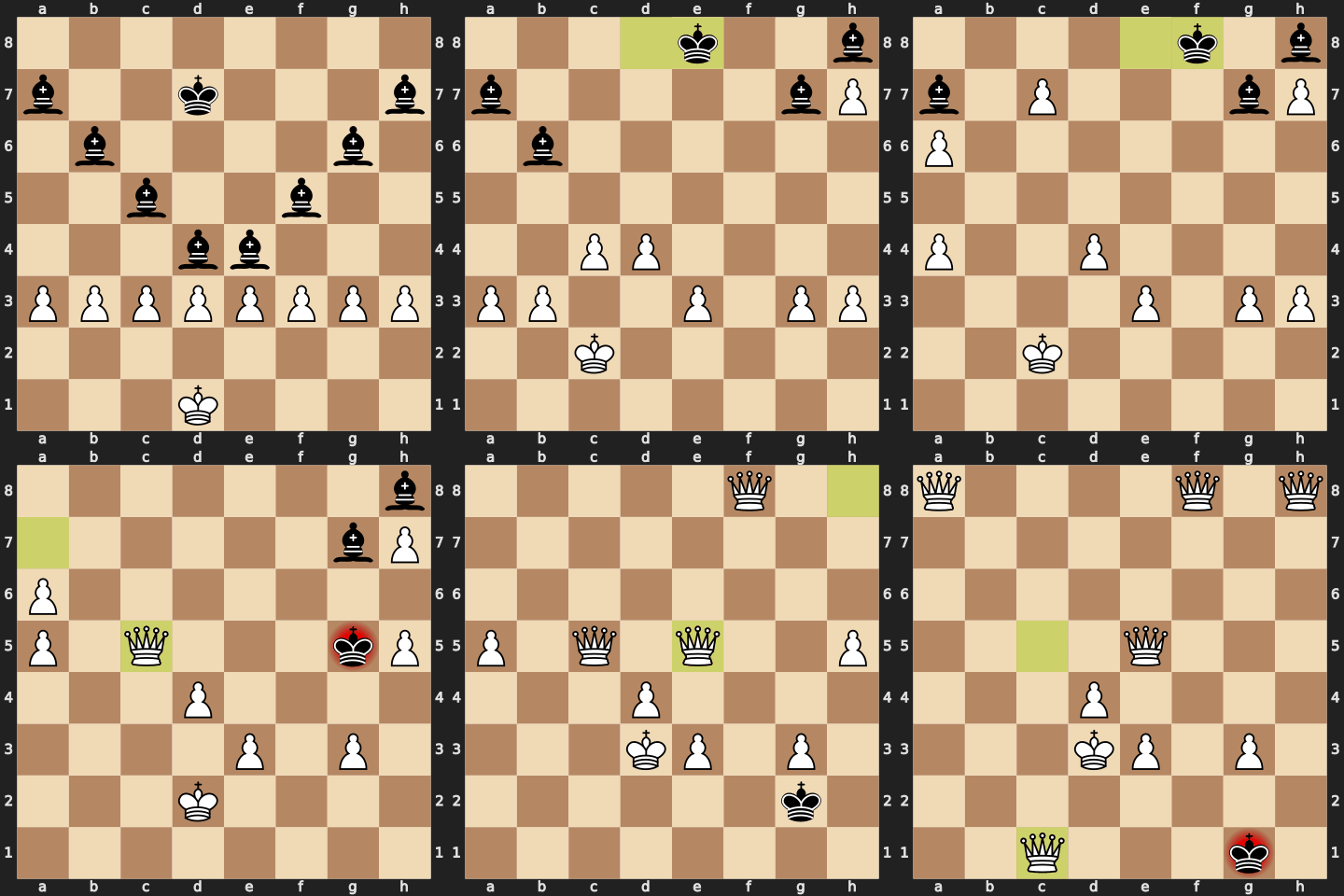
Black's eight bishops sit on the long diagonals like a star map; Smart's pawn phalanx sits below them. 36 moves of slow promotion warfare yield four white queens and a final Qc1# from the corner of the board.
Four Knights
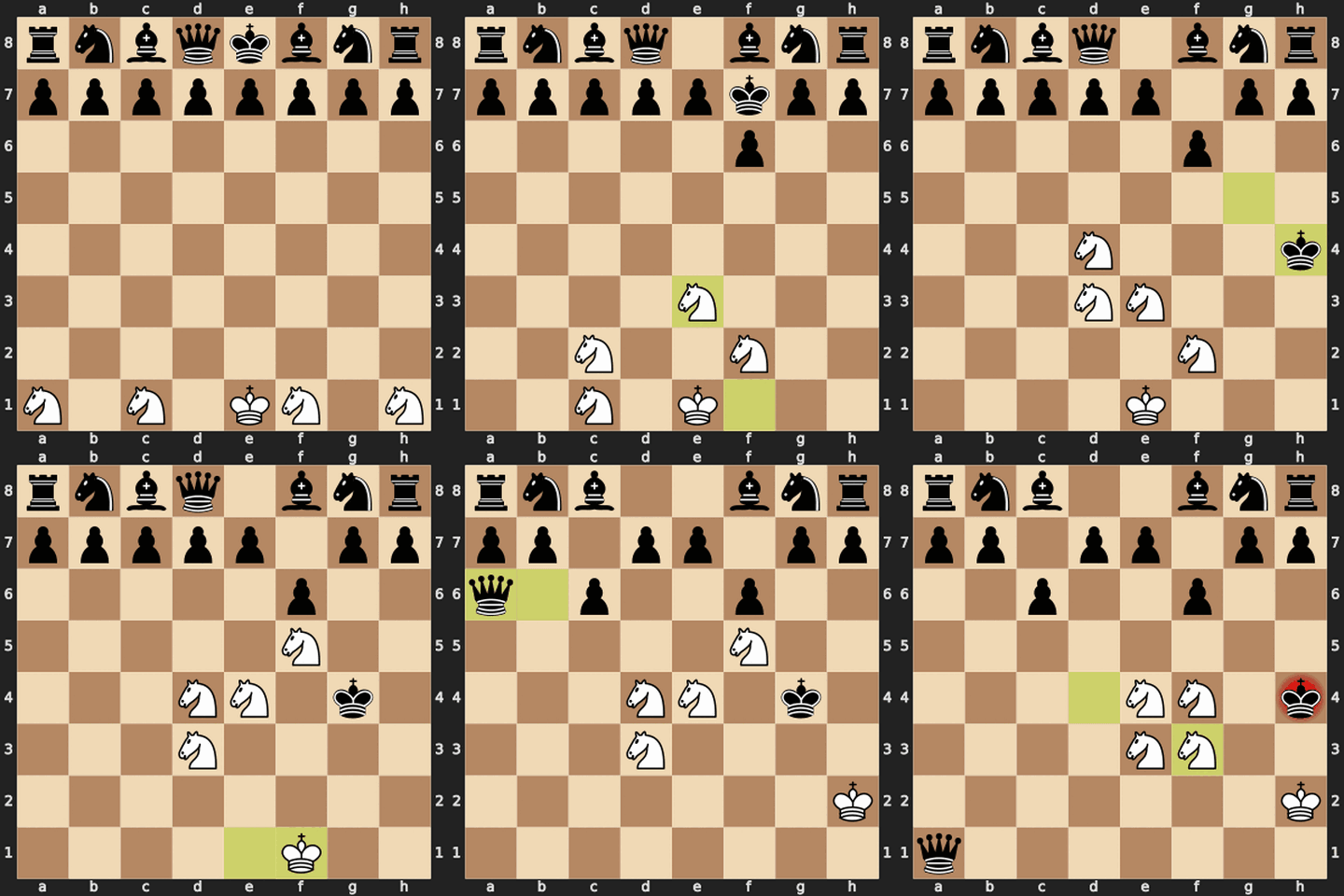
Smart starts with K + four knights symmetrically posted on a1/c1/f1/h1; Black has the entire opening army. Knights jig their way into a cooperative net and mate before Black can mobilize a single major piece.
Skull Mask
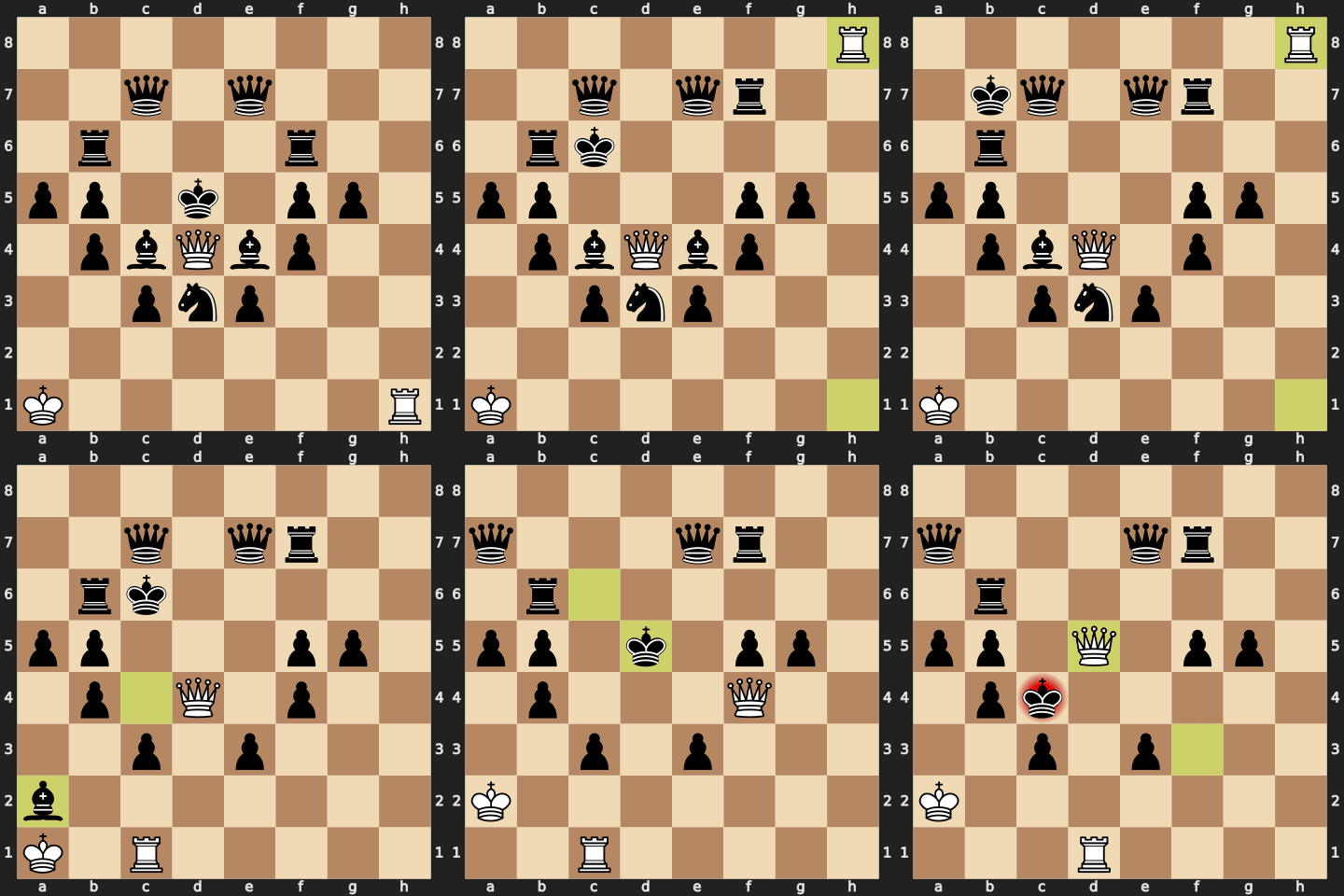
Black's pieces draw a skull: rooks for eye sockets, queens for temples, knight and bishops for jaw and teeth. Smart's king starts in the corner and tip-toes out while a rook and queen deconstruct each feature, ending Qd5#.
Spiral Vault
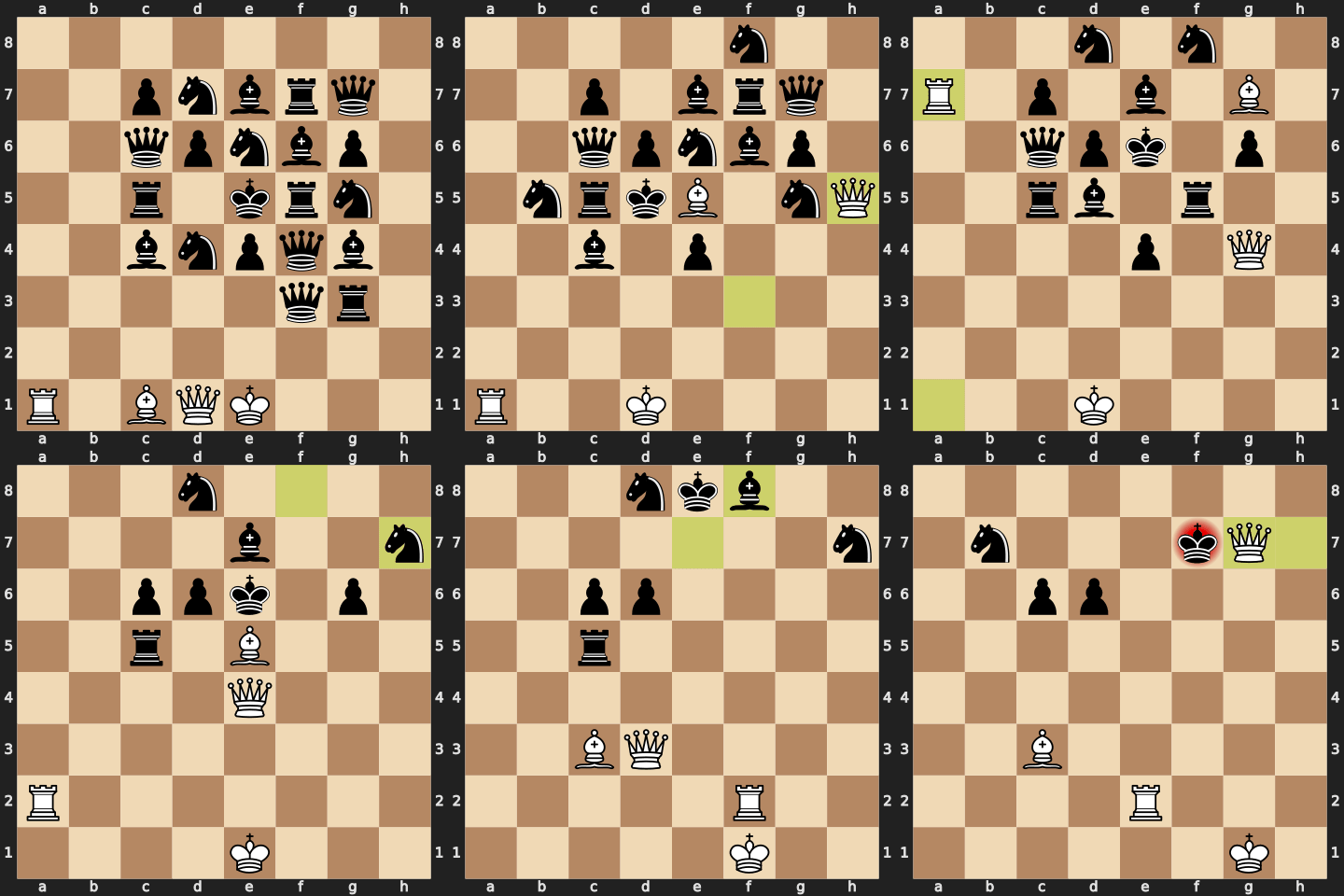
Black's pieces spiral outward from the king in a vault formation, a chaos of bishops, knights, rooks and queens stacked on every square of the upper half. Smart's R+B+Q carves a path inward through 27 moves of attrition to Qg7#.
Mosaic Blitz
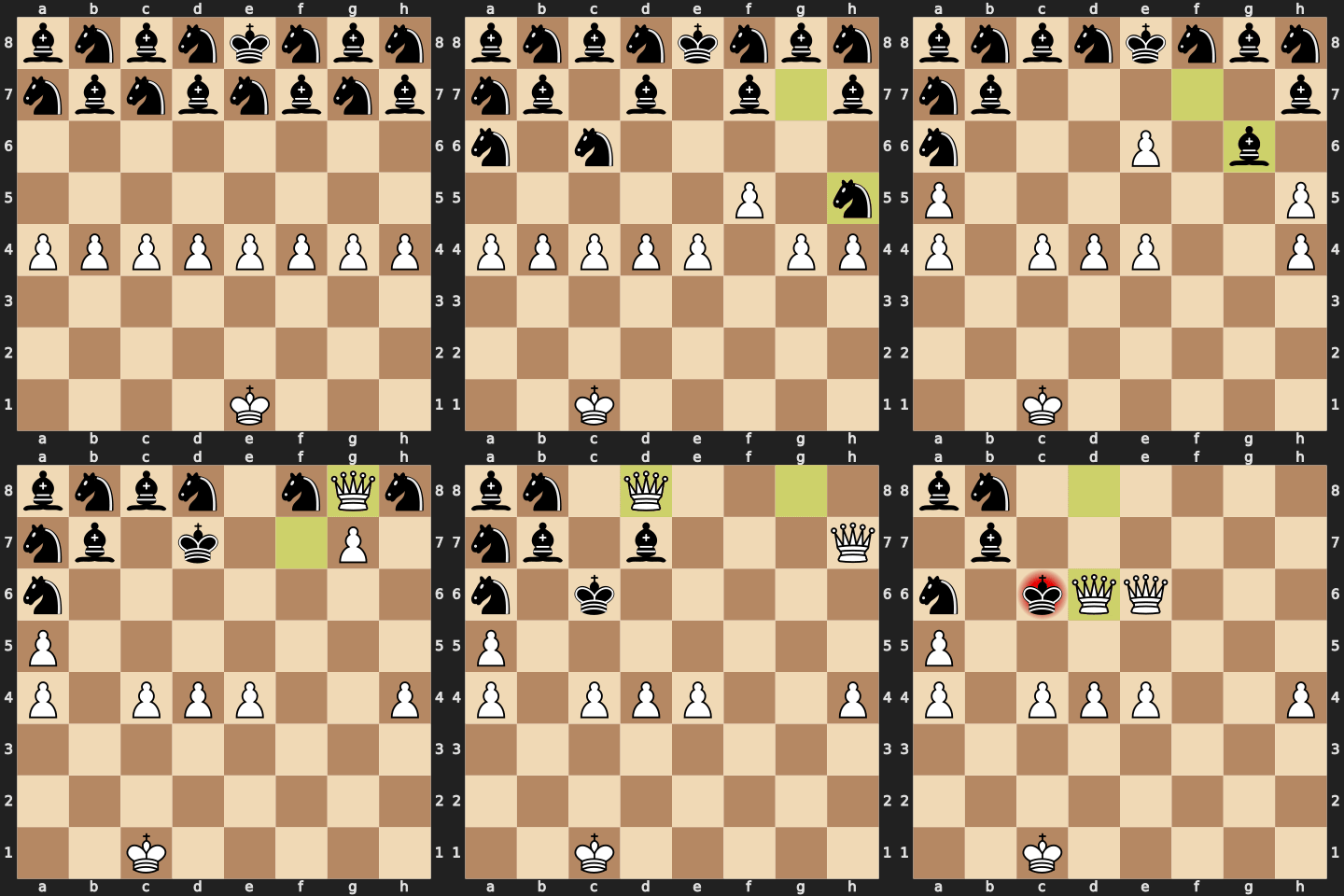
Black's bishops and knights tile the back two ranks in a perfect checkerboard mosaic. Smart's pawn wave cracks open the mosaic, promotes three queens in five moves, and ends in a queen-and-queen double-mate.
