One of the most valuable skills I have learned in the past year is undoubtedly LaTeX — so much so that I have moved almost all of my notetaking and document writing to LaTeX or Pandoc.
However, with almost any markup language, I ran into friction: constantly importing headers and defining commands I used in every document. Some commands have become muscle memory. When I got compiler errors every time I forgot to redefine them, I became quite frustrated. So I caved: I made a preamble that I appended to all of my LaTeX docs.
\RequirePackage[l2tabu, orthodox]{nag}
\documentclass[12pt]{article}

\usepackage{amssymb,amsmath,verbatim,graphicx,microtype,units,booktabs}
\usepackage[margin=10pt, font=small, labelfont=bf,
            labelsep=endash]{caption}
\usepackage[colorlinks=true, pdfborder={0 0 0}]{hyperref}
\usepackage[utf8]{inputenc}

\usepackage{xcolor}
% Highlight shell or code commands
\newcommand{\shellcmd}[1]{\texttt{\colorbox{gray!30}{#1}}}
% Placeholder for something to do
\newcommand{\todo}[2]{\textbf{\colorbox{red!50}{#1}}{\footnote{#2}}}
% Format a table row to make it more visible
\newcommand{\gray}{\rowcolor[gray]{.9}}

\usepackage[left=1.15in, right=1.15in]{geometry}
\usepackage{titleps}
\newpagestyle{main}{
    \setheadrule{.4pt}
    \sethead{\sectiontitle}
            {}
            {Illya Starikov}
}
\pagestyle{main}

% *-------------------- Modify This As Needed --------------------* %
% \usepackage[top=0.5in, bottom=0.5in, left=0.5in, right=0.5in]{geometry}
% \pagestyle{empty}

\title{\todo{Title}{Insert title here.}}
\date{\today}
\author{Illya Starikov}
Then, I took it one step further. I occasionally make practice tests for students in Calculus and Physics, so I decided to make a command that acts as extensions of my preamble for tests.
\usepackage{lastpage,ifthen}
\newboolean{key}
\setboolean{key}{true} % prints questions and answers
% \setboolean{key}{false} % prints questions only
\newcommand{\question}[2]{\item (#1 Points) #2}
\newcommand{\answer}[1]{\ifthenelse{\boolean{key}}{#1}{}}

% This must be filled out
\newcommand{\points}{0} % total number of points for the exam
% Capping score, to offer a point or two bonus
\newcommand{\capped}{0\ }
\newcommand{\difference}{0\ } % the difference of the two
\newcommand{\timeallotted}{0 hour} % duration of the exam

\begin{document}
\section*{\answer{Key}}
Complete the following problems.
In order to receive full credit,
please show all of your work and justify your answers.
You do not need to simplify your answers
unless specifically instructed to do so.
You have \timeallotted.
This is a closed-book, closed-notes exam.
No calculators or other electronic aids will be permitted.
If you are caught cheating, you will receive a zero grade for this exam.
Please check that your copy of this exam contains \pageref{LastPage}
numbered pages and is correctly stapled.
The sum of the max points for all the questions is \points,
but note that the max exam score will be capped at \capped
(i.e., there is \difference bonus point(s),
but you can't score more than 100\%).
Best of luck.

\begin{enumerate}
\question{}{}
\answer{}

\end{enumerate}
\end{document}
Reminiscing on my academic career, there are certainly things I did right; however, there are certainly things I did wrong. Aside from the rights and the wrongs, there are things I had wished I had done sooner. Today, I hope to shed some light on some of these things.
For context, as of a month ago I am an alumnus of Missouri University of Science and Technology, an engineering college in Missouri. It has equipped me very well in mathematics[1], physics[2], and computer science[3]. I wrote roughly 159,141 lines of code in college, so I feel as if I got my money’s worth. Thanks to Missouri S&T, I have a fairly diverse background in many things.
Below is advice I would recommend to anyone currently studying computer science (or programming in general).
Get A Computer You’ll Love
I got a 13-inch MacBook Pro my freshmen year of college, and it was the best decision I made in my academic career. At the beginning of my senior year, I got a 15-inch MacBook Pro with an LG UltraFine 5K Display, it was the second best decision I made in my academic career.
Getting a great computer is not just to speed up compile times; it's to make programming more enjoyable. During a typical programming day, I'll be on my computer 8-12 hours. 33%-50% of my time that day will be on a computer. Reducing friction 33%-50% of the day is almost invaluable.
Although a MacBook was perfect for me, it might not necessarily be right for anyone else. Find a computer you love, you won’t regret it.
Learn LaTeX
LaTeX was probably my most used programming tool in my academic career. It was a Swiss Army knife for any form of documents I might need:
At Missouri S&T, C++ is the first (and during my time there, the only) language one learned. The problem with this? One language, whether it be the be-all and end-all that C++ is, is not always appropriate for the job. There were times where Python was a much better choice. Sometimes it was C. Sometimes it was Swift. It all depends on the project. My recommendation is if you learned Python, learn C++. If you learned C++, learn Python. From there, find languages that will be useful for your domain.
Learn Your Text Editor
I didn’t pick up Vim until I was a junior; this was a giant mistake on my part. Vim didn’t just make it easier to delete a particular line of code; Vim made it easier to open files quickly, explore codebases faster, modify text quicker, etc.
Vim is not for everyone. Vim might not be right for you. Find a good text editor, and learn everything you can about it. It’ll make the friction of actually writing code much less.
Take Higher-Level Classes Early
Nearly all Computer Science programs require one to take higher-level classes as electives; in our school, it was roughly five graduate level classes. I made the mistake of taking all five my last year.
Emphasis on mistake.
Take them early; chances are you won’t be bogged down with job finding, apartment hunting, or the likes. Taking 18 hours, with three very difficult classes, in one term is not something I would wish on anyone.
Find Interests In Computer Science
When you find topics that interest you in Computer Science, chances are you will like your major more. I found particular interests in AI-related courses, but it is not for everyone. Computer Science has a breadth of interesting topics; check to see what your school has to offer, like:
Security
AI
Data Mining and Big Data
Machine Learning
Databases
UI/UX Design
Find Interests Outside Computer Science
Burnout is a serious issue in the industry. It can be a serious issue inside school as well. Foster passions outside of the classroom. Maybe join a design team, fraternity, or a sports team. There will be plenty of time at work to learn new things.
In addition, take genuinely interesting electives (not the easy ones). I learned I had an interest in Physics, and I carry that with me every day.
Intern As Much As Possible
Internships are not only a gentle introduction into the industry, but a great way to determine what job you will want outside of school. Internships are often joked about as "a 12-week interview process", and this can be true. If you find a good company that you can do good work for, it’s a great way to secure a job upon graduation.
Have Fun
The most important lesson I learned in college was to have fun (in moderation). College is all about learning who you are, what you want out of life, how to interact with others, and how to simply have fun. Lessons you learn in college will get carried over after graduating. Why not use this time to make life-long friends, create great memories, and know who you really are?
In Closing
This guide is not comprehensive; but it’s something I wish I read when I was starting. There’s always room to grow, so figure out what works for you. Do what makes you happy.
Calculus Series, Differential Equations, Linear Algebra, and Statistics. ↩︎
Classical Mechanics, Electromagnetism, Modern Physics. ↩︎
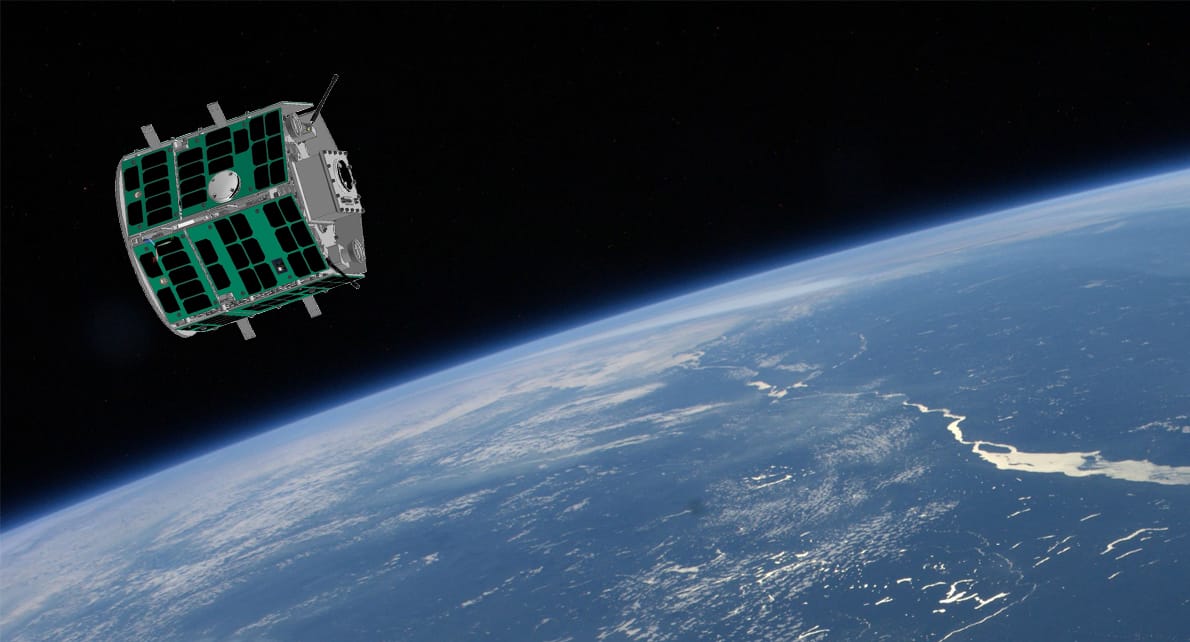
In February 2015, Missouri University of Science and Technology won the Air Force's Nanosat-8 competition, beating MIT, Georgia Tech, and seven other universities. Their winning design: two satellites that would perform proximity operations in space, demonstrating inspection capabilities for non-responsive spacecraft. Nearly a decade later, these satellites are finally ready for launch.
Background
Missouri S&T hired Dr. Hank Pernicka in 2001 to establish their aerospace engineering program. By 2005, the university was competing in national satellite competitions. Dr. Pernicka set clear expectations for his students: "dealing with spacecraft, close to 100% is required for success."
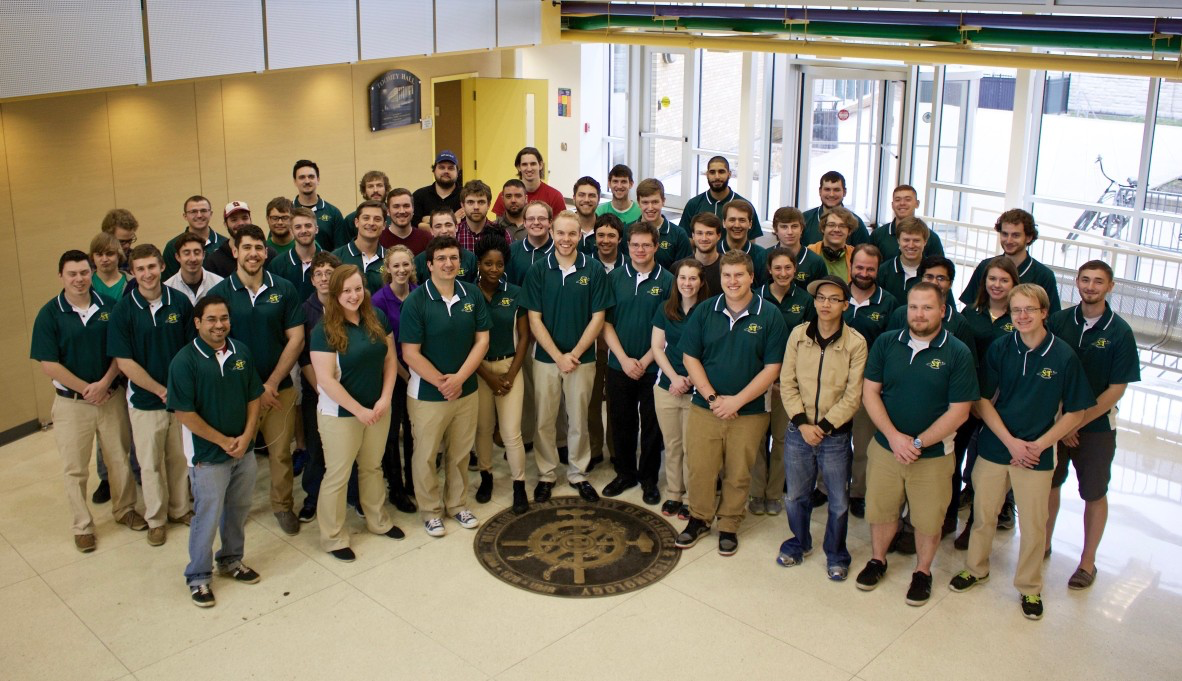
The Missouri S&T Satellite Team (M-SAT) grew from a single course to a 50-person multidisciplinary team by 2015. Their competition history included third place in Nanosat-4 and second place in Nanosat-7, where they notably outperformed MIT.
The Nanosat-8 Competition
The University Nanosat Program, funded by the Air Force Office of Scientific Research, challenges universities to develop flight-ready satellites. Nanosat-8, launched in 2012, focused on proximity operations and space situational awareness – capabilities with direct military applications.
Ten universities competed over two years. The final review occurred January 18-19, 2015, at Kirtland Air Force Base. Winners would receive Air Force launch services for their satellites.
The Mr & Mrs Sat Design
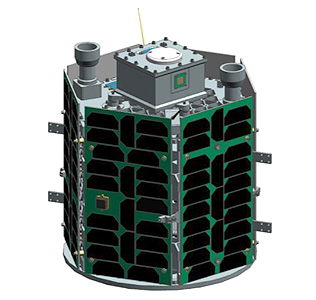
Missouri S&T proposed a two-satellite system:
MR SAT (Missouri-Rolla Satellite): The inspector satellite
MRS SAT (Missouri-Rolla Second Satellite): Simulates an uncooperative space object
The mission addresses a practical problem. When satellites malfunction or stop responding, operators need to assess damage without risking astronaut spacewalks or expensive replacement missions. Mr & Mrs Sat demonstrates autonomous inspection at a 10-meter distance.
Key Technical Innovations
Stereoscopic Imaging: Custom dual-camera system creates real-time 3D images, allowing precise position and velocity measurements in space.
R-134a Propulsion: Instead of expensive spacecraft propellants, the team used R-134a refrigerant – the same compound found in automotive air conditioning. The cold gas system, stored in a container roughly the size of a 2-liter bottle, provides six degrees of freedom for formation flying. Cost: about $20 per bottle versus thousands for traditional propellants.
Autonomous Control: The Self-sufficient, Accelerated Spacecraft Integration Flight Control System (SASI FCS) maintains formation without ground intervention, critical for practical operations.
Development Challenges
Dr. Pernicka warned students the project would be "underfunded and due in two years – a ridiculous deadline for normal satellite design." Air Force safety requirements added complexity.
Anna Schroeter, Program Manager, coordinated 9 subsystems and 25+ personnel. Her responsibilities included budget proposals, Air Force coordination, and systems integration across multiple engineering disciplines.
The psychological toll was significant. As Dr. Pernicka noted, "Sometimes they fail spectacularly. It's part of the business." Students invested years in projects that could fail during launch or in orbit.
From Competition to Flight Hardware
Winning in 2015 guaranteed launch services but required transforming academic designs into flight-qualified hardware. This meant:
Space qualification for every component
Redundancy for all critical systems
Testing for launch vibrations, thermal cycling (-100°F to +200°F), and radiation exposure
The process took nearly a decade. By Summer 2024, flight-ready satellites were delivered to the Air Force Research Laboratory. Multiple student generations contributed to the project through graduation cycles and the COVID-19 pandemic.
Mission Profile
The satellites will likely launch on a SpaceX Falcon 9, possibly via the International Space Station. Once deployed, they'll demonstrate:
Automated proximity operations
3D imaging and reconstruction
Formation flying using low-cost propulsion
Primary mission duration: 4 months Expected operational life: 2-4 years
Applications include military satellite inspection, commercial satellite diagnostics, and development of future servicing missions.
Educational Impact
The program has produced over 11,000 alumni across 25 years. Many work at NASA, SpaceX, Boeing, and other aerospace companies. Students gain end-to-end spacecraft development experience unavailable in traditional academic programs.
Joseph Nguyen exemplifies the program's reach. A first-generation college student who initially found undergraduate research "a little too challenging," he became Student Director. His scholarship letter stated: "As the first male in my family to attend college, your scholarship will financially assist my family in the expenses of my attendance. I hope to make my community proud and hope to make you proud as a student who dared to change his future."
Technical Significance
The R-134a propulsion system demonstrates how cost constraints drive innovation. If university students can achieve precision formation flying with hardware store refrigerant, the approach could benefit budget-conscious small satellite operators.
The stereoscopic imaging system addresses growing needs for space situational awareness as orbit becomes more congested. Autonomous inspection capabilities have clear national security applications.
Looking Forward
Mr & Mrs Sat awaits launch within 1-2 years. The approaching milestone represents a decade of student effort, technical problem-solving, and persistence through setbacks.
When these satellites finally reach orbit, they'll prove that the greatest space achievements don't always come from billion-dollar budgets or prestigious institutions – sometimes they come from Missouri students with the audacity to make hardware store refrigerant fly. In the cold vacuum above, Mr & Mrs Sat will dance on air conditioning dreams, showing the world that innovation thrives on constraint, that ridiculous deadlines can forge real spacecraft, and that true engineering genius isn't about having the most resources but about having the nerve to reach for the stars with whatever's in your toolbox. They'll orbit as monuments to every student who dared to believe that a hardware store trip could be the first step to space – and that sometimes, the most extraordinary achievements begin with the most ordinary tools.
func bubbleSort(var unsorted: Array<Int>) -> Array<Int> {
    for i in 0..<unsorted.count - 1 {
        for j in 0..<unsorted.count - i - 1 {
            if unsorted[j] > unsorted[j + 1] {
                unsorted.swap(j, j + 1)
            }
        }
    }

    return unsorted
}
Selection Sort
func selectionSort(var unsorted: Array<Int>) -> Array<Int> {
    for i in 0..<unsorted.count - 1 {
        var minimumIndex = i
        for j in i + 1 ..< unsorted.count {
            if unsorted[j] < unsorted[minimumIndex] {
                minimumIndex = j
            }
            unsorted.swap(minimumIndex, i)
        }
    }

    return unsorted
}
Insertion Sort
func insertionSort(var unsorted: Array<Int>) -> Array<Int> {
    for j in 1...unsorted.count - 1 {
        let key = unsorted[j];
        var i = j - 1

        while i >= 0 && unsorted[i] > key {
            unsorted[i + 1] = unsorted[i]
            i--
        }

        unsorted[i + 1] = key
    }

    return unsorted
}
Merge Sort
func merge(leftArray left: Array<Int>,
           rightArray right: Array<Int>) -> Array<Int> {
    var result = [Int]()
    var leftIndex = 0, rightIndex = 0

    // Computed property to check if indexes reached end of arrays
    var indexesHaveReachedEndOfArrays: Bool {
        return leftIndex < left.count && rightIndex < right.count
    }

    while indexesHaveReachedEndOfArrays {
        if left[leftIndex] < right[rightIndex] {
            result.append(left[leftIndex])
            leftIndex++
        }
        else if left[leftIndex] > right[rightIndex] {
            result.append(right[rightIndex])
            rightIndex++
        }
        else {
            result.append(left[leftIndex])
            result.append(right[rightIndex])

            leftIndex++
            rightIndex++
        }
    }

    result += Array(left[leftIndex..<left.count])
    result += Array(right[rightIndex..<right.count])

    return result
}

func mergesort(unsorted: Array<Int>) -> Array<Int> {
    let size = unsorted.count
    if size < 2 { return unsorted }

    let split = Int(size / 2)

    let left = Array(unsorted[0 ..< split])
    let right = Array(unsorted[split ..< size])

    let sorted = merge(leftArray: mergesort(left),
                       rightArray: mergesort(right))
    return sorted
}
Throughout my undergraduate studies, I've become good at digging deeper until I completely understand a subject. But when I look around me, I realize I'm in the minority. Often, students only want to know how to get from question to answer without any intermediate thinking. I can't pinpoint a definitive reason why, but I have one hypothesis: encapsulation[1].
The most famous example I've encountered is the derivative of any trigonometric function besides \(\sin x\) or \(\cos x\). As any student who's taken Calculus can tell you,
$$\frac{d}{dx} \left(\tan x\right) = \sec^2 x$$
However, most students couldn't tell you:
$$ \begin{align*} \frac{d}{dx} \left(\tan x\right) &= \frac{d}{dx} \left(\frac{\sin x}{\cos x}\right) \\ &= \frac{\cos x \cos x + \sin x \sin x}{\cos^2 x} \\ &= \frac{\cos^2 x + \sin^2 x}{\cos^2 x} \\ &= \frac{1}{\cos^2 x} \\ &= \sec^2 x \end{align*} $$
At first glance, this seems like useless information. You might even think of it as a piece of trivia—until you see how many people miss it on a quiz or test. And entry-level Calculus isn't the only place this matters. This pattern appears everywhere: physics, thermodynamics, mathematics of any kind, computer science, and the like.
You might be wondering: why does it matter? If it's worth a couple of points on a test, is it that harmful? Maybe not—until you realize you don't conceptually understand the subject, only mechanically.
The next time you're learning something, ask yourself: "why?". The outcome might delight you.
The act of enclosing in a capsule; the growth of a membrane around (any part) so as to enclose it in a capsule. ↩︎