Skip to content

Blog

Talk To Your TODOs

I talk to my TODO list. You should too.

NOTE 📜 This is a post about AI. All views are my own and do not represent my employer. Please review my Disclosures.

I love TODO lists. I especially love spending days bringing one up, and promptly abandoning it.

Weeks later, I'm using it again. It's captured most of my priorities, but not all of them. Stuff falls through the cracks, I start to not trust my TODOs. Day-by-day it falls further out of sync, until I stop using it. Some time goes by, I fill the missing pieces and I'm back checking off boxes!

But a wildly new priority appeared! My system falls out of sync again, and it won't resync until I do a massive overhaul. You guessed it, I'm off working on the wild project while my original TODOs wither away.

What's wrong with me?

The Solution

What's wrong with me is I like doing stuff. Real stuff. I hate grunt work, a lot. And most of the work in maintaining a task manager is grunt work:

  1. Seeding. The initial high. Step 1 of using a task manager, relentlessly filling it with your current TODOs. You feel a rush of productivity, without moving one step closer to your goals.
  2. Maintenance. The reality of using a task manager. Adding new tasks, big or small. Removing ones that are no longer relevant, which is much harder. Keeping it in sync with your life.
  3. Reprioritize. The curveballs. Most change a few tasks in a project, some change entire projects, and rarely one will have you reconfigure most of your active areas of work.

So lately, instead of writing TODO lists, I've been talking to TODO lists instead.

With AI, I've been able to automate away the grunt work so I can focus on doing the work. Using natural language, I can turn prompts into projects. "Help me plan out a wedding." "Review my taxes folder and make me a template for my yearly filing." "Scan my contacts, find my relatives, and add tasks to wish them a Happy Birthday." These are actual projects Gemini has helped me with.

Here's how you can talk to your TODO list as well.

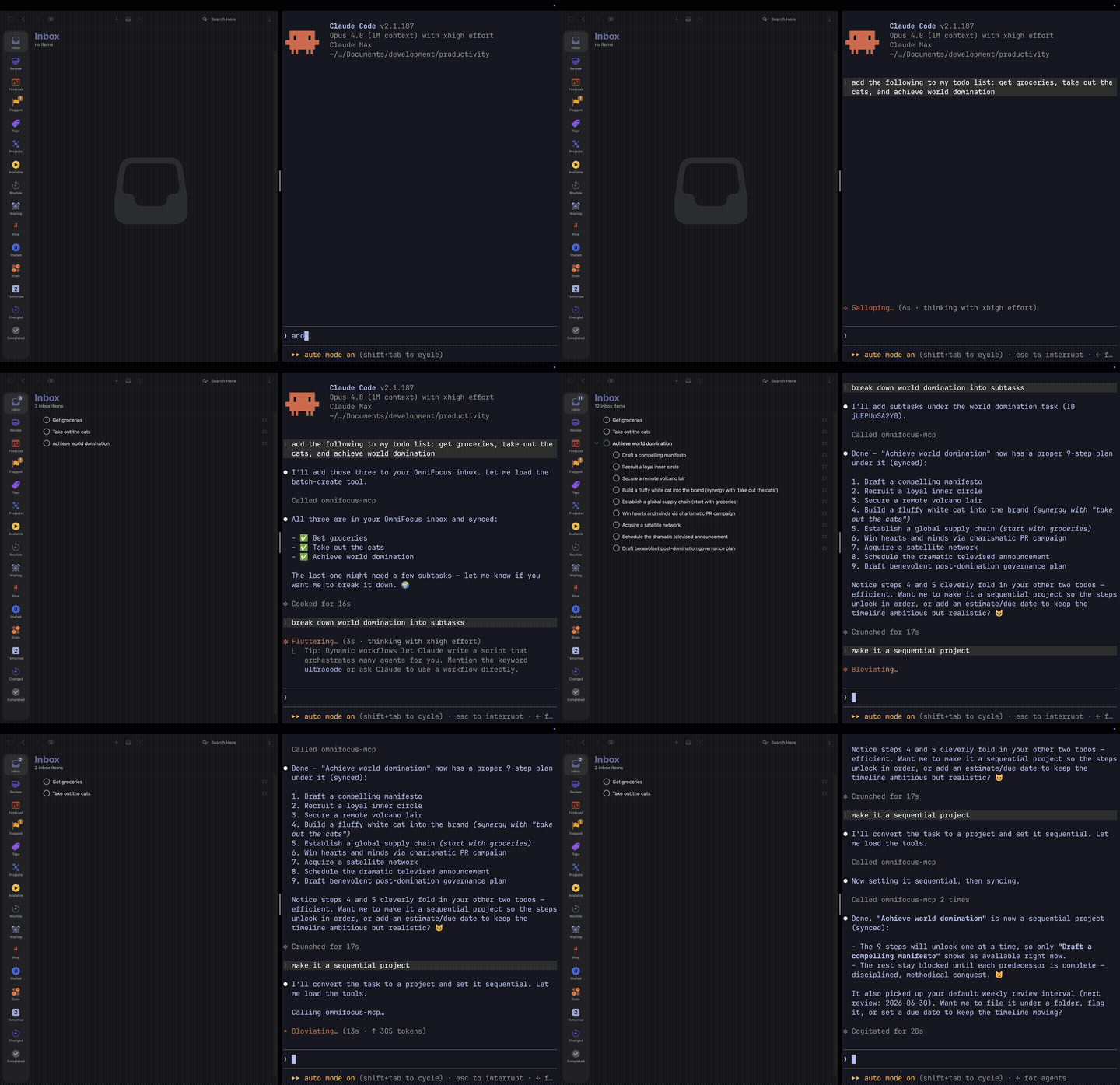
The MCP server in action: a plain-English request in the terminal becomes tasks filed in OmniFocus.

MCP: The TODO->AI Connector

MCP stands for Model Context Protocol. An MCP server is a small adapter that lets an AI client (the Gemini CLI, Cursor, ChatGPT desktop) reach into another app and use it as a set of tools: read your tasks, create new ones, retag a project, run a query. The model never swallows your database. It calls tools, and the server decides which tools exist and what each one is allowed to touch.

That fence is the point. Your tasks aren't baked into a model or shipped off to train one. The server sits between the assistant and your data, exposing a short, named list of actions and nothing else. The model picks which to call; the server enforces the rest.

My Setup

I've been using OmniFocus on-and-off for about 10 years, so it's my tool of choice. For myself, the only way I can consistently use a TODO list is if it has all my tasks.

My setup is deliberately boring. I run one of the OmniFocus MCP servers from the catalog below against my own database, and drive it from the terminal with the Gemini CLI, which is already open all day. Everything below is something I've actually asked it.

You don't need a terminal, though. The same server plugs into a GUI chat client just as well: the Gemini app, Cursor, anything that speaks MCP lets you register a server and start asking in plain English. The terminal is my preference, not a requirement. Wherever you already talk to an assistant is where this lives.

How I Actually Use It

Three chores eat most of what a task manager costs you, one for each flavor of grunt work above: clearing the inbox is maintenance, the weekly review is where you catch a reprioritization before it derails you, and starting a project from scratch is seeding without the dread. Here's how each one goes when the assistant takes the boring half.

Inbox Triage

Capture and organize are two different moods, and the switch between them is where I lose tasks. Over a day I'll dump twenty things into the inbox: "call the vet," "renew the passport," "that book Taylor mentioned," "look into the weird noise the car makes." Then I never sort them, because sorting means stopping.

So I don't sort. At the end of the day I ask it to triage: file anything it's confident about, ask me about the rest. The obvious ones land on their own: the vet call in Errands, the passport in a Travel project. It hands back the two or three it can't place, I answer those, and the inbox is empty. I never left capture mode.

Weekly Review

The weekly review is the GTD ritual I skip the most, because it's an hour of mechanical cleanup before any thinking happens. That mechanical hour is exactly what an assistant is for. I run it in the classic three passes and let the model do the grunt work in each.

Get Clear. Empty the inbox, then: "Find any project with no next action and flag it. List tasks missing a tag or a time estimate and propose values." Stalled projects are what quietly kill a system; having them surfaced instead of hunted is most of the battle. I approve or correct the proposed tags in one pass.

Get Current. "Pull my Waiting For list. Cross-reference my calendar for the last two weeks and the next two, and tell me what I've committed to that isn't in here yet." Half the time it catches a meeting that implied a task I never wrote down.

Get Creative. This is the part I actually want to do, so it's the part I keep. "Based on my active projects, give me a mind-sweep: what am I likely forgetting?" It's a trigger list tuned to my real life instead of a generic checklist. Most of it I discard. The one or two it surfaces that I'd genuinely dropped pay for the whole review.

Project Planning

A blank project is the most expensive thing in any task manager. Spelling out the dozen obvious sub-tasks of "plan a camping trip" is pure overhead, and that overhead is usually what stops me from starting at all.

So I start from a draft instead. "Set up a project for a long weekend in Tahoe: permits, gear check, food plan, the drive, who's coming. Give it sub-tasks and rough due dates working back from the 15th." Thirty seconds later there's a real project, sequenced and dated. Maybe half the tasks are right. I delete the ones that don't apply, fix the dates, add the two things it couldn't have known. Editing a wrong draft beats producing a right one from a blank page, every time.

Pick Yours

If OmniFocus isn't your task manager, almost everything else has an MCP server too. Most have several.

A few notes before the catalog:

  • Official means the company that builds the tool ships the server. Prefer these unless you need self-hosted, on-prem, or a feature only the community fork has.
  • Most Tier-1 tools (i.e., Atlassian, Notion, Asana) now run a hosted, OAuth-only MCP at mcp.{vendor}.com/mcp or similar. SSE transport is being phased out; assume Streamable HTTP unless told otherwise.
  • Star counts last cross-checked May 2026 and drift weekly. The registry.modelcontextprotocol.io registry is the canonical place to look up new entries.

Task Managers

OmniFocus

  • themotionmachine/OmniFocus-MCP Query, dump, edit, batch. JXA under the hood, easiest to drop into Claude Desktop today.
  • jqlts1/omnifocus-mcp-enhanced When themotionmachine hits its ceiling: custom perspectives, real hierarchical sub-tasks, Planned Dates, reparenting that doesn't break.
  • vitalyrodnenko/OmnifocusMCP Pick your runtime: a Rust binary on Homebrew, Python on uv, or TypeScript on Node. 45 tools, four prompts, same surface across all three.

Things 3

  • hald/things-mcp Reads everything (Inbox, Today, Upcoming, Anytime, Someday) and, as of v0.8.1, writes too: add and update todos, projects, and areas via AppleScript.
  • rossshannon/Things3-MCP The fork that lets you actually create. Sub-tasks fall back to Markdown checkboxes in notes (Cultured Code's AppleScript surface won't allow native checklists).
  • ebowman/mcp-server-things Defensive by default: an AI-tag-creation guard, 30-second AppleScript timeouts, env-vars for every behavior. The one to pick if you don't want surprises.

Todoist

  • Official: Doist/todoist-mcp 44 tools, hosted at ai.todoist.net/mcp, OAuth, MCP Apps support so widgets render in chat. (The older @doist/todoist-ai name still works as a thin shim; new installs use todoist-mcp.)
  • greirson/mcp-todoist DRYRUN=true is the killer feature: rehearse bulk operations before committing them. Quick-Add natural-language parser included.
  • abhiz123/todoist-mcp-server ~390 stars, untouched since April 2025, still works. Light enough to keep around even after switching to the official.

TickTick / Dida365

  • karbassi/mcp-ticktick Habits, focus timers, filters, calendar. The only TickTick server that feels like the actual app. Wants both a v1 token and a v2 cookie to unlock the full surface.
  • jacepark12/ticktick-mcp OAuth2 with auto-refresh and a flag for Dida365 users in China. Easy on-ramp.
  • liadgez/ticktick-mcp-server 100% API coverage (112 ops) plus a local cache to fix TickTick's missing "list all tasks" endpoint.

Apple Reminders

  • FradSer/mcp-server-apple-events Native EventKit, not AppleScript, so it doesn't crawl on a real Reminders database. Now covers Calendar too; recurrence rules and location triggers come along for the ride.
  • mggrim/apple-reminders-mcp-server 18 tools with chrono-node parsing natural-language dates ("next Tuesday at 4," "in two weeks"). List-color and emblem control if you care about the visual side.
  • shadowfax92/apple-reminders-mcp AppleScript-only, basic CRUD. Smaller surface, easier to audit before letting an LLM near your reminders. (Dormant since early 2025.)

Microsoft To Do

Google Tasks

Habitica

  • iBreaker/habitica-mcp-server Tasks and checklists are the productivity half; pets, mounts, shop, and skills are the rest. 8 capability domains in one server, all gamified.

TaskWarrior

  • awwaiid/mcp-server-taskwarrior Wraps the local task binary. Set up TaskWarrior once, get an LLM-friendly interface for free.
  • acebaggins/taskwarrior-mcp Real-time updates and prompt scaffolding so the model knows what to do next without you spelling it out.
  • meirm/taskwarrior-ng A full web app on top of TaskWarrior, plus MCPO to expose the same MCP server as REST. Useful when you want both interfaces.

Amazing Marvin

Remember The Milk

No native community MCP server. RTM users currently rely on Zapier's MCP wrapper for Remember The Milk actions. Genuine gap if you want to fill it.

Time-blocking & calendars

Sunsama

  • Official: api.sunsama.com/mcp Hosted, OAuth, Streamable HTTP. Tasks and workflows, no setup beyond authorize.
  • robertn702/mcp-sunsama 15 task tools with GitHub and Gmail integrations baked into create-task. Stream and group operations included; HTTP-Basic-Auth option for self-hosted setups.

Reclaim.ai

Motion

  • h3ro-dev/motion-mcp-server Built-in rate limiting that self-throttles to a conservative 12 requests every 3 minutes (well under Motion's 12-per-minute cap) so you don't get throttled mid-loop. SQLite persistence across restarts.

Routine

  • Official First-party local server (npx routine-mcp-server; needs the Routine desktop app running and Node 18+). Calendars, tasks, and notes from the daily-planner app.

Project Management

Asana

  • Official: mcp.asana.com/v2/mcp Streamable HTTP, OAuth 2.1, GA in early 2026. The V1 SSE endpoint died May 11, 2026; if you're still pointing there, you're broken.
  • roychri/mcp-server-asana READ_ONLY_MODE if you don't trust the LLM yet, custom-field operations if you do. ~137 stars and still active.
  • n0zer0d4y/asana-project-ops Enterprise fork of roychri with batch operations, direct section assignment, and selective tool activation.

ClickUp

  • Official: mcp.clickup.com/mcp ~50 tools across 14 categories, OAuth 2.1 with PKCE. No delete tools, intentionally. Rate limits depend on plan and the Everything-AI add-on.
  • taazkareem/clickup-mcp-server Multi-account, hybrid OAuth/API-key, fuzzy global search, persona-based tool filtering. The community option people stayed on after ClickUp went official.
  • hauptsacheNet/clickup-mcp Three modes (read-minimal, read, write) and append-only descriptions, so the LLM can't blow away your notes by accident. Image support with size budgeting for token-conscious agents.

Linear

  • Official: mcp.linear.app/mcp Issues, projects, milestones, comments, teams, cycles, initiatives, roadmaps, documents. Full surface, OAuth 2.1.
  • tacticlaunch/mcp-linear Goes deeper than the official: cycles, milestones, roadmaps, saved views, templates, custom fields, webhooks, audits, rate-limit health checks.
  • dvcrn/mcp-server-linear Multi-workspace via tool prefixing. The right pick if you run Linear across several agencies or clients. (Lightly maintained; last updated April 2025.)

Jira / Confluence (Atlassian)

  • Official: mcp.atlassian.com/v1/mcp (Rovo) Cloud-only but covers Jira, Confluence, Compass, and Bitbucket Cloud in one server. SSE endpoint deprecates June 30, 2026.
  • sooperset/mcp-atlassian 5,000 stars and 72+ tools across Jira (Cloud + Server / Data Center) and Confluence. The only good answer for self-hosted Jira. Patch to v0.17.0+ for the Feb 2026 RCE/SSRF fix.
  • aashari/mcp-server-atlassian-jira Five generic HTTP tools that hit any Jira API endpoint, with TOON responses for 30–60% token savings on big issues.

Monday.com

  • Official: mondaycom/mcp Hosted at mcp.monday.com/mcp, OAuth 2.1. Boards, items, columns, groups, plus Dynamic API Tools that give you full GraphQL access on the fly.
  • Prat011/mcp-server-monday Python via uvx, Smithery-installable, Docker option. Pragmatic and quick. (Formerly sakce/mcp-server-monday; the repo was transferred, not forked.)

Notion

  • Official: makenotion/notion-mcp-server 4,257 stars. v2.0 uses the data-sources abstraction from API 2025-09-03. Notion is steering toward the hosted mcp.notion.com/mcp. Heads-up: there's an open prompt-injection-via-page-content advisory (#238 at last check).
  • suekou/mcp-notion-server Markdown conversion to cut tokens, tool allowlist via --enabledTools. The community server that makes Notion responses LLM-readable.
  • awkoy/notion-mcp-server Production-positioned: Zod-validated, batch operations, comments, search, archive/restore.

Trello

  • GabrielRamirez/trello-mcp 73 tools across nine categories, Docker-ready, remote HTTP support. The most thorough Trello server in the catalog.
  • delorenj/mcp-server-trello Built-in token-bucket rate limiting (300/10s per key, 100/10s per token) and persistent board switching. Actively maintained (SSRF protection and due-reminders landed mid-2026).
  • adriangrahldev/advanced-trello-mcp-server Production-hardened HTTP layer: keep-alive, exponential-backoff retries with jitter, batch tools, attachment downloads.

Shortcut

  • Official: useshortcut/mcp-server-shortcut Hosted at mcp.shortcut.com/mcp (OAuth) or local stdio (PAT). Stories, epics, iterations, objectives, docs, custom fields. Ship-safe with SHORTCUT_READONLY=true and a SHORTCUT_TOOLS allowlist.

Wrike

  • Official: mcp.wrike.com Hosted. Task queries, folder/project navigation, prioritization, and meeting-to-task conversion.

Smartsheet

  • Official Hosted. Sheet read/summarize, row CRUD, attachments. Requires a Business / Enterprise / Advanced Work Management plan.
  • josh-cornett/smartsheetmcp TypeScript, Streamable HTTP and SSE, broad endpoint coverage with documented pagination so the LLM doesn't silently truncate your sheets.
  • terilios/smartsheet-server Healthcare-analytics flavor: clinical-note summarization, sentiment, batch analysis on top of Smartsheet.

Plane

  • Official: makeplane/plane-mcp-server 100+ tools across ~19 modules. OAuth at mcp.plane.so/http/mcp, PAT at mcp.plane.so/http/api-key/mcp.

Basecamp

Backlog (Nulab)

Dart

  • Official: its-dart/dart-mcp-server Native MCP for Dart's AI-first PM platform. Tasks, docs, projects. (The local server is now deprecated in favor of Dart's hosted MCP.)

Fibery

  • Official: Fibery-inc/fibery-mcp-server Natural-language interaction with Fibery workspaces. Python. (This local server is deprecated; Fibery now hosts one at mcp.fibery.io/mcp.)

Taskade

  • Official: taskade/mcp Projects, tasks, workspaces, OAuth.

Notes

Notion

See Project management above.

Obsidian

For the Obsidian Tasks plugin specifically, jfim/obsidian-tasks-mcp parses both emoji and Dataview syntax directly from markdown, no REST API needed.

Logseq

  • ergut/mcp-logseq Hooks into Logseq's Local HTTP API, with optional vector search via local Ollama. DB-mode supported, tag-based privacy excludes work fine.
  • eugeneyvt/logseq-mcp-server Search/Get/Edit/Delete unified-tool architecture, template enforcement, soft-delete safety. Fewer tools, fewer ways to misfire.
  • joelhooks/logseq-mcp-tools TypeScript. Journal summaries, graph analysis, DataScript natural-language queries. Closest thing to a research assistant for your Logseq graph.

Roam Research

Apple Notes

  • sirmews/apple-notes-mcp Read-only: lists and searches by reading the Apple Notes SQLite database directly (needs Full Disk Access). No creating or editing. (Archived since late 2024.)
  • RafalWilinski/mcp-apple-notes Semantic search via a LanceDB vector store. The one to pick if you've been hoarding Notes for years and want to query them like a brain.

Bear

Airtable

  • domdomegg/airtable-mcp-server PAT-scoped, schema discovery, read/write, search, comments. Distributed via .mcpb (Claude Desktop extension), pre-listed in Anthropic's MCP Registry.
  • rashidazarang/airtable-mcp v4 with 42 tools: full CRUD, comments, schema, webhooks, batch ops, AI-prompt templates.
  • jordan-huffman/airtable-mcp-server Fixes the "everything is a string" gap of the popular forks: proper handling of single-select, date, formula, and checkbox fields.

Dev

GitHub Issues + Projects

  • Official: github/github-mcp-server ~29,200 stars; one of the most-starred MCP servers anywhere. Local binary, Docker, hosted remote variant. Watch out: the projects toolset is off by default. Flip GITHUB_TOOLSETS or --dynamic-toolsets.
  • taylor-lindores-reeves/mcp-github-projects Pre-dated official Projects support. Auto-generated GraphQL types and an ALLOWED_REPOS write-restriction list make it good for sprint workflows.
  • idosal/git-mcp Turns any GitHub repo into a doc/code source for retrieval. Not for issue management; the right tool for "what does library X actually do."

GitLab

  • Official: GitLab Duo's built-in MCP server Issue + MR creation and code search since GitLab 18.5; assignees, reviewers, labels, and milestones added in 18.8. Works on Cloud and self-managed.
  • zereight/gitlab-mcp The community wrapper to reach for when Duo isn't an option.
  • nguyenvanduocit/gitlab-mcp A lighter, more selective alternative; zereight's is the one with the broader API surface.

Bitbucket

  • Official (via Atlassian Rovo) PR lifecycle, pipelines, deployments, all in the same Atlassian server. API-token only; no Bitbucket OAuth.
  • b1ff/atlassian-dc-mcp Purpose-built for Atlassian Data Center, with OS-keychain secret storage. Separate @atlassian-dc-mcp/{jira,confluence,bitbucket} packages.
  • aashari/mcp-server-atlassian-bitbucket Generic-tool design: a few HTTP-method tools that hit any endpoint. Sister project to aashari's Jira server.

YouTrack

Redmine

  • runekaagaard/mcp-redmine Closest to 100% Redmine API coverage. ~172 stars, quiet since January 2026.
  • jztan/redmine-mcp-server 45 tools, every auth mode (API-key, Basic, OAuth2), prompt-injection protection, Docker. OAuth2 wants Redmine 6.1+.

Taiga

  • talhaorak/pytaiga-mcp Epics, user stories, tasks, issues, sprint tracking, verbosity controls. The Taiga server you'll actually keep installed.

OpenProject

Vikunja

  • 0xK3vin/vikunja-mcp 11 capability domains: kanban, relations, views, notifications, teams. The polished pick.
  • democratize-technology/vikunja-mcp API-token + JWT auth, smart hybrid filtering that falls back to client-side when the server can't help. Cleaner architecture than most.
  • aimbitgmbh/vikunja-mcp Safety controls (ENABLE_PROJECT_DELETE etc., default false because Vikunja has no trash). Tested with gpt-oss:20b if you're going local.

Generic / Self-Hosted

These don't wrap an external SaaS. They are the task system, designed for AI workflows from the start.

Back to Checking Boxes

I still abandon my TODO list. I'll ignore it for a week, miss a project, let it drift. The difference now is that catching up isn't a weekend of grunt work, it's a sentence: "here's what changed, sort it out." The list rebuilds itself, and I get back to doing the stuff I actually wanted to do.

AI Won't Replace Software Engineering (Yet)

But it will raise the bar.

NOTE 📜 This is a post about AI. All views are my own and do not represent my employer. Please review my Disclosures.

I have a boring opinion: AI is a tool.

Like a text editor, a compiler, grep. And like every tool, it's clueless, easily nudged off track, and sometimes too eager to please. That's not a flaw of character. It's a stochastic model, not a person.

It is a groundbreaking tool. My third most-used after the text editor I'm typing this in and the shell running it. No tool has rooted itself this deep, this fast. Long-abandoned projects look polished. Ideas I shelved as too tedious are a prompt away. It's almost magic.

The numbers feel magic too:

The headlines are magic too:

Still, I'd taper expectations. The underlying tech is human language, not a model of the world. Language is a symptom of intelligence, not the cause. AI is still a tool.

A wooden tray of tools — Vim manual, compiler stamp, grep magnifying glass, slide rule — and a glowing crystal labeled AI, with a hand reaching for it.

Replacing Software

I've been coding with AI assistants for over two years. The shortest summary I have:

The best intern I could ask for. It listens, chips away, makes some bad assumptions. On familiar ground, it shines. Off-trail, the output is off-trail too. With clear direction, it solves most of what a working engineer hits in a day.

I've watched it fall flat in narrow places (LaTeX Tikz, custom diagrams) and broad ones (overweighting the current file instead of reaching for world knowledge). It's not just me:

My workflow is unrecognizable from two years ago. The objective hasn't moved: ship software that scales. Code is one piece. AI helps with most of them, but someone still has to orchestrate top-to-bottom. AI turns a rowboat into a crewed ship, and the rower into the captain. They route, monitor, and adjust. I find AI roughly useless without me at the wheel, nudging it back on course.

A pilot in a cockpit watching robot crew assemble a half-built airliner mid-flight at sunset.

This may age badly, but I'll stake it: the software engineering industry keeps growing for a while yet. It contracts later, when models meet or beat human intelligence and the captain stops being load-bearing. For now we're building the ship and flying it at the same time.

So if we aren't being replaced, what are we doing?

Raising The Bar

When the compiler arrived, demand for engineers went up. More ambitious projects became feasible; the harder problems got reached for, not skipped. Productivity tools tend to do that — they raise the ceiling before they shrink the floor.

The lesson: lean into where AI is strong. Onboarding, legacy code, the routine. I haven't written an argparse CLI by hand in over a year, and I don't miss it. Side projects that would have taken months take days. The cobwebs in my codebases are fun to clear, not tedious. Professionally, however, it's a different story.

The difference is simple: I read every line of code I ship at work. I don't read every line I ship at home. Side-project stakes are low. if it breaks, someone files an issue or sends a patch. Production stakes aren't.

When models pass human intelligence, I'll stop reading the code to fix it and start reading the code to learn from it. It'll know more than I do. Until then, intelligence is bounded by context windows and language. I'm not staking a career on a pile of tokens and linear algebra — neither by skipping the code review, nor by quitting the field.

A few real obstacles on the way there:

Those are problems for us, as humans, to fix.

As engineers, we do what we did when the compiler shipped, and the IDE, and the package manager: we build more. Better. Sometimes the bottleneck is human review; sometimes it's reaching past where the model can see. The bar moves up.

Every engineer now runs a small team of capable agents. We can build anything we can specify. We can serve very small audiences with very specific software, or very large ones with very hard software. The work isn't going away. It's getting harder, and more interesting, at the same time.

Still The Captain

I trust the model on the easy stretches. I read every line on the hard ones. That doesn't change until the ship doesn't need a captain. And from where I'm standing, mid-flight, it still does.

There's No Place Like $HOME

A ten-year journey of mostly Vim, then VS Code, then back to Vim.

NOTE 📜 This is a post about AI. All views are my own and do not represent my employer. Please review my Disclosures.

Let me take you through ten years of text editors.

I've been programming primarily via a shell since 2016, and my dotfiles go back to 2017. I wrote the thesis that you should care deeply about the tools you use. In 2026 I use the same tools I did then. But a lot else has changed.

I entered big tech, and noticed how few engineers around me shared my tool suite. Most lived in a GUI editor where the terminal was optional and a shell was something you bolted on. I found it increasingly hard to communicate intent with colleagues. So, out of FOMO, I decided to try something different. After a decade of Vim, I changed my daily driver to VS Code.

Then, around 2025, the work itself changed. My workload and my approach to it were suddenly different.

IDE For Me?

At first it was pretty nice. The tooling was integrated: version control was a panel instead of a man page, the file tree sat right there, a debugger and a run button one click away. Nothing needed a name before I could use it; every action was a menu, every menu a button. For someone starting out it lowers the floor, and you can be productive before you understand the machine underneath.

My "Oh, this just works" moment was subtle but delightful: my compiler would print a filepath, line, and column in its output, and one day I realized I could click it and land on that exact spot in the source. It was exactly what IDEs promise: it just worked.

I took many other lessons from the IDE into Vim, and almost all of them collapse to a single keystroke: go to definition (gd, yes I had to setup language servers), find all references (gr), rename a symbol everywhere it lives (F2), the lightbulb quick-fix (F4), language-server autocomplete, a Problems panel for the squiggles (<leader>xx). I even bound the fuzzy file opener to Ctrl-P, the same key VS Code uses for the same thing.

It had quirks. A beat of lag sat between the keypress and the glyph, just long enough to notice; a one-keystroke edit became a command palette, a fuzzy match, an Enter; opening a 5,000-line file spun the fan up like a jet on a runway. The terminal lived in a cramped strip at the bottom, a few lines tall, where my whole workflow used to live. And the editor I tuned on my laptop was never quite the editor waiting on my desktop. Each one was small. Together they were ceremony.

By the end, though, it felt like maintaining a delicate garden. I would weed away panes so I could see more code and then they would sprout back up after a reboot.

My VS Code setup, the daily driver I switched to after a decade of Vim.

My typical workflow would be:

  1. My cursor sits in a function I just wrote. It calls an API I don't know, so I take a hand off the keyboard and mouse over it, waiting for the indexer to wake up.
  2. Right-click the symbol, scan the menu, click Go to Definition. A new tab opens in another file and scrolls me somewhere I didn't pick.
  3. That definition calls a bare helper. Hover it, wait for the tooltip, click Go to Definition again. A third tab piles on.
  4. Read the helper, then hunt the tab strip for the tab that was mine. Click back, mis-click a neighbor, correct.
  5. Back in my function, drag-select the wrong argument with the mouse, then fix the call.
  6. Click into the terminal pane, run the file, and wait for it to come back.

$HOME, sweet, $HOME

The thinking then is the same now: an IDE built for everyone optimizes you for average. This doesn't mean IDEs are bad or that people who use IDEs should feel bad (even John Carmack swears by Visual Studio, the full Microsoft IDE, not VS Code). It just means tooling is worth the investment when you live in code (even your IDE). Before Vim I used Xcode, Sublime Text, and Atom, and I still think Sublime was the GOAT back then.

With shell tools, I am able to craft the perfect environment for me. I like coding at the speed of thought. I feel more comfortable navigating, modifying, and manipulating the code all via the keyboard. I like completely automatable environments. I like being in control.

My Vim setup, back home in the terminal.

My typical workflow is:

  1. My cursor sits in a function I just wrote. It calls an API I don't know, so I read it in place. No mouse, nothing to wake up.
  2. gd jumps to the definition, and the jump is recorded so I can come back.
  3. That definition calls a bare helper. gd again, another hop on the jump list.
  4. Read the helper. Ctrl-o Ctrl-o walks the jump list back the way I came, onto my function.
  5. Back in my function, ci( swaps the argument in normal mode, no selection to drift.
  6. Ctrl-w to the tmux pane, recall the run command from history, Enter; the output prints in place.

Same six steps. Not one of them takes my hands off home row.

The AI of it All

Confession: FOMO was not the only reason I decided to try VS Code. My dotfiles had gone stale, mostly untouched for five years. Reviving them meant sinking days into a revamp before I could code again, or switching to VS Code and coding immediately. I chose the latter.

But then AI flipped that premise on its head. Particularly, Claude Code changed everything for me in 2025; can you spot when I started using it?

2017-Q116 2017-Q250 2017-Q37 2017-Q432 2018-Q118 2018-Q29 2018-Q313 2018-Q43 2019-Q113 2019-Q33 2019-Q45 2020-Q13 2020-Q218 2020-Q32 2020-Q47 2021-Q41 2022-Q21 2023-Q32 2024-Q17 2025-Q23 2025-Q3675 2025-Q423 2026-Q1166 2026-Q231

The cost of maintaining dotfiles was the cost of the tokens to do it.

But you may ask, with tools rapidly changing and shifting around AI today, will the terminal even matter tomorrow? In my opinion, it will matter even more.

The cost of writing code is minimal; the cost of reading code is still your reading speed. I read every line of code I ship to production, and you should too. The task has now shifted, but the thinking has not: the more time you spend reading code, the more time you should invest in tooling to assist you with it.

Reading code is not linear. You jump from your function to an API, to its helpers, and back. That's the motion both lists above describe, and the motion an editor lives or dies on.

How does Vim do this any better than an IDE? Because it's already designed for it.

Open a file in Vim, start typing, and nothing lands. You're in normal mode, where the keys are a vocabulary for moving, not typing: j/k/h/l step through the buffer, / jumps to anything you can name, gd lands on a definition and gr lists every reference, Ctrl-o walks the jump list back the way you came, % hops to the matching brace, ci( rewrites what is inside the parens with no selection to drift. Every one of those is a way to read. Writing is a mode you ask for, a deliberate i before a single character lands, and you leave it the moment you are done. The resting state of the editor is the thing you do most: looking at code that already exists, moving through it the way you read it, without waking an indexer, without ever reaching for the mouse.

An IDE is built the other way around. The cursor blinks at an insert point the second a file opens, primed to type, and every reading motion is a second layer bolted over that: a menu to find, a panel to define, a click to chase a reference. The default is write; reading is the thing you add. That used to be a preference. AI made it the whole job. When writing a line costs a sentence of English, the expensive part is no longer producing code, it is reading the code that came back, often code nobody at the keyboard wrote. Vim built its grammar for exactly that motion in the nineties, decades before the motion became the bottleneck.

You might object that agents change even this: you read their work as a diff in a review pane, not a buffer you move through. But a diff is a keyhole. To trust a change I still open the files it touches and follow what it calls, and that tracing lives in the editor, not the review pane. The pane shows me what moved; Vim is where I find out what it meant.

VS Code and Vim, spliced along a diagonal.

Whatever Works, Works

I tried something new. Don't drop everything you use and replace it with my stack; find one part of your workflow, see if it can be improved, and keep what works. If I had to pick somewhere to start, give Vim keybinds a go.

Learning a new editor is hard. Learning a key at a time is sustainable.

One afternoon it took me until lunch to notice my mouse had died. I'd been somewhere I didn't need it. There's still no place like $HOME.

Diff Viewer

Two versions in, every real change out. Reordered keys and trailing whitespace don't count.

Compare

Drop, paste, or type two versions. The differences appear below as you type.

Differences

Markdown preview (rendered, sandboxed)
Reference
How to use it
  1. Load two documents. Type or paste into the left and right panes, or drop a file onto either side.
  2. Pick a format, or let it guess. Auto-detect reads the file extension and a quick content sniff. Override it from the Format menu when you know better.
  3. Read the diff. Side-by-side on desktop, stacked and unified on a phone. Additions are green, deletions are red, and the changed words inside a line are tinted.
  4. Tune what counts. Toggle off whitespace, case, or blank-line changes. Switch between word-level and character-level highlighting.
  5. Take it with you. Copy or download a unified .patch, or hit Share link to put the whole comparison in a URL.

Keyboard: Alt+↓ and Alt+↑ jump to the next and previous change.

What “smart” means

The viewer picks a strategy per format instead of treating everything as text:

  • JSON parses both sides and compares structure, so key order and indentation never register. One changed value is one changed line.
  • YAML parses to the same canonical, key-sorted form before diffing. Reordering a mapping is a no-op.
  • XML and HTML are pretty-printed by the browser’s own parser, then compared line by line.
  • CSV is parsed into a table and diffed cell by cell, so a single edited field doesn’t flag the whole row.
  • Markdown gets a line-and-word diff plus a live rendered preview.
  • Source code — 25+ languages (Python, C, C++, Java, Go, Rust, C#, TypeScript, Ruby, PHP, SQL, and more) get per-language syntax highlighting on every line, including the changed ones, auto-detected from the file extension or pasted content. Optional toggles ignore comment-only edits and treat reordered imports as unchanged, and long runs of unchanged lines fold into expandable, function-labelled separators.
  • Plain text falls back to a classic line diff with word-level highlights.

If a document won’t parse as its claimed format, the viewer says so and compares it as plain text instead. Nothing throws.

Privacy

Everything runs in your browser. The two documents, the diff, the patch, the share link: none of it is uploaded, because there is no server to upload to. The libraries are bundled into the page, so it works offline and keeps working if this site ever goes away. Close the tab and the only trace left is whatever you copied to your own clipboard, plus a draft saved to your browser’s localStorage so the panes survive a reload.

FAQ
Does it send my files anywhere?

No. The diff is computed locally in JavaScript. There are no network requests after the page loads.

How big a file can it handle?

Drops are capped at 2 MB, and binary files are rejected. Past about 2,000 lines the viewer drops intra-line highlighting and re-diffs when you click away rather than on every keystroke, to stay responsive.

Why does reordering JSON keys show no change?

Because JSON objects are unordered by definition. The viewer compares the parsed structure, not the text. Turn off “Sort keys” if you want key order to count.

What does the Share link contain?

Both documents and your current options, compressed into the URL after the #. The link never hits a server, so very large inputs can make it too long for some apps to pass around.

Can I diff two different formats?

You can, but it is rarely useful. The viewer detects one format for the pair. Set it explicitly from the Format menu if auto-detect guesses wrong.

Does it highlight source code?

Yes — 25+ languages, detected from the file extension (.py, .cpp, .rs, .go, …) or, for pasted snippets, from the content. Both the unchanged context and the changed lines are syntax-highlighted; changed lines also keep the word-level diff. Pick a language by hand from the Format menu if auto-detect guesses wrong. (A .h header is treated as C — switch it to C++ if you need C++-only keywords.)

What do “Ignore comments” and “Ignore import order” do?

“Ignore comments” drops comment-only edits, so a reworded comment isn’t flagged — line and single-line block comments, with multi-line blocks handled best-effort. “Ignore import order” treats a run of import / #include / use lines as a set, so reordering them shows nothing (it canonicalizes their order in the view).

What is “Fold unchanged”?

Long stretches of unchanged lines collapse into one separator, labelled with the enclosing function or class, so a small change in a large file stays readable — click a separator to expand it. It also keeps very large files fast.

Artificially Unintelligent

mini(wins), max(losses)

NOTE 📜 This is a post about AI. All views are my own and do not represent my employer. Please review my Disclosures.

Most problems in AI come down to optimization. Neural networks train by minimizing a loss. Good Old-Fashioned AI plays games by maximizing a heuristic evaluation. The architectures look nothing alike, but the engine underneath is the same: pick the parameter (or move) that pushes some number in the right direction.

For a chess engine, that number comes from a "fitness function": a heuristic that takes the board state and produces a score for the position. The AI then prioritizes moves that maximize its fitness while trying to minimize the adversary's. This is the famous minimax algorithm, and it goes something like this:

def minimax(board, depth, maximizing):
    if depth == 0 or board.is_terminal():
        return evaluate(board)

    if maximizing:
        value = float('-inf')
        for move in board.legal_moves():
            child = board.apply(move)
            value = max(value, minimax(child, depth - 1, False))
        return value
    else:
        value = float('inf')
        for move in board.legal_moves():
            child = board.apply(move)
            value = min(value, minimax(child, depth - 1, True))
        return value

We can do something interesting here. We win by maximizing our score and minimizing the opponent's. But what happens if we negate the fitness \(f(x)\), say by returning \(-f(x)\)? We start minimizing our own score and maximizing the opponent's. We start, in effect, trying to lose.

def dumb_evaluate(board):
    return -evaluate(board)

One line. That's the whole thing. The algorithm doesn't change; it still faithfully maximizes whatever score it's given. We just give it a worse score, and it faithfully drives the game off a cliff.

With this, we get some pretty entertaining games. I present to you Artificial Unintelligence.

Smart vs Dumb

Eight hand-picked games where Smart starts at a material deficit, often facing a Black army arranged into a deliberate visual pattern, and still wins. The set is ordered from the most ordinary to the most theatrical. Every game ends in checkmate (1-0).

Standard Match

Standard Match

The control. Standard opening, no FEN setup, no visual pattern, just Smart vs Dumb. Smart wins on g6 with a quiet bishop sacrifice and a queen mate. Sets the baseline before things get strange.

Pawn Cross

Pawn Cross

Black's king sits dead center inside a small + of pawns. Smart has only K + R against this miniature cross and threads the rook around the arms, stripping pawns one at a time before delivering Ra1#.

Zigzag Fence

Zigzag Fence

Black's pawns form a perfect zigzag fence across ranks 4–7. Smart's queen alone walks the fence end to end, picking off pawns on the diagonal and converging on Qe2#.

Bishop Constellation

Bishop Constellation

Black's eight bishops sit on the long diagonals like a star map; Smart's pawn phalanx sits below them. 36 moves of slow promotion warfare yield four white queens and a final Qc1# from the corner of the board.

Four Knights

Four Knights

Smart starts with K + four knights symmetrically posted on a1/c1/f1/h1; Black has the entire opening army. Knights jig their way into a cooperative net and mate before Black can mobilize a single major piece.

Skull Mask

Skull Mask

Black's pieces draw a skull: rooks for eye sockets, queens for temples, knight and bishops for jaw and teeth. Smart's king starts in the corner and tip-toes out while a rook and queen deconstruct each feature, ending Qd5#.

Spiral Vault

Spiral Vault

Black's pieces spiral outward from the king in a vault formation, a chaos of bishops, knights, rooks and queens stacked on every square of the upper half. Smart's R+B+Q carves a path inward through 27 moves of attrition to Qg7#.

Mosaic Blitz

Mosaic Blitz

Black's bishops and knights tile the back two ranks in a perfect checkerboard mosaic. Smart's pawn wave cracks open the mosaic, promotes three queens in five moves, and ends in a queen-and-queen double-mate.