Technology
Gadgets, tools, and the small obsessions of a life lived through good hardware. Enthusiasm, applied responsibly.
The Zero-Width Space-Place
Nothing to see here.
Zero‑Width Space
Click the translucent pill (blue dot marks it) or the big Copy button.
What’s Zero-Width Space?
The zero‑width space (U+200B) is a Unicode glyph that renders nothing and occupies zero width. In the right hands, this “invisible ink” changes how software treats text.
Example
Below are seven tricks I actually use, each with a quick demo.
- Anchor an Alphabetical List
Prefix one or more ZWS characters to push an item ahead of "A".
Newsletter ← with ZWS
Apple
Zucchini
- Break Auto‑Linking
Drop a ZWS into a URL or email to foil scrapers while leaving it human‑readable.
hello@starikov.co
https://starikov.co
- Duplicate C++ Identifiers
ZWS is a valid identifier char in many compilers.
int total = 1; // normal
int total = 2; // looks the same, compiles fine
std::cout << total + total; // prints 3
- Python Indentation Gremlins
Slip a ZWS into leading spaces; code looks aligned but crashes.
def hello():
print("ok") # four spaces
print("boom") # four + ZWS → IndentationError
-
Hide Easter‑Egg Text
Insert a binary watermark every 100 chars; humans never see it, diff tools do. -
Zero‑Length Social Forms
Some platforms allow a username, bios, and other forms that is literally just ZWS. Pure minimalism. -
Control word‑wrapping
Add ZWS inside a super‑long URL to let browsers break the line without inserting a visible hyphen.
<span style="word-break:break-all">
https://example.com/superlongpaththatneverends
</span>

RSS: RSS Starter Set
My recommended RSS feeds—thoughtfully curated over a decade of reading.
The skeleton is automatically generated by this script. Import the following OPML into any reader to pull everything at once.
Apple🍎
-
Apple | Developer — RSS
Official notes on software releases, tooling updates and policy changes inside Apple’s developer ecosystem. -
Apple | Newsroom — RSS
Corporate statements covering product launches, financial results and wider initiatives. -
Daring Fireball — RSS
Commentary and link aggregation focused on Apple and the technology industry. -
MacStories — RSS
In‑depth reviews, workflows and analysis for advanced iOS and macOS users. -
Marco.org — RSS
Occasional essays on software development, podcasting and independent publishing. -
Six Colors — RSS
Reporting and analysis on Apple’s hardware, software and services, aimed at enthusiasts and professionals. -
The Sweet Setup — RSS
Recommendations and workflows that enhance productivity across Apple platforms.
Companies🏢
-
Android Developers — RSS
Technical updates and best practices for building, testing and distributing Android applications. -
Apple | ML Research — RSS
Peer‑review‑style summaries of Apple’s research in machine learning and artificial intelligence. -
AWS Machine Learning Blog — RSS
Case studies, tutorials and announcements on applying AI services within Amazon’s cloud. -
Chromium — RSS
Progress reports from the open‑source browser project that underpins Chrome and Edge. -
Facebook | Engineering — RSS
Technical deep dives into infrastructure, data systems and product engineering at Meta. -
Garmin — RSS
Product news and usage guidance for navigation, fitness and outdoor devices. -
GitHub | Engineering — RSS
Insights into scaling and securing the world’s largest code‑hosting platform. -
Instagram | Engineering — RSS
Engineering narratives on delivering social‑media features to a global audience. -
LinkedIn | Engineering — RSS
Articles on large‑scale data processing, relevance ranking and platform reliability. -
Meta — RSS
Corporate news spanning product releases, policy positions and financial updates. -
Meta | Research — RSS
Academic‑style papers exploring computer vision, natural‑language processing and related fields. -
Microsoft Research — RSS
Peer‑reviewed research and technology transfers from Microsoft’s global labs. -
Netflix TechBlog — RSS
Engineering case studies on content delivery, cloud reliability and data analysis. -
NVIDIA — RSS
Updates on graphics, high‑performance computing and AI initiatives. -
OpenAI — RSS
Announcements and research summaries related to language models and AI safety. -
OpenAI News — RSS
Headline feed distilling OpenAI’s key product and policy updates. -
Signal — RSS
Technical and policy discussions on end‑to‑end encryption and secure messaging. -
Stack Overflow — RSS
Reflections on software‑developer culture, community trends and platform improvements. -
TensorFlow — RSS
Release notes, tutorials and ecosystem news for Google’s deep‑learning framework. -
Wolfram — RSS
Essays on computational science, applied mathematics and software innovation.
Computer Science🐛
-
AI Impacts — RSS
Research exploring the economic and societal consequences of advanced AI systems. -
AI Weirdness — RSS
Experiments illustrating both the creativity and the limitations of neural‑network models. -
And now it’s all this — RSS
Practical scripting advice and observations on engineering workflows. -
Andrej Karpathy — RSS
Essays on deep learning, vision models and large‑scale training techniques. -
arg min — RSS
Technical commentary on optimisation, machine learning and data science. -
Berkeley | AI — RSS
Accessible summaries of recent artificial‑intelligence research from UC Berkeley. -
ByteByteGo — RSS
Illustrated guides to system design, scalable architecture and distributed computing. -
C++ Stories — RSS
Modern‑C++ features, guidelines and best practices. -
CodeProject Latest Articles — RSS
Community‑authored tutorials covering a broad spectrum of software topics. -
Coding Horror — RSS
Essays on software craftsmanship, usability and developer culture. -
Columbia | Statistical Modeling — RSS
Discussions on Bayesian statistics, social‑science methods and data communication. -
Eric Jang — RSS
Research notes on robotics, reinforcement learning and applied AI. -
fast.ai — RSS
Practical deep‑learning instruction aimed at software developers. -
Hacker News — RSS
Daily aggregation of technology news, startup announcements and research papers. -
IEEE Spectrum — RSS
Engineering‑centric reporting on emerging technologies and industry trends. -
It Runs Doom! — RSS
Showcases unconventional devices capable of running the classic video game Doom. -
James Stanley — RSS
Personal projects and commentary on security, electronics and software. -
Joel on Software — RSS
Classic essays on software management, product design and programming practice. -
John D. Cook — RSS
Short, accessible reflections linking mathematics, statistics and software development. -
Journal of Artificial Intelligence Research — RSS
Peer‑reviewed papers presenting state‑of‑the‑art advances across all branches of AI. -
Julia Evans — RSS
Illustrated tutorials demystifying Linux, networking and debugging techniques for practitioners. -
Keet — RSS
Research notes on knowledge representation, ontologies and semantic web technologies. -
Krebs on Security — RSS
Investigative reporting on cyber‑crime, data breaches and digital‑fraud trends. -
learnbyexample — RSS
Concise command‑line and text‑processing guides for developers honing Unix skills. -
Lenny's Newsletter — RSS
Product‑management insights distilled from industry data and operator interviews. -
linusakesson.net — RSS
Technical explorations of low‑level electronics, music synthesis and retro computing. -
Luke Salamone — RSS
Essays on graphics programming, game‑engine design and related tooling. -
Machine Intelligence Research Institute — RSS
Analyses of AI alignment challenges and strategies to mitigate long‑term risks. -
ML Mastery — RSS
Hands‑on machine‑learning tutorials emphasising clear code and practical results. -
Newest Python PEPs — RSS
Live feed of proposals shaping the future syntax and semantics of Python. -
sidebits — RSS
Brief technical notes on performance optimisation, systems programming and Rust. -
Simon Willison's Weblog — RSS
Frequent posts on open data, web tooling and practical large‑language‑model experiments. -
Simplify C++! — RSS
Guidelines for writing clearer, safer and more maintainable modern‑C++ code. -
Slashdot — RSS
User‑moderated headlines covering technology policy, hardware and open‑source news. -
Swift.org — RSS
Release notes and evolution proposals for Apple’s open‑source programming language. -
The Gradient — RSS
Editorial essays unpacking recent machine‑learning research for a broad technical audience. -
The Old New Thing — RSS
Historical and technical commentary on Windows APIs and system design. -
The Pragmatic Engineer — RSS
Operational advice on scaling software organisations and engineering careers. -
The Register — RSS
Independent technology journalism tracking industry moves, hardware and cybersecurity. -
Unixmen — RSS
How‑to articles and reviews focused on Linux administration and open‑source tools. -
VimGolf — RSS
Micro‑challenges showcasing efficient command sequences in the Vim editor.
Cooking🧑🍳
-
101 Cookbooks — RSS
Seasonal, whole‑food recipes emphasising natural ingredients and vegetarian cuisine. -
David Lebovitz — RSS
Recipes and culinary observations from a pastry chef living in Paris. -
Drinkhacker — RSS
Spirits reviews, cocktail recipes and industry news for enthusiasts. -
Love and Lemons — RSS
Plant‑forward dishes presented with bright photography and concise instructions. -
Pinch of Yum — RSS
Accessible comfort‑food recipes paired with blogging and photography tips. -
Serious Eats — RSS
Evidence‑based cooking guides, equipment reviews and culinary science. -
smitten kitchen — RSS
Home‑kitchen recipes designed for reliable results and minimal fuss. -
Tartelette — RSS
Pastry and dessert recipes illustrated with professional‑quality photography.
Culture🦠
-
The Substack Post — RSS
Platform news and commentary on the evolving newsletter ecosystem. -
XXL — RSS
Coverage of hip‑hop music, culture and industry developments.
Gaming👾
-
Nintendo Life — RSS
News, reviews and community coverage centred on Nintendo hardware and software. -
Nintendo UK — RSS
Official announcements, release dates and promotional updates for UK audiences. -
PlayStation — RSS
Product news, developer interviews and firmware updates from Sony Interactive. -
Pure Nintendo — RSS
Independent reporting and opinion on Nintendo gaming and related culture.
-
Google | DeepMind — RSS
Research highlights and applications from Alphabet’s advanced‑AI division. -
Google | Developers — RSS
API changes, tooling updates and developer‑centric announcements across Google platforms. -
Google | Security — RSS
Security advisories, vulnerability research and best‑practice guidance from Google. -
Google | Testing — RSS
Methodologies and frameworks for building reliable, well‑tested software at scale. -
Google | Workspace — RSS
Release notes detailing new features and refinements in Google’s productivity suite. -
The Keyword — RSS
Company‑wide announcements spanning consumer, enterprise and research initiatives.
Health⚕️
-
Adjust Services — RSS
Advice on ergonomics, musculoskeletal health and workplace well‑being. -
Different Brains — RSS
News and resources promoting understanding of neurodiversity. -
Exceptional Individuals — RSS
Career guidance and support services for neurodivergent professionals. -
GoodTherapy — RSS
Evidence‑informed articles on mental‑health practices and therapeutic approaches. -
Stronger by Science — RSS
Strength‑training research translated into practical coaching recommendations. -
The Gottman Institute — RSS
Relationship insights grounded in decades of psychological research.
Interest(ing)⌚️💼
-
Atlas Obscura — RSS
Reports on unusual places, histories and cultural phenomena worldwide. -
BOOOOOOOM! — RSS
Contemporary art, illustration and photography features with international scope. -
Europe By Rail — RSS
Practical guidance and commentary on rail travel across the European continent. -
Field Notes — RSS
Dispatches on paper goods, analogue tools and design‑focused manufacturing. -
I Love Typography — RSS
Articles exploring type design, font history and typographic trends. -
Naturally Ella — RSS
Vegetarian recipes highlighting seasonal produce and whole foods. -
Rands in Repose — RSS
Essays on engineering leadership, organisational culture and personal productivity. -
Wait But Why — RSS
Long‑form explorations of technology, psychology and existential questions. -
zen habits — RSS
Minimalist practices aimed at simplifying work, health and daily routines.
News🗞️
-
NATO — RSS
Official statements, operational updates and policy briefings from the alliance. -
ProPublica — RSS
Investigative journalism focused on accountability in public and private sectors. -
The White House — RSS
Executive‑branch announcements, speeches and policy documents. -
United Nations — RSS
Global news and humanitarian updates from UN agencies and missions. -
Economist
A weekly newspaper‑magazine renowned for its dry wit and data‑rich, liberal‑minded analysis of global politics, economics, business, science and culture.- Economist | Asia — RSS
- Economist | Briefing — RSS
- Economist | Asia — RSS
- Economist | Briefing — RSS
- Economist | Asia — RSS
- Economist | Briefing — RSS
- Economist | Business — RSS
- Economist | China — RSS
- Economist | Economic & Financial Indicators —
RSS - Economist | Europe — RSS
- Economist | Explains — RSS
- Economist | Finance & Economics — RSS
- Economist | Graphic Detail — RSS
- Economist | International — RSS
- Economist | Leaders — RSS
- Economist | Middle East & Africa — RSS
- Economist | Science & Technology — RSS
- Economist | The Americas — RSS
- Economist | The World This Week — RSS
- Economist | United States — RSS
Nice🫶
-
Damn Interesting — RSS
Narrative essays revealing overlooked episodes of scientific and historical importance. -
FoxTrot — RSS
Daily comic strip blending family humour with math and technology references. -
Goodreads — RSS
Book‑industry news, author interviews and reading‑list recommendations. -
Longreads — RSS
Curated selection of high‑quality long‑form journalism and essays. -
NASA Image of the Day — RSS
Daily space imagery accompanied by contextual scientific commentary. -
Poorly Drawn Lines — RSS
Single‑panel comics presenting dry humour and absurdist scenarios. -
Saturday Morning Breakfast Cereal — RSS
Comics exploring science, philosophy and contemporary life through satire. -
The Atlantic | In Focus — RSS
Photo‑journalistic essays capturing global events and social issues. -
The Oatmeal — RSS
Humour, storytelling and occasional educational comics. -
Three Panel Soul — RSS
Webcomic art dealing with gaming culture and personal reflection.
ST̶EM🧬🧑🏫💊
-
Big Data, Plainly Spoken — RSS
Statistical commentary translating complex data into everyday insights. -
Construction Physics — RSS
Analytical essays on the economics and engineering of the built environment. -
FlowingData — RSS
Data‑visualisation projects and tutorials illustrating societal trends. -
Girls' Angle — RSS
Mathematics outreach content aimed at encouraging young women in STEM. -
In the Dark — RSS
Commentary from an astrophysicist on cosmology, academia and science policy. -
Infinity Plus One — RSS
Expositions on advanced mathematics, including category theory and algebra. -
Inframethodology — RSS
Reflections on scholarly writing practices and research methodology. -
Luca Marx — RSS
Interdisciplinary essays bridging physics, technology and philosophy. -
M‑Phi — RSS
Academic posts on mathematical logic, philosophy of mathematics and related topics. -
Math ∩ Programming — RSS
In‑depth articles connecting theoretical mathematics with practical algorithms. -
NASA — RSS
Agency news covering missions, scientific discoveries and aerospace policy. -
Quanta Magazine — RSS
Explanatory journalism on fundamental research in physics, mathematics and biology. -
Sabine Hossenfelder: Backreaction — RSS
Critical analyses of theoretical‑physics claims and broader science communication. -
What If? — RSS
Scientific answers to hypothetical questions, presented with rigorous humour. -
xkcd — RSS
Webcomic offering concise observations on science, technology and relationships. -
Your Local Epidemiologist — RSS
Public‑health analysis interpreting epidemiological data for a general readership.
San Francisco🌉
-
CalMatters — RSS
Non‑profit journalism examining California policy, politics and social issues. -
Eater SF — RSS
Restaurant openings, closures and dining trends in the Bay Area. -
Mountain View Post — RSS
Local news and community updates from the heart of Silicon Valley. -
SF Funcheap — RSS
Listings of free and low‑cost events across San Francisco. -
SF Weekly — RSS
Alternative weekly covering local politics, culture and entertainment. -
SFGATE — RSS
Regional news, culture and lifestyle reporting for the broader Bay Area. -
SFist — RSS
City‑focused news briefs spanning transit, weather and civic affairs. -
The SF Standard — RSS
Data‑driven journalism addressing urban change and local governance.
Tech📲
-
Have I Been Pwned — RSS
Alerts on newly disclosed data breaches and compromised account details. -
Internal Tech Emails — RSS
Curated internal memos offering insight into strategy debates at major tech firms. -
No Mercy / No Malice — RSS
Market analysis and commentary on technology, media and economics. -
Official Android Blog — RSS
Product releases, operating‑system updates and ecosystem developments for Android. -
Platformer — RSS
Independent reporting on social‑media governance and content‑moderation policy. -
Product Hunt — RSS
Daily digest of new software tools, hardware gadgets and startup launches. -
Sandofsky — RSS
Insights on mobile photography, software design and indie development. -
Source Code in TV and Films — RSS
Screenshots highlighting real or spoofed code snippets in visual media. -
Spotify — RSS
Company announcements on audio streaming, podcasting and platform expansion. -
Stratechery — RSS
Strategic analysis of technology business models and competitive dynamics. -
The Waving Cat — RSS
Commentary on the societal impact of connected devices and digital policy.
Україна🇺🇦
-
Euromaidan Press — RSS
English‑language coverage of Ukrainian politics, reforms and the ongoing conflict. -
European Pravda — RSS
Reporting on Ukraine’s diplomatic relations with the EU and neighbouring states. -
Kyiv Post — RSS
Independent journalism addressing business, society and security in Ukraine. -
President of Ukraine | Speeches — RSS
Official transcripts of presidential addresses and policy announcements. -
President of Ukraine | Videos — RSS
Recorded statements and event coverage from the Office of the President. -
The Kyiv Independent — RSS
Startup newsroom delivering investigative reports and on‑the‑ground updates. -
Thinking about... — RSS
Historian Timothy Snyder’s essays on Eastern Europe and democratic resilience. -
Ukrayinska Pravda — RSS
National news outlet covering politics, corruption inquiries and social issues. -
ukrinform — RSS
State news agency providing wire‑style updates on national and international events.


Wordleconomics
When in doubt, SLATE it out.
Over the past year, I've become quite invested in Wordle. Actually, Taylor and her family started playing first, and I quickly joined in. Soon enough, I even got my mom hooked on it!
If you're not familiar, Wordle is an engaging daily puzzle where you have six tries to guess a secret five-letter word, guided by helpful color-coded hints.
Throughout the year, I consistently chose the same starter: SLATE.
It felt safe and reliable—I always knew my next steps based on it. However, Taylor experimented with different starters and consistently crushed it.
This made me curious: what are actually the best starting words? After some digging, familiar contenders: CRANE, SLATE, TRACE, CRATE, CARET. I've compiled a comprehensive list below for (both of our) future reference.
S L A T E
T R A C E
C R A T E
C A R E T
Identifying the Optimal Starters
Rather than relying solely on intuition or AI, I wanted to see if a straightforward, "old-school" program could crack this puzzle. First, we needed a suitable dictionary of words. Unix and macOS provide the standard words library, but this includes obscure entries that Wordle may not recognize.
Next, we required an effective scoring method. A straightforward approach is to calculate letter frequency across all words—the more frequently a letter appears, the higher its score.
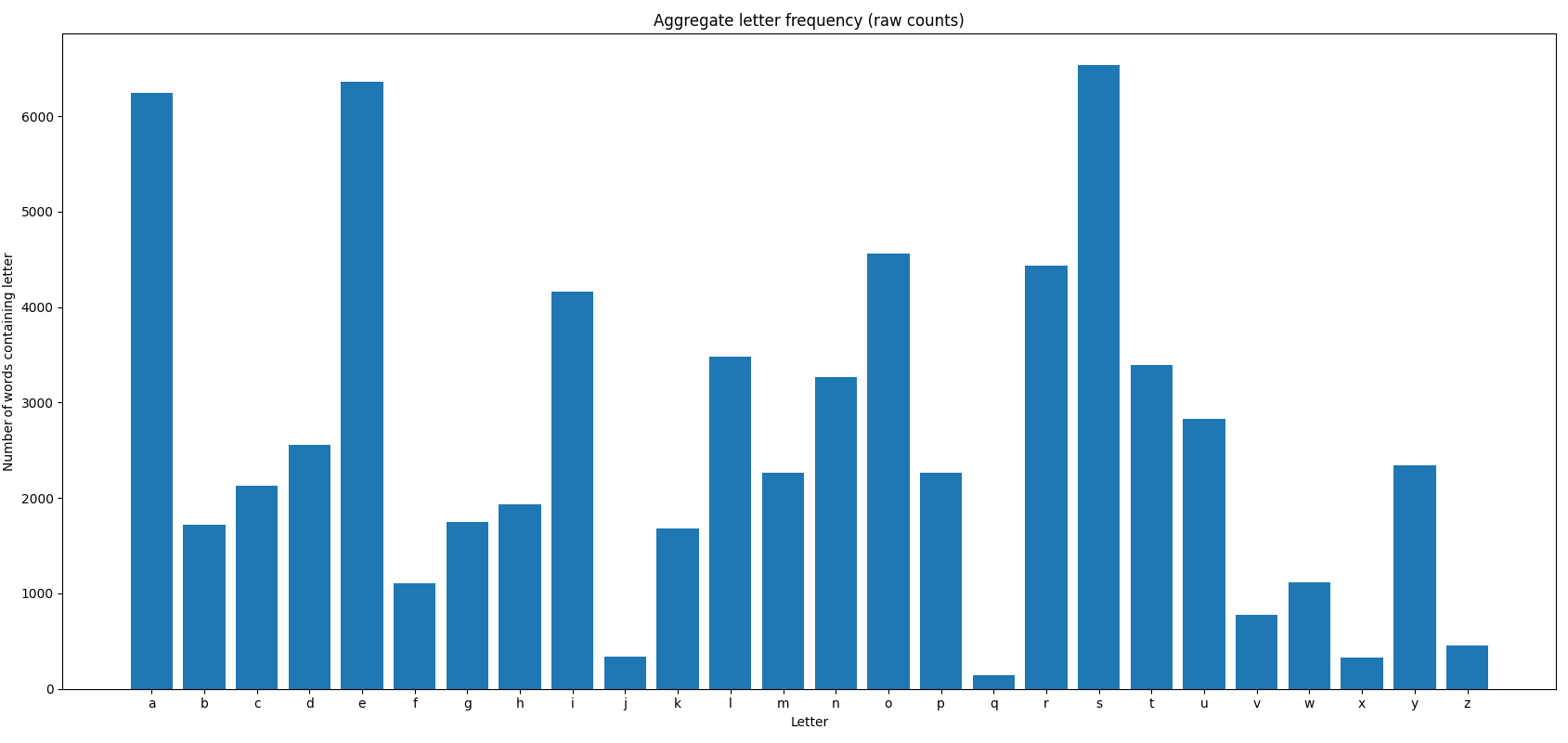
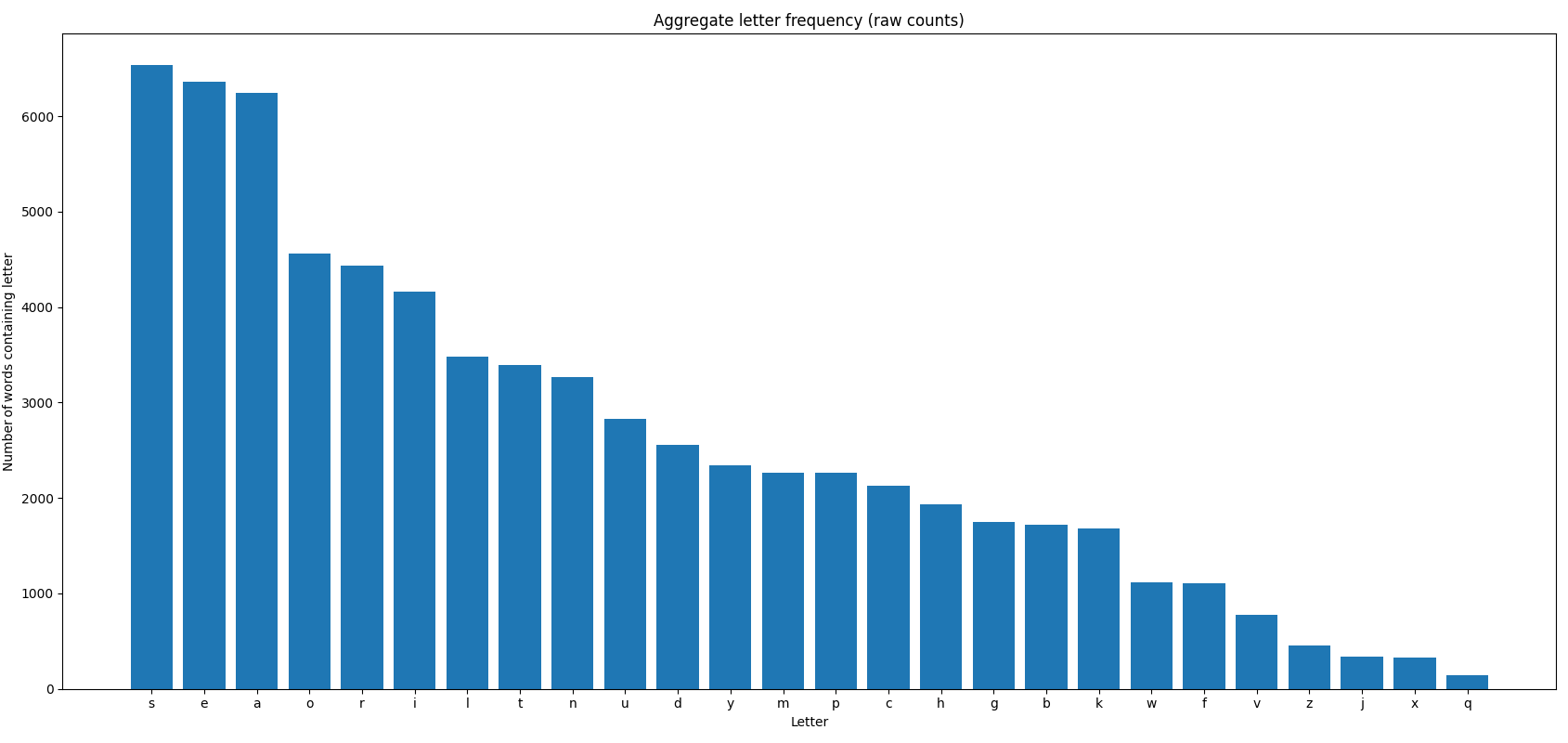
Quickly, some letters emerged as particularly common:
- Most frequent:
S,E,A - Moderately frequent:
O,R,I
Interestingly, four of these letters are vowels: E, A, O, I.
Positional frequency matters too—letters are scored higher if they're common in specific positions within words.
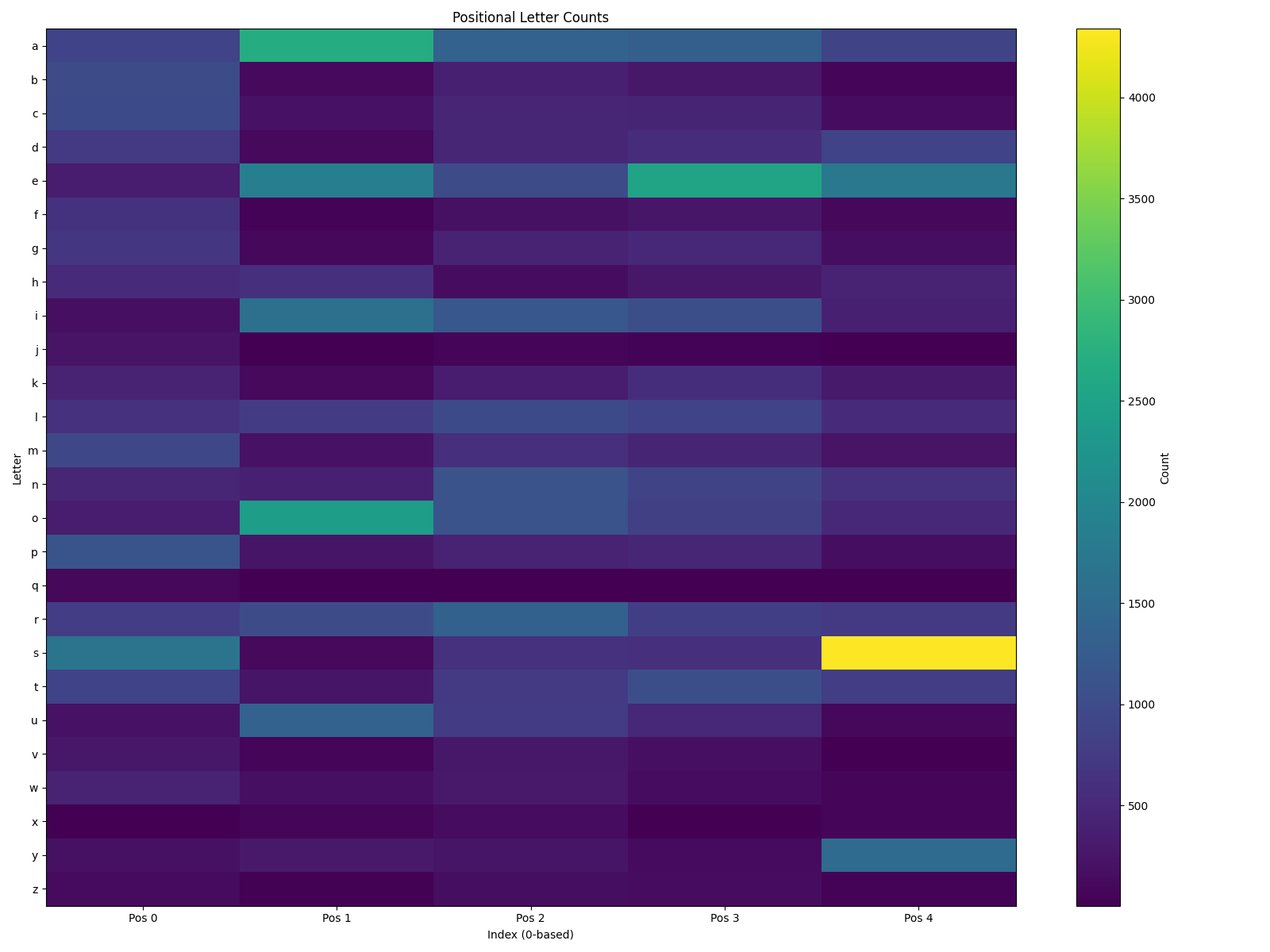
Notably:
- The
{S, 4}combination (a trailing "S") dominates, suggesting many plurals.{S, 4}: ____S
- Other frequent positional letters:
{A, 1}: _A___{E, 1}: _E___{E, 3}: ___E_{I, 1}: _I___{O, 1}: _O___{S, 0}: S____{T, 0}: T____{U, 1}: _U___{Y, 4}: ____Y
Finally, by combining aggregate letter frequency and positional data, a hybrid scoring system emerged. This method offers a more balanced and nuanced approach, producing unique top words: AEROS, SOARE, REAIS, AROSE, and RAISE.
S O A R E
R E A I S
A R O S E
R A I S E
Even when you feed my script the same 2,309‑word official Wordle answer list that WordleBot uses, our rankings still diverge because of how we each value information: my hybrid metric simply adds up how frequently each letter—and, to a lesser degree (10 % blend), each letter‑in‑position—appears across all answers, then zeroes out any word with duplicate letters on turn one, so high‑coverage vowel‑heavy options like AEROS and SOARE dominate; WordleBot, by contrast, runs a full entropy simulation for every guess and keeps duplicate letters if they shrink the remaining solution space, which is why consonant‑balanced staples like CRANE and SLATE top its chart. In short, we share the same dictionary; the gulf comes from aggregate‑frequency math versus entropy‑driven feedback simulation, plus my harsh repeat‑letter penalty and modest positional weight.
Parting Thoughts
Choosing the ideal Wordle starter is about balancing letter frequency and positional insights. Popular starters like CRANE and SLATE remain consistently strong choices due to their strategic letter placement and high-frequency letters. Meanwhile, hybrid scoring systems, which blend multiple metrics, offer compelling alternatives like SOARE and AEROS, maximizing initial guess effectiveness.
Whether sticking with tried-and-true favorites or exploring data-driven options, the real fun of Wordle lies in its daily puzzle-solving and the friends and family your spend doing it with.
My Words
The words generated by my program rank first by a hybrid metric (10% blend), then positional, then aggregate letter frequencies. The metrics are calculated by a sum of the letter’s value, with the value equaling the number of letter occurrences / total words. Positional does the same over the individual positions.
| Word | Hybrid # | Hybrid | Position # | Position | Aggregate # | Aggregate |
|---|---|---|---|---|---|---|
| AEROS | 1 | 0.98841 | 1 | 1.89498 | ||
| SOARE | 2 | 0.98324 | 3 | 1.89498 | ||
| REAIS | 3 | 0.97544 | 7 | 1.86772 | ||
| AROSE | 4 | 0.97213 | 2 | 1.89498 | ||
| RAISE | 5 | 0.96532 | 6 | 1.86772 | ||
| SERIA | 6 | 0.96462 | 9 | 1.86772 | ||
| SERAI | 7 | 0.96366 | 8 | 1.86772 | ||
| LARES | 8 | 0.96129 | 19 | 0.77624 | 17 | 1.82195 |
| RALES | 9 | 0.96041 | 20 | 1.82195 | ||
| TARES | 10 | 0.95962 | 6 | 0.79354 | ||
| ARISE | 11 | 0.95871 | 5 | 1.86772 | ||
| ALOES | 12 | 0.95772 | 10 | 1.83063 | ||
| AESIR | 13 | 0.95761 | 4 | 1.86772 | ||
| RATES | 14 | 0.95669 | ||||
| TOEAS | 15 | 0.95635 | 13 | 1.82518 | ||
| ARLES | 16 | 0.95380 | 14 | 1.82195 | ||
| RANES | 17 | 0.95379 | 23 | 0.77186 | 41 | 1.80754 |
| NARES | 18 | 0.95341 | 29 | 0.76567 | 40 | 1.80754 |
| EARLS | 19 | 0.95316 | 15 | 1.82195 | ||
| LAERS | 20 | 0.95265 | 16 | 1.82195 | ||
| REALS | 21 | 0.95174 | 21 | 1.82195 | ||
| TERAS | 22 | 0.95116 | 37 | 1.81649 | ||
| LEARS | 23 | 0.95079 | 19 | 1.82195 | ||
| TEARS | 24 | 0.94912 | 35 | 1.81649 | ||
| AEONS | 25 | 0.94816 | ||||
| PARES | 1 | 0.81023 | ||||
| BARES | 2 | 0.80168 | ||||
| CARES | 3 | 0.79946 | ||||
| MARES | 4 | 0.79818 | 90 | 1.74042 | ||
| PANES | 5 | 0.79441 | ||||
| PORES | 7 | 0.79219 | ||||
| BANES | 8 | 0.78586 | ||||
| PALES | 9 | 0.78458 | ||||
| BORES | 10 | 0.78364 | ||||
| CANES | 11 | 0.78364 | ||||
| DARES | 12 | 0.78364 | 60 | 1.75988 | ||
| MANES | 13 | 0.78236 | ||||
| CORES | 14 | 0.78142 | ||||
| GARES | 15 | 0.78028 | ||||
| MORES | 16 | 0.78014 | ||||
| FARES | 17 | 0.77765 | ||||
| PONES | 18 | 0.77637 | ||||
| BALES | 20 | 0.77604 | ||||
| TORES | 21 | 0.77550 | ||||
| MALES | 22 | 0.77253 | ||||
| HARES | 24 | 0.76998 | ||||
| PATES | 25 | 0.76856 | ||||
| ALOSE | 11 | 1.83063 | ||||
| STOAE | 12 | 1.82518 | ||||
| LASER | 18 | 1.82195 | ||||
| SERAL | 22 | 1.82195 | ||||
| ARETS | 23 | 1.81649 | ||||
| ASTER | 24 | 1.81649 | ||||
| EARST | 25 | 1.81649 |
Top Words
Top recommended words based on expert analysis. Check mark ✓ applies to words that have been Wordle words before.
| # | Word | Why it ranks |
|---|---|---|
| Tier A | ||
| 1 | CRANE (✓) | Highest WordleBot skill 99/99 |
| 2 | SLATE (✓) | ditto 99/99 – classic S‑start, E‑end |
| 3 | TRACE (✓) | 99 — covers C/R/T trio |
| 4 | CRATE (✓) | anagram of TRACE |
| 5 | CARET | 99, never an answer yet |
| 6 | CARTE | same 99 rating |
| 7 | SLANT | WordleBot 99, "hard‑mode friendly" |
| 8 | PLATE (✓) | newest 98/99 pick after CRANE |
| 9 | STARE (✓) | long‑time player favorite, 97 |
| 10 | SAINT (✓) | 97, nice S‑start / NT ending |
| 11 | LEAST | WordleBot 97, duplicate‑safe |
| 12 | STALE (✓) | 97, frequent solution ending |
| 13 | TASER | 97, yet unused answer |
| 14 | PARSE | 97, R/S/E trio |
| 15 | SNARE (✓) | 96, hits S/A/R/E combo |
| 16 | TRADE (✓) | 96, D tests mid‑freq cons |
| 17 | PLANE | 96, vowel‑balanced |
| 18 | SANER | 96, "anser" pattern |
| 19 | PLACE (✓) | 96, common C/E ending |
| 20 | SLICE (✓) | 96, tests C/I vowel |
| Tier B | ||
| 21 | TRICE (✓) | 98 WordleBot |
| 22 | DEALT | top hard‑mode 99 |
| 23 | LANCE | 98 alt to SLANT |
| 24 | TRIPE | 95 (hard‑mode) |
| 25 | SHALT | 94 skill; avoids ‑S plural issue |
| 26 | TAILS | 94; S‑ending test |
| 27 | PETAL | 93; alternate to PLATE |
| 28 | ROAST | high 97 in WordsRated pair study |
| 29 | RAISE | Tyler Glaiel's top "answer‑valid" pick |
| 30 | SAUCY | Hi‑score 'future‑answer' word, Feb 2024 |
| 31 | SAUCE | runner‑up to SAUCY |
| 32 | SOAPY | high vowel‑con repeat test |
| 33 | SEIZE | Z‑check without Q/J |
| 34 | CEASE | double‑E confirmation |
| 35 | BRINY | tests Y‑ending |
| 36 | CRIER | common bigram ‑ER |
| 37 | SALLY | WordleBot 92 but strong Y test |
| 38 | SADLY | similar Y test, avoids E |
| 39 | SOOTY | vowel+Y, covers double‑O |
| 40 | BRINE | #4 on WordsRated score list |
| Tier C | ||
| 41 | SALET | MIT "optimal" (avg 3.42 guesses) |
| 42 | SOARE | Glaiel/Fan #1 eliminator |
| 43 | SAINE | Hackernoon highest exact‑green probability |
| 44 | SLANE | MIT list #6 |
| 45 | SAREE | Bertrand Fan entropy #2 |
| 46 | SEARE | entropy #3 |
| 47 | SAICE | WordPlay top‑10 |
| 48 | REAST | MIT #2 overall |
| 49 | TRAPE | MIT #5 |
| 50 | PRATE | MIT #7 |
| 51 | TEALS | MIT tied #9 |
| 52 | TRAIN | MIT tied #9 – introduces N |
| 53 | RANCE | 3Blue1Brown "max‑4‑guess coverage" |
| 54 | RATED | same study – strong D check |
| 55 | RANTS | alt w/ S‑end |
| 56 | RONTE | high entropy variant |
| 57 | RAILE | WordPlay top‑10 (rare but allowed) |
| 58 | TRICE (✓) | already in Tier A — demonstrates overlap |
| 59 | LATER | Top TikTok/Reddit frequency‑ranked list pick |
| 60 | AROSE | Excel/YouTube statistical pick |
| Tier D | ||
| 61 | IRATE | linguist‑approved vowel+RT |
| 62 | ALTER | common ALT‑ pattern |
| 63 | ADIEU | 4‑vowel classic |
| 64 | AUDIO | 4‑vowel alt, tests U |
| 65 | ARISE | vowel/R/S spread |
| 66 | ROATE | best pure eliminator, not an answer |
| 67 | SAUTE | five high‑freq letters+U |
| 68 | POISE | balances mid vowels/cons |
| 69 | TEASE | vowel‑dense w/ common T/S/E |
| 70 | CAUSE | WordRated score #7 |
| 71 | SHINE | fills H/N combo hole |
| 72 | NOTES | Wired letter‑freq starter |
| 73 | RESIN | ≈ NOTES but R swap |
| 74 | TARES | Wired / Real‑Stats top 5 |
| 75 | SENOR | same Wired set |
| 76 | ROAST | already Tier B — popular SmartLocal |
| 77 | TALES | Prof. Smyth simulator #1 |
| 78 | CONES | simulator #2 |
| 79 | HATES | 97 % success in 3‑word strat |
| 80 | POUTY | vowel‑light follow‑up favorite |
| Tier E | ||
| 81 | CLINT | best second word for SOARE combo |
| 82 | ROUND | part of 3‑word meta |
| 83 | CLIMB | third word in same set |
| 84 | SALLY | WordRated list (tests double L/Y) |
| 85 | SADLY | Y‑ending + D check |
| 86 | SOOTY | digs into double‑O / Y |
| 87 | BRINY | rare B/Y test |
| 88 | SEIZE | Z‑probe after vowels |
| 89 | DEALT | already Tier B — hard‑mode default |
| 90 | LANCE | already Tier B |
| 91 | OUIJA | meme‑ish 4‑vowel+J probe |
| 92 | ABOUT | vowel‑heavy common pick |
| 93 | CANOE | community vowel test |
| 94 | STORE | SmartLocal "other good word" |
| 95 | COALS | best two‑word pair (COALS+NITER) |
| 96 | NITER | complement to COALS |
| 97 | SUITE | Tom's Guide demo of today's solve |
| 98 | PIQUE | tests rare Q/I pair |
| 99 | TARSE | Reddit pick beats SALET in 2024 tweaks |
| 100 | TILER | frequency‑based R‑ending probe (Real‑Stats) |
Source Code
Want the source code? Find it here.
 IllyaStarikov

I avoid the Mac App Store as much as possible. It's buggy. It's slow. Apps are getting pulled from it left and right. But I couldn't avoid it permanently because of software updates. As macOS Sierra 10.12 rolled out, I clicked on the App Store, followed by updates, and...
I couldn't get the updates page to open. Killed App Store. Restarted computer. Everything.
After doing some research, I discovered there's a way to update software from the terminal: softwareupdate. So, after running one command (sudo softwareupdate -iv), I'm writing this from the latest version of macOS Sierra.
Apps of 2014
My favorites from a landmark year.
As this is my first year of writing about apps, I wanted to do something this Christmas: thank the apps and writers that made this year such a special year. I have broken down my favorite iOS and OS X apps and articles.
As there are many great apps this year, it is impossible to catalog them all. So I have decided to break it down to my personal favorite, runner-up, and a selected few honorable mentions.
Congratulations to everyone who made the list, and I hope to see you all next year with the wonderful things you create in the coming year.
iOS
This was the second biggest year for iOS developers, runner-up to the introduction of the App Store. iOS 8 expanded the capabilities of what the iPhone and iPad could do. Thanks to extensions and continuity, iOS has never been more powerful. A more powerful iOS means more powerful apps.
With so many apps, there are equally so many opportunities. Applications that were never possible before are now on the App Store—not to mention the Today View widgets, keyboards, extensions, and so much more.
This is why the runner-up Workflow is such an intriguing, new app; it builds on the power and functionality of iOS. However, the winner this year is Overcast.
Winner: Overcast
Among the podcast renaissance, Overcast shines as the most notable choice for iOS enthusiasts. There are many features that make Overcast shine, apart from the developer and Accidental Tech Podcast host Marco Arment. The favorite features: Smart Speed and Voice Boost.
Smart Speed is without a doubt my favorite feature in any podcasting app. It builds upon the current speed setting, and skips pauses and gaps in audio to save minutes or hours a week. The best part of it all? The fact that I never notice the boost in speed. Sometimes I don't believe that Smart Speed is on, only to check and realize it's on 1.2x or even 1.3x speed. Furthermore, the Voice Boost works just as the name suggests, boosting the voice and nothing more. With the suppressed iPhone speaker, sometimes it is impossible to hear podcasts through the background noise when I'm doing dishes, laundry, or just dealing with outside noise. The accuracy of Smart Speed and Voice Boost is unmatched, and quite frankly I don't think there is any podcast app that is comparable to it.
In addition to Smart Speed and Voice Boost, Overcast also features intuitive playlists, a customary and elegant iOS 8 appeal, a huge directory of podcasts, Twitter recommendations, and curated playlists. There are other things that Overcast doesn't do that simply delight me: it never pesters you to buy the in-app purchase if you haven't purchased it, never nags for a review, and the decision to not incorporate top lists. Plainly, everything about Overcast delights me.
Overcast is free on the App Store, with a $4.99 in-app purchase to "unlock everything"—Smart Speed, Voice Boost, unlimited playlists, and more.
Runner-Up: Workflow
The newly-released app by the team at DeskConnect is an exceptional example of iOS automation. With many powerful actions, variables, and automation tools, Workflow is amongst the most powerful apps within the App Store. The possibilities are almost endless.
Of the many things possible via Workflow, some of the workflows I have forked and created from the internet can do things never before possible on iOS, such as:
- Markdownifying webpages
- Cross-posting images to Facebook, Twitter, and Instagram
- Annotating and deleting screenshots
- Getting all my calendar events and sharing availability
- Getting a random dining option
Though it is most certainly a power-user app, the interface is simplistic enough that just about any user can unlock its full capacity.
Workflow is $2.99 on the App Store.
Honorable Mentions
- 1Password: my go-to password manager, an app that I use religiously. With an encrypted vault, powerful password generator, and Launch Center Pro capability, I could not think of an app that deserves a more honorable mention.
- Launch Center Pro: an application that takes advantage of iOS's URL schemes, adding the potential to create powerful shortcuts and workflows.
- Editorial: the most powerful text editor on iOS. Editorial supports Markdown, plain text, TextExpander, custom workflows, and so much more.
- Evernote: my central note-taking app. On iOS, I use the Evernote share sheet more than any other, simply because it's so simple yet powerful.
- Tweetbot: my Twitter experience. I use Tweetbot over Twitter simply because of the iCloud syncing, no advertisements, more powerful mute filters, better font options, and better appeal.
OS X
I took a different approach than what most people are doing—instead of showcasing apps that took full advantage of Yosemite, I wanted to show off the most-used applications on my Mac.
Granted, Yosemite did bring a visual redesign that brought a downright beautiful experience to the Mac; however, this was not the only change to the Mac. Continuity brought about a more seamless Mac experience, making things like Handoff and Text Message Forwarding possible. Many other little things got an upgrade, like Mail, Notification Center, and Spotlight.
Ironically, even though Spotlight got a major improvement, this year's winner is Alfred 2, with runner-up being 1Password.
Winner: Alfred 2
As this is my first year doing favorite apps, what better app to introduce than one I use most: Alfred. Alfred was amongst the first set of apps I downloaded on my first MacBook—it was the best decision I have ever made. Since January 27, 2014, I have used Alfred 15,867 times, averaging 49.0 times per day. There is no app that comes to mind that I have used nearly as much.
After the Yosemite reveal, Spotlight was revamped to have more of an Alfred appeal; however, Spotlight cannot replace Alfred (and will unlikely ever replace Alfred). Granted, Spotlight and Alfred do similar things: they launch files, can give directions and addresses, provide contact information, and offer many shortcuts that save me hours a week.
So why is Alfred so important to me? Simple: workflows and expanded functionality. I am not confined to the default features of Spotlight—I can make or fork workflows. Instead of just launching apps, I can also kill and quit apps. If I have an app to look up, I don't have to search via the Mac App Store. That would be tiring. Instead, I search via Alfred. Find Evernote notes? There's a workflow for that. Netflix search? Workflow for that. The possibilities are only constricted by my imagination.
Alfred 2 is free via their website, and the Powerpack price varies.
Runner-Up: 1Password
1Password is an application that I use religiously—on iOS and OS X both. With a visual overhaul to match Yosemite's flatter and translucent design, 1Password makes password management actually enjoyable.
1Password brings 21st-century peace of mind in an internet filled with malicious intentions. Being the powerhouse of security, password storage, and password management that 1Password is, you can sleep safe and sound knowing your passwords won't be compromised.
1Password is $34.99 on the Mac App Store or the AgileBits website.
Honorable Mentions
- TextExpander: saves time by expanding short abbreviations into frequently-used text.
- OmniFocus: my choice for task management. OmniFocus is an unparalleled task manager that is simply unmatched by any other application on OS X.
- iStat Menus: a utility that quickly displays the statistics of my MacBook. Currently, I have many items enabled: CPU history and CPU cores, memory used/free, disk activity, bandwidth and bandwidth history, sensors, and time. Everything I need quick access to is a glance away, and more in-depth statistics are a click away.
- Bartender: with so many iStat Menus enabled, there is no space for menu items—my solution is Bartender. Bartender has all of my menu items outside of iStat Menus, including Backblaze, Dropbox, TextExpander, and 1Password.
- Yoink: after dragging and dropping time and time again, you might realize how frustrating it can be sometimes; Yoink brings a solution. Every time you drag something, Yoink slides a little window to store that file in—and keeps it there until you're ready to drop it somewhere. Simple yet so powerful.
Merry Christmas!