Software Engineering
Building software is the easy part. Building it with other people is the job. Notes from the trade.
Begin a Brag Doc
Document the narrative before someone else drafts it.
📄 Brag Doc Template The structure below, as copy-paste-ready markdown.
📋 My Brag Doc The personal version: NBA arenas, gym PRs, concerts.
When I entered tech, I assumed my manager knew everything I was working on. I gave status at weekly standups. We went deep in our one-on-ones. I figured he was keeping track.
He was, but humans don't work that way. A manager runs a 6-12 person team. They hold the big picture: the major milestones, the big PRs, the design docs that landed. The rest fades fast, and compacts with every new cycle.
This is why you should keep a brag doc. A brag doc is a running log of your impact: wins, artifacts, metrics, growth. You own it. You maintain it. It's ready when you need it.
There are plenty of other reasons have one:
- Memory is unreliable. Both yours and your manager's. By the time calibration happens, Q1 work has been buried under three quarters of newer fires.
- Promotion packets need scaffolding. You can't synthesize 12 months of work into a 500-word write-up the night before. You need raw material.
- Calibration is comparative. Your skip-level is in a room comparing you against four other engineers. Specificity wins.
- Job changes happen. The doc you keep for promotion is the same doc you grab when a recruiter pings you about a senior role.
- Leadership rotation. Your manager rotates. So does your skip, your director, your VP. Each new chain inherits a thin model of your work, and only you can fill it in.
Brag Evolution
Initially, I communicated my achievements once a performance cycle: through the write-up. You know the one. List five achievements from the last 12 months. Or list the projects you worked on and explain their outcomes. My manager would read it and form a judgement. This was fine, for a while.
It's hard to craft a narrative in the format of the performance review. You have to explain the high level and go into gritty details, all inside a word limit. By the time you've explained the project, you have 100 words left for the impact. By the time you've made the impact case, the section is over. You cherry-pick the wins you can summarize in two sentences, not the wins that mattered most.
Around every performance review, my manager was surprised by all I had accomplished. This is actually not a good sign. It meant my manager had a thin view of what I was doing for most of the year. I needed to change that.
Then came time for my first promotion. I had to shape two years of work into a coherent case. I pored over old performance reviews, gathered everything into one doc, and updated it for the newest wins. It was a lot of work. Hence this meme:

The system was unsustainable.
Then came the brag doc. Thirty minutes the last Friday of each month. A few bullets, minimum. When the next perf review came around, I copied the relevant rows into the form. When the next promotion came around, the doc was already most of the packet. The mad scramble never came back.
Philosophy
Over the years of maintaining a brag doc, I have gotten quite opinionated on them. I thought they should:
Know your audience. This document isn't for you, it's for your management chain. Imagine your manager in a review session and they need to quickly justify your contributions: you need structure and hierarchy. Or you're a senior leader reviewing this document to determine promotion: you need a story and a vision. Write your document for them, not you.
Focus on impact, not contributions. I've tried a lot this cycle, some things landed resoundingly, some things landed poorly. You don't need to omit your missteps, because this proves your work was challenging. Instead, you need to focus on your most impactful work and how you got there.
Write as you go. A doc you compile two weeks before review is fragmentary at best. The doc you maintain weekly stays grounded in real artifacts: PRs you actually shipped, meetings you actually ran, bugs you actually closed.
Quantify ruthlessly. "Improved performance" is forgettable. "Cut p99 latency from 280ms to 95ms across a rollout to 1M users" is not.
Tie work to scope. Every entry should answer: what changed, who benefited, and at what scope. Without scope, "fixed a bug" reads identical to "led a multi-team migration."
And, because we live in the AI era, one last principle:
Make it AI friendly. Maintaining the doc is grunt work. Point an AI at your raw materials and it writes most of this for you. You handle the craft, curation, and story. The AI handles the toil.
Doc Template
Owning the doc lets you control the narrative: what gets surfaced, how, and to whom. The alternative is leaving it to memory.
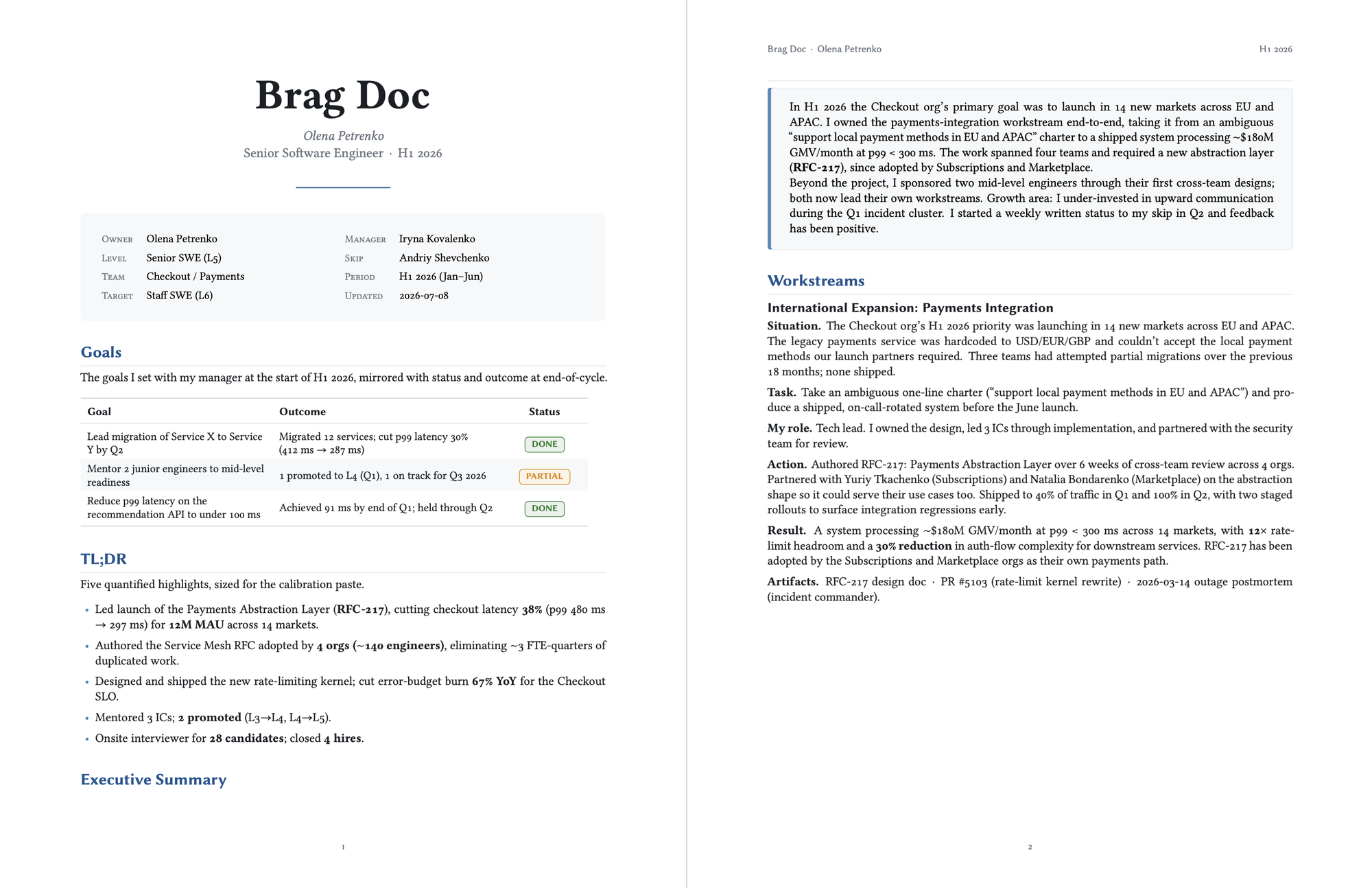
Goals
You've probably already set these with your manager. If you're already tracking goals elsewhere, paste them in verbatim. If not, write down what you and your manager agreed to in your last planning conversation.
Examples:
- Lead the migration of the user-auth subsystem from Service A to Service B by Q3.
- Onboard and ramp two new mid-level engineers to independent contribution.
- Reduce p99 latency on the recommendation API to under 100ms.
TL;DR
Bullet points of the big landings throughout the year. Punchy, data-driven, memorable. Reads like a cross between a stats sheet and a press kit.
What metrics back up your goals? Did you conduct interviews? Host an intern? Cover a broad set of data points and go deep on a few.
Examples:
- Shipped the auth migration on the Q3 date, zero customer-facing regressions.
- Cut p99 from 280ms to 91ms; backed by load-test results and a week of post-rollout monitoring.
- Authored 4 design docs, reviewed 31, mentored 2 new engineers to independent contribution.
- Closed 47 bugs, including 3 sev-2 production incidents.
Executive Summary
The overview of your cycle, written for skim-readers. Picture an outsider or a senior leader with a few paragraphs of attention: what do they need to know?
Example:
This year I focused on three workstreams: the auth migration, latency reduction, and team growth. The auth migration shipped on time and unblocked the broader platform refactor. Latency work brought us within SLO for the first time in 18 months. I also onboarded two new engineers, and now formally mentor one of them.
Workstreams
This is the meat. For each major workstream you contributed to, write 2-4 paragraphs covering: the problem, the approach you took, the outcome, and your specific contribution. Be honest about scope. If you were one of five engineers, say so. If you led the design and three others implemented, say that.
I usually have 3-5 core workstreams per cycle. Anything fewer reads as low impact. Anything more reads as scattered.
Example:
Auth Migration. Service A had been our auth provider since 2019, but its rate-limiting story didn't scale to our new mobile clients. I led the design, partnered with the security team for review, and shipped the migration to 40% of traffic in Q2 and 100% in Q3. Net result: 12x rate-limit headroom and a 30% reduction in auth-flow complexity for downstream services.
Artifacts
Now that you laid out your case, you need data to support it. You proved the quality of your work; now it's time to prove the quantity.
Here, I post everything:
- Documents especially design docs
- Pull Requests not just core work, but rollbacks, bug fixes (even if the bug is in your code), any sort of code contributions
- Tickets you've closed with highly-visible ones (i.e., high number of comments) at the top
- Meetings such as alignment sessions, peer programming, or presentations you've done
- Awards from your peers or your management chain
The point isn't to pad the section. Calibration discussions often pivot on a specific artifact you forgot to mention. Better to have it listed and unused than missing and decisive.
Peer Reviewers
Who did you work with? In what domains? What were their contributions? Your manager will ask all three when reading your writeup. The list isn't only so they can ask others about your work; it also helps level you. If you're level N working with N+1 and N+2 reviewers who vouch for you, that's a strong promotion signal.
This list, along with your brag doc, is one of the few levers you have during this process. So make it solid. Talk with your reviewers before the cycle; ask if they have feedback for you.
Growth
The section reviewers trust most. A self-aware gap analysis signals seniority better than any single win. Name real things; vague "I should communicate more" reads as filler.
Three sub-sections cover it:
- What you got better at. Specific skills, with evidence.
- What you missed or got wrong. Concrete misses, with what you'd do differently.
- Where you want feedback. Direct questions your reviewers can answer.
Example:
What I missed. Q3 incident cluster: I under-communicated to skip-level for ~2 weeks. Course-corrected with a weekly written status; feedback positive in Q4.
Quarterly Log
The raw material that feeds everything above. One entry per quarter, accumulated monthly. Each entry is a structured set of bullets: shipped, designed, helped, incidents, decisions, quotes, lessons, metrics.
This section is the most important and the most unglamorous. The Workstreams, TL;DR, and Executive Summary all draw from it. If you maintain nothing else, maintain this. By the end of the year, you'll have a year of evidence ready to be cherry-picked.
Example slice from a Q4 entry:
- Shipped:   RFC-217 reached 100% rollout
- Decisions: Deferred Project Zeta to H1 (~6 eng-weeks)
- Metrics:   p99 checkout 312ms → 297ms (post-canary)
Your Own Brag Doc
This inspired me to publish my own brag doc, of sorts. I took the things I'd done outside of work: every NBA arena I've visited, every concert I attended, every gym PR. Same idea as the work brag doc, just for the parts of life that don't have a perf review.
You can read mine here.
Whichever version you keep, personal or work or both, start it today. Open a doc, paste in three things you did this week, and don't stop. The version you'll have in 6 months is the one you'll wish you had today. Write it once a month, cash it once a year.

Brag Doc Template
A simple template for tracking your engineering impact across a performance cycle.
Copy this file, fill in your own content. Update the Quarterly logs once a month. Promote items into the upper sections every 2-4 weeks. At review time, you trim and reorder. Don't write from scratch.
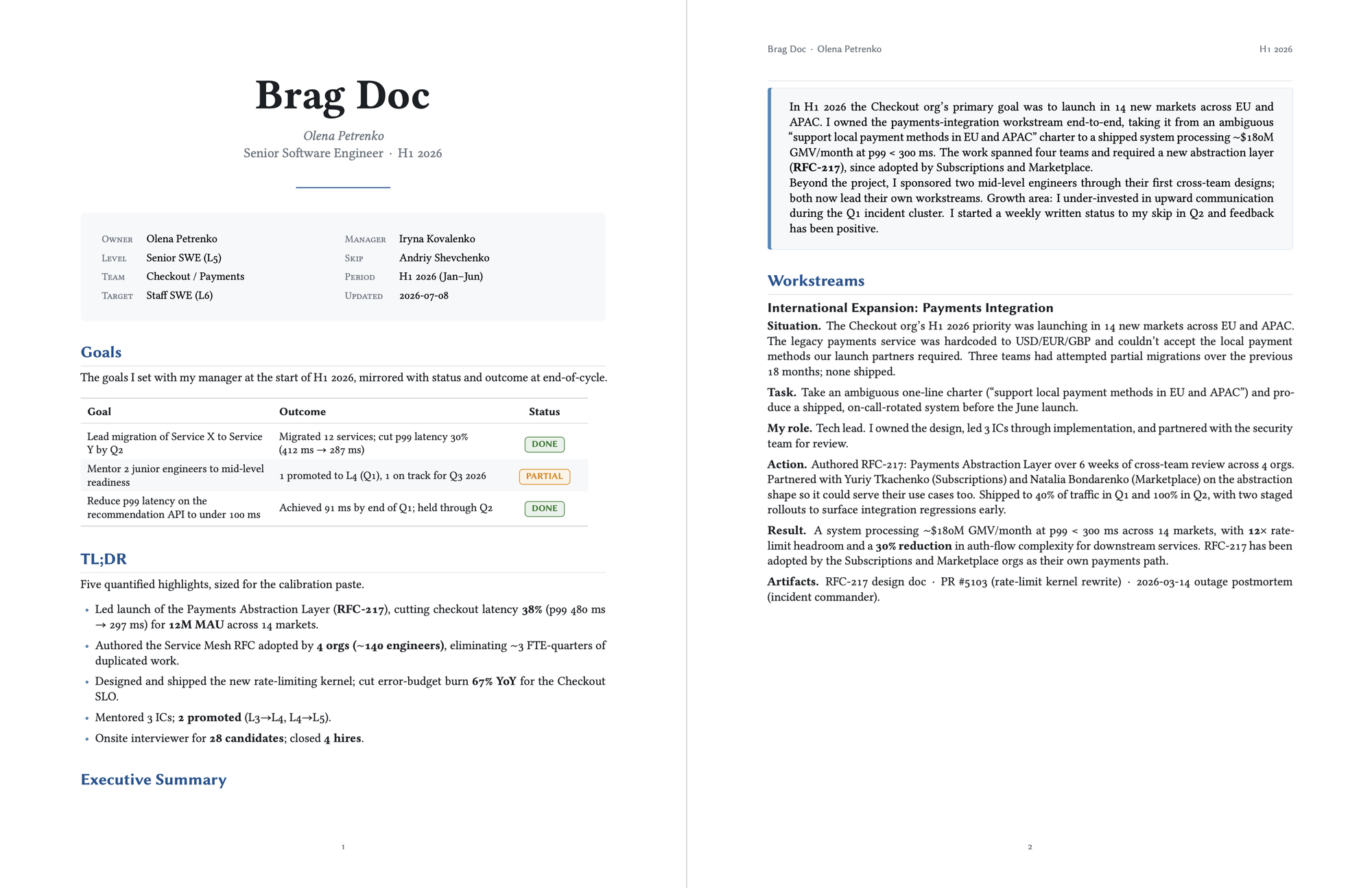
Metadata
| Field | Value |
|---|---|
| Owner | Your name |
| Level | e.g., Senior SWE (L5) |
| Period | e.g., H2 2025 |
| Manager | Name |
| Last updated | YYYY-MM-DD |
Goals
The 2-5 goals you set with your manager at the start of the cycle. Mirror them at the end with a status and one-line outcome.
| Goal | Status | Outcome |
|---|---|---|
| Lead the migration of Service X to Service Y by Q3 | 🟢 Done | Migrated 12 services; cut p99 latency 30% |
| Mentor 2 junior engineers to mid-level readiness | 🟡 Partial | 1 promoted, 1 in progress |
🟢 done · 🟡 partial · 🔴 missed · ⚪️ deprioritized
TL;DR
3-7 bullets, each one quantified. Lead with the biggest thing. This is what your manager pastes into calibration.
- Led launch of, cutting checkout latency 38% (p99 480ms → 297ms) for 12M MAU.
- Authored the Service Mesh RFC adopted by 4 orgs (~140 engineers), eliminating ~3 FTE-quarters of duplicated work.
- Designed and shipped the new rate-limiting kernel; cut error budget burn 67% YoY.
- Mentored 3 ICs; 2 promoted (L3→L4, L4→L5).
- Onsite interviewer for 28 candidates; closed 4 hires.
Executive Summary
One to three short paragraphs. What was the team trying to do, what was your role in it, what's different because you were there.
In H2 2025 the Checkout org's primary goal was to launch in 14 new markets. I owned the payments-integration workstream end-to-end, taking it from an ambiguous "support local payment methods in EU and APAC" charter to a shipped system processing ~$180M GMV/month at p99 < 300ms. The work spanned four teams and required a new abstraction layer (RFC-217), since adopted by Subscriptions and Marketplace.
Beyond the project, I sponsored two mid-level engineers through their first cross-team designs; both now lead their own workstreams. Growth area: I under-invested in upward communication during the Q3 incident cluster. I've started a weekly written status to my skip in Q4 and feedback has been positive.
Workstreams
One subsection per major project. Use STAR: Situation, Task, Action, Result. 3-5 per cycle is typical. Fewer reads as low impact. More reads as scattered.
[Outcome-shaped title, e.g., "Made international expansion possible"]
- Situation. What problem existed before you started? Quantify the pain.
- Task. What you were asked, or what you decided, to do.
- My role. Sole engineer / TL with 4 ICs / co-lead with @alice / reviewer & sponsor of @bob's work. Honest attribution makes your real contribution legible.
- Action. 3-6 things you did. Decisions you made and why. Trade-offs you owned. Partners (PM, design, data) you worked with.
- Result. Numbers. Adoption. Behavior change.
- Artifacts. Links to design docs, PRs, launches, dashboards, postmortems.
Repeat the block above for each major workstream.
Artifacts
Direct links. Reviewers cross-reference these. Keep it skim-able.
- Design docs / RFCs. Title: one line on impact
- Significant PRs. Title: one line on impact
- Talks / posts. Title: venue, audience size
- Incidents / on-call. e.g., IC for 3 sev-2s; 8 shifts; ~24 pages
- Hiring. Loops: 28 · Hires closed: 4 · Bar-raiser: 12
- Above and beyond. Open-source, internal community work, DEI, conference talks
Peer Reviewers
Who can speak to which work. Share this section with them so they know what to comment on.
| Reviewer | Relationship | What they can speak to |
|---|---|---|
| @alice | Cross-team peer | RFC-217 review, payments collab |
| @bob | Direct mentee | Mentorship effectiveness |
| @carol | Sister-team TL | Cross-team alignment, incident response |
Growth
The section reviewers trust most. Name real things. "I should communicate more" is not a growth area.
What I got better at. e.g., Writing strategy docs that get traction outside my org. 0 → 3 adopted RFCs.
What I missed or got wrong. e.g., Q3 incident cluster: I under-communicated to skip-level for ~2 weeks. Course-corrected with a weekly written status; feedback positive in Q4.
Where I want feedback. e.g., Am I operating at the L6 bar on technical scope? Where am I still acting like a Senior IC instead of a Staff IC?
Quarterly Log
The raw material. Update once a month; one entry per quarter. Promote items upward every 2-4 weeks.
Template entry
## YYYY Qn

- Shipped:   [Major PRs, launches, decisions this quarter]
- Designed:  [RFCs, docs, proposals]
- Helped:    [Mentees, unblocks, sponsored work]
- Incidents: [On-call shifts, sev levels, what I learned]
- Decisions: [Strategic decisions that landed]
- Quotes:    [Positive feedback received this quarter]
- Lessons:   [Honest notes; private to you]
- Metrics:   [Dashboard movement traceable to me]
Example entry
## 2025 Q4

- Shipped:   RFC-217 (payments abstraction) reached 100% rollout
             Rate-limit kernel to 100% (canary started Q3)
             Onboarded @marketplace onto the new auth flow
- Designed:  RFC-217 v3 published; reviews from 4 orgs
             RFC-218 (Service Mesh follow-on) draft circulated
- Helped:    Co-authored @alice's L3 → L4 promo packet
             Sponsored @bob's first cross-team design review
             Unblocked @marketplace on auth migration (3 × 40min)
- Incidents: IC for 2 sev-2s (Oct 14, Nov 2); 12 pages total
             Cut false-positive rate 60% via alert config
- Decisions: Deferred Project Zeta to H1 (~6 eng-weeks saved)
             Pushed back on premature dual-write; saved a quarter
- Quotes:    @director on RFC-217: "clearest doc this quarter"
             @skip on RFC-218: "exactly the right altitude"
- Lessons:   4-day meeting series that should've been a doc;
             next time, propose async first
- Metrics:   p99 checkout 312ms → 297ms (post-canary)
             Build time 41min → 17min (CI parallelization)
             Error budget burn 4.2× SLO → 1.4× SLO YoY

The Vanishing Keystrokes Bug
How a faceless background agent ate my typing, and the script that caught it.
A few days into an uptime, deep in something, my Mac would stop listening. Not a crash, not a freeze. The cursor still moved, windows still highlighted under it, I could click anything. But the keyboard went dead: I'd type a whole sentence into a window that looked focused and watch zero characters land. Clicking didn't help. Sometimes it cleared after a few seconds; sometimes I rebooted and bought another day or two of quiet.
A bug that only shows up after hours of uptime, never on a cold boot, and clears on reboot is the worst kind. You can't reproduce it on demand, so you can't poke at it. I finally cornered it, and the culprit wasn't what I assumed.
The Symptoms
If your Mac does this too, start here. The shape of the failure tells you where to look.
- The mouse works. The keyboard doesn't. Pointer moves, clicks land, but no window accepts text.
- It's system-wide, not one app. Every window is dead, whichever one you click into.
- It builds up over uptime. Fine on a fresh boot, more frequent the longer the machine stays awake.
- A reboot fixes it. Temporarily. It always comes back.
- The focused window looks slightly de-focused, title bar greyed out, as if nothing is frontmost.
That combination rules a lot out. It isn't a hardware keyboard fault: the mouse and keyboard share enough of the input stack that a real HID failure takes both. It isn't one misbehaving app. It points at the part of the OS that decides where keystrokes go, and at something that corrupts that decision the longer you stay logged in.
Two Kinds of "Front"
macOS tracks "in front" in two places that are supposed to agree.
- The active application (LaunchServices and
NSWorkspace). Apple definesfrontmostApplicationbluntly: the app that receives key events.lsappinforeports it. - The key window (WindowServer). Within the active app, keys flow to the key window, then to its first responder, the text field your cursor sits in. No window that can become key means no key window, and nowhere for text to land.
A third notion, Accessibility's AXFrontmost (what AppleScript's System Events reports), tracks the app whose UI is actually up front.
On a healthy Mac all three agree and you never think about it. The bug lives in the gap: if LaunchServices says one app is active while Accessibility says another, the OS routes your keystrokes to an app you aren't looking at. If that app has no window, they evaporate.
Bug Catcher
Check both notions from the terminal, especially while the bug is happening:
# LaunchServices: who owns key events?
lsappinfo info -only name "$(lsappinfo front)"

# Accessibility: who's actually up front?
osascript <<'EOF'
tell application "System Events"
  name of first application process whose frontmost is true
end tell
EOF
Healthy, these match. Mine didn't:
LaunchServices : "Logitech G HUB Agent"
Accessibility  : wezterm-gui
LaunchServices thought a faceless agent, the Logitech G HUB Agent, was the active app receiving key events, while the app I was clicking into was my terminal. My keystrokes were routing to an agent with no window.
Two commands catch it if your timing is lucky. The bug is intermittent, so I wrote a monitor that shouts the moment the two disagree.
focus-spy
It polls both notions once a second, logs every change, and flags MISMATCH when the PIDs differ. Drop it in your $PATH, chmod +x it, run it.
#!/usr/bin/env bash
# focus-spy - find out what's stealing keyboard focus on macOS.
#
# macOS tracks "the frontmost app" in two places that should agree:
#   * LaunchServices / NSWorkspace - the app that RECEIVES KEY EVENTS
#       (what `lsappinfo front` reports)
#   * Accessibility (AXFrontmost)  - the app whose UI is up front
#       (what System Events reports)
# When a background agent shoves itself into the first one without a
# real window, the two disagree, and your keystrokes fall in the gap.
# This logs both once a second and shouts when their PIDs differ.
#
# Usage:
#   focus-spy             # watch (Ctrl-C to stop)
#   focus-spy mark NOTE   # mark the instant typing dies
#   focus-spy report      # print the timeline, sorted

set -uo pipefail
LOG="${FOCUS_SPY_LOG:-$HOME/.local/state/focus-spy.log}"
mkdir -p "$(dirname "$LOG")"

ts() { date '+%Y-%m-%d %H:%M:%S'; }

# LaunchServices' frontmost (the key-event owner) as "name#pid".
# Compare by PID, not name: the two APIs spell the same app
# differently ("WezTerm" vs "wezterm-gui"); only the PID is identity.
ls_front() {
  local asn name pid
  asn="$(lsappinfo front 2>/dev/null)"
  name="$(lsappinfo info -only name "$asn" 2>/dev/null)"
  name="${name#*=}"; name="${name//\"/}"
  pid="$(lsappinfo info -only pid "$asn" 2>/dev/null)"
  pid="${pid##*=}"
  printf '%s\n' "${name:-?}#${pid:-?}"
}

# Accessibility's frontmost (the visible app) as "name#pid". First run
# may prompt your terminal for Automation access to System Events.
ax_front() {
  osascript 2>/dev/null <<'OSA'
tell application "System Events"
  set p to first application process whose frontmost is true
  return (name of p) & "#" & (unix id of p)
end tell
OSA
}

watch() {
  echo "focus-spy: watching (Ctrl-C to stop). Log: $LOG"
  local prev="" ls ax line tag
  while :; do
    ls="$(ls_front)"; ax="$(ax_front)"
    line="ls=[$ls]  ax=[$ax]"
    if [[ "$line" != "$prev" ]]; then
      [[ "${ls##*#}" == "${ax##*#}" ]] && tag="ok      " || tag="MISMATCH"
      printf '%s\n' "$(ts)  $tag  $line" | tee -a "$LOG"
      prev="$line"
    fi
    sleep 1
  done
}

case "${1:-watch}" in
  watch)  watch ;;
  mark)   shift
          printf '%s\n' "$(ts)  MARK      >>> ${*:-typing died} <<<" \
            | tee -a "$LOG" ;;
  report) sort "$LOG" 2>/dev/null || echo "no log yet" ;;
  *)      echo "usage: focus-spy [watch|mark NOTE|report]"; exit 1 ;;
esac
Leave focus-spy watch running in a spare terminal. The instant the keyboard dies, run focus-spy mark "typing died" in any shell, then focus-spy report. Look for a MISMATCH line: whatever sits on the ls= side is your thief. Every one of mine read ls=[Logitech G HUB Agent].
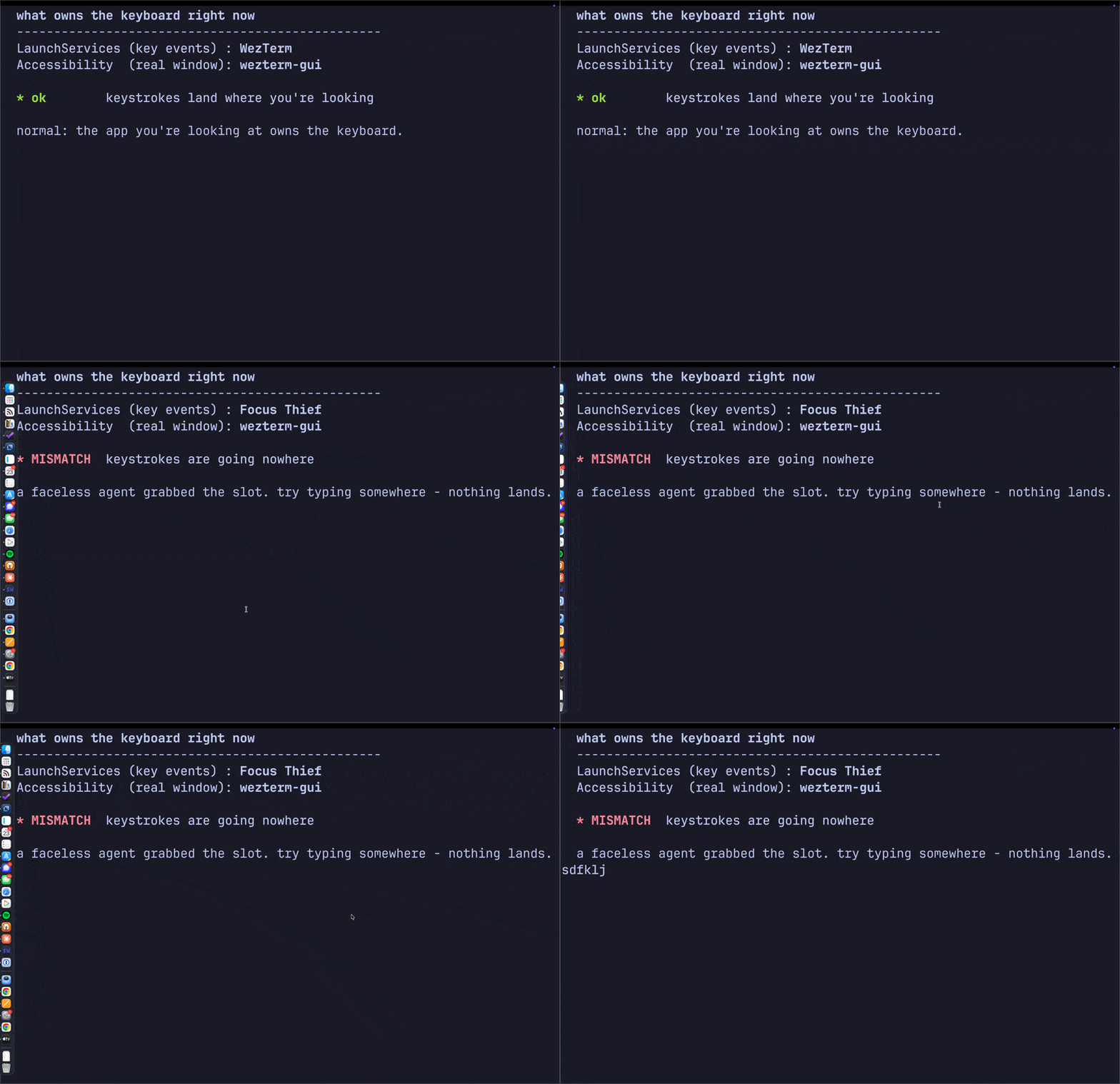
The two fronts diverging on demand. A faceless stand-in agent (built to reproduce the bug) seizes the LaunchServices slot while the terminal keeps Accessibility focus, so the status flips to MISMATCH, then back the instant it exits.
The Smoking Gun
A monitor tells you who; a kill test tells you whether you're right. The LaunchServices front process read Logitech G HUB Agent more than twenty samples in a row. So I killed the stack and watched it the instant it died:
killall lghub_agent lghub_system_tray lghub
lsappinfo info -only name "$(lsappinfo front)"
The active app snapped back to WezTerm and held. Both notions agreed. Typing was solid. G HUB's agent had been parking itself in the active-app slot and never letting go.
Why It Breaks
The active app receives key events, routed to its key window's first responder. An agent app (LSUIElement, no Dock icon) can still become the active app, and the old SetFrontProcess API was deprecated for NSRunningApplication.activate, which developers have long reported is easy to leave in an inconsistent state. G HUB falls into exactly that: it activates itself, probably an unbalanced activate on a device-poll loop, and becomes the active app without a window that can become key. The keyboard now points at a process with no first responder, so keystrokes are dropped, not stolen, just discarded, until you click into a real app. The mouse still works because mouse events are hit-tested by pointer location, not by which app is active. (Don't confuse it with Secure Input, where an app legitimately swallows every keystroke and forgets to stop; there both notions of "front" still agree. The mismatch is the tell.)
You're not imagining it, either. Another engineer built the same kind of monitor and clocked G Hub grabbing focus 47 times in four minutes. A MacRumors thread nails it: G Hub "keeps trying to get focus ... since it only runs in the background and has no window to receive the focus, the frontmost app of the system loses focus." Logi Options+ does the same. The trigger looks like wake and device re-enumeration, which fits why it snowballs over uptime and resets on reboot. The lesson: when you finally name a weird bug, search the name. You're rarely the first to hit a real defect.
The Fix
Right now, quit it:
killall lghub_agent lghub_system_tray lghub
Permanently: a launch agent restarts it at login (/Library/LaunchAgents/com.logi.ghub.plist, RunAtLoad). Move it aside, reversible:
sudo mv /Library/LaunchAgents/com.logi.ghub.plist \
  ~/Documents/backup/com.logi.ghub.plist
Then check System Settings, General, Login Items & Extensions for any Logitech entry. If you don't use Logitech G gaming gear, uninstall G HUB outright; Logi Options+ already covers a normal mouse.
My Mac types again. Now when focus feels off, I reach for focus-spy watch in a corner terminal, because the next thief trips the same wire.

AI Won't Replace Software Engineering (Yet)
But it will raise the bar.
I have a boring opinion: AI is a tool.
Like a text editor, a compiler, grep. And like every tool, it's clueless, easily nudged off track, and sometimes too eager to please. That's not a flaw of character. It's a stochastic model, not a person.
It is a groundbreaking tool. My third most-used after the text editor I'm typing this in and the shell running it. No tool has rooted itself this deep, this fast. Long-abandoned projects look polished. Ideas I shelved as too tedious are a prompt away. It's almost magic.
The numbers feel magic too:
- OpenAI processes ~6 billion API tokens per minute; the Library of Congress, every three seconds.
- Anthropic went from $87M to $30B in revenue in 27 months; a 345× run.
- NVIDIA hit $4T in July 2025 and $5T in October 2025; the first company at either line.
The headlines are magic too:
- Frontier models now score ~2× expert virologists on the Virology Capabilities Test; biology benchmark scores rose >4× from Nov 2022 to April 2025.
- Two of the four 2024 Nobel Prizes went to AI work; Hassabis and Jumper for AlphaFold, Hopfield and Hinton for neural networks. First Nobels for AI, ever. Two in one year.
- On 2-hour tasks, AI agents beat human experts 4×. On 32-hour tasks, humans win 2-to-1. There's a duration cliff in agentic work, and almost all real engineering lives on the wrong side of it.
Still, I'd taper expectations. The underlying tech is human language, not a model of the world. Language is a symptom of intelligence, not the cause. AI is still a tool.
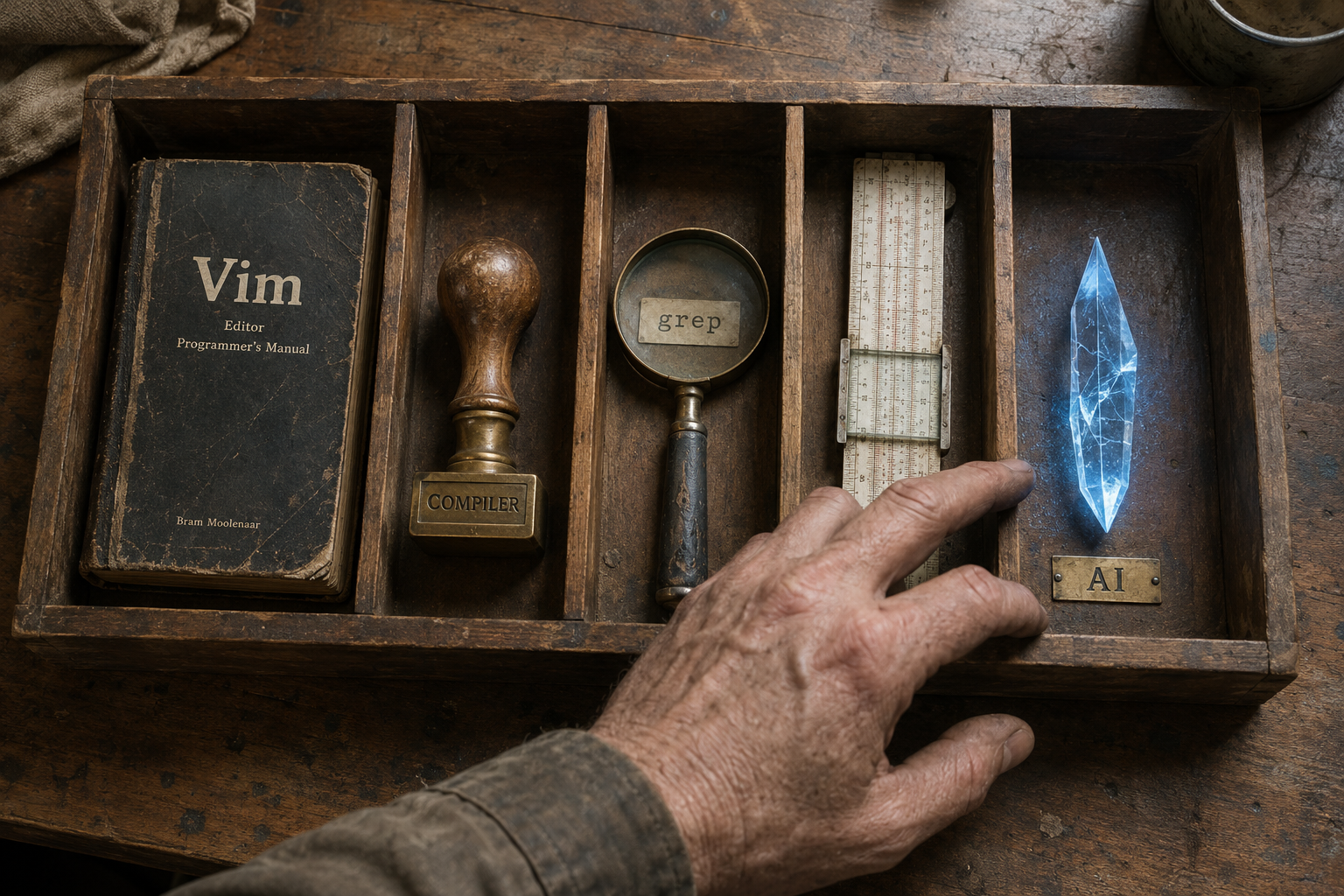
Replacing Software
I've been coding with AI assistants for over two years. The shortest summary I have:
The best intern I could ask for. It listens, chips away, makes some bad assumptions. On familiar ground, it shines. Off-trail, the output is off-trail too. With clear direction, it solves most of what a working engineer hits in a day.
I've watched it fall flat in narrow places (LaTeX Tikz, custom diagrams) and broad ones (overweighting the current file instead of reaching for world knowledge). It's not just me:
- METR ran a randomized controlled trial: 16 experienced open-source devs, 246 real GitHub issues. With AI tools enabled, they took 19% longer to ship. Afterwards, the same devs estimated AI had sped them up by 20%. A 39-point gap between feeling and measurement, on their own codebases.
- MIT's Project NANDA found 95% of organizations investing in generative AI saw "little to no measurable impact on P&L" despite $30–40B in enterprise spending. Internal builds succeed at one-third the rate of purchased ones.
- Goldman Sachs, March 2026: "no meaningful relationship between AI and productivity at the economy-wide level". Only 10% of S&P 500 management teams quantified AI's impact on a specific use case. Just 1% quantified it on earnings.
- Only 21% of generative AI users have redesigned a workflow around the tool. The rest are layering AI on top of processes that don't need it.
- Hallucinations are the #1 documented AI failure mode: 38% of catalogued incidents, more than nonsensical output (25%) and fabrication (15%) combined.
- AI incidents tracked by the AI Incident Database climbed from 149 (2023) to 233 (2024) to 362 (2025). The trendline is accelerating, not slowing.
My workflow is unrecognizable from two years ago. The objective hasn't moved: ship software that scales. Code is one piece. AI helps with most of them, but someone still has to orchestrate top-to-bottom. AI turns a rowboat into a crewed ship, and the rower into the captain. They route, monitor, and adjust. I find AI roughly useless without me at the wheel, nudging it back on course.

This may age badly, but I'll stake it: the software engineering industry keeps growing for a while yet. It contracts later, when models meet or beat human intelligence and the captain stops being load-bearing. For now we're building the ship and flying it at the same time.
So if we aren't being replaced, what are we doing?
Raising The Bar
When the compiler arrived, demand for engineers went up. More ambitious projects became feasible; the harder problems got reached for, not skipped. Productivity tools tend to do that — they raise the ceiling before they shrink the floor.
The lesson: lean into where AI is strong. Onboarding, legacy code, the routine. I haven't written an argparse CLI by hand in over a year, and I don't miss it. Side projects that would have taken months take days. The cobwebs in my codebases are fun to clear, not tedious. Professionally, however, it's a different story.
The difference is simple: I read every line of code I ship at work. I don't read every line I ship at home. Side-project stakes are low. if it breaks, someone files an issue or sends a patch. Production stakes aren't.
When models pass human intelligence, I'll stop reading the code to fix it and start reading the code to learn from it. It'll know more than I do. Until then, intelligence is bounded by context windows and language. I'm not staking a career on a pile of tokens and linear algebra — neither by skipping the code review, nor by quitting the field.
A few real obstacles on the way there:
- Only 3% of developers "highly trust" AI output. About 46% explicitly don't. 75% still ask a human when they don't trust the model.
- Hyperscaler AI hardware depreciates fast enough that ~$400B in annual depreciation outpaces their combined profits. The denominator can't keep up with the numerator.
- Art history grads (3% unemployment) are now more employed than computer scientists (6.1%) and computer engineers (7.5%). Twenty years of "learn to code" inverted in twenty-four months.
- US data centers used 183 TWh of electricity in 2024 — roughly all of Pakistan's annual consumption — projected to grow 133% to 426 TWh by 2030.
Those are problems for us, as humans, to fix.
As engineers, we do what we did when the compiler shipped, and the IDE, and the package manager: we build more. Better. Sometimes the bottleneck is human review; sometimes it's reaching past where the model can see. The bar moves up.
Every engineer now runs a small team of capable agents. We can build anything we can specify. We can serve very small audiences with very specific software, or very large ones with very hard software. The work isn't going away. It's getting harder, and more interesting, at the same time.
Still The Captain
I trust the model on the easy stretches. I read every line on the hard ones. That doesn't change until the ship doesn't need a captain. And from where I'm standing, mid-flight, it still does.
)
There's No Place Like $HOME
A ten-year journey of mostly Vim, then VS Code, then back to Vim.
Let me take you through ten years of text editors.
I've been programming primarily via a shell since 2016, and my dotfiles go back to 2017. I wrote the thesis that you should care deeply about the tools you use. In 2026 I use the same tools I did then. But a lot else has changed.
I entered big tech, and noticed how few engineers around me shared my tool suite. Most lived in a GUI editor where the terminal was optional and a shell was something you bolted on. I found it increasingly hard to communicate intent with colleagues. So, out of FOMO, I decided to try something different. After a decade of Vim, I changed my daily driver to VS Code.
Then, around 2025, the work itself changed. My workload and my approach to it were suddenly different.
IDE For Me?
At first it was pretty nice. The tooling was integrated: version control was a panel instead of a man page, the file tree sat right there, a debugger and a run button one click away. Nothing needed a name before I could use it; every action was a menu, every menu a button. For someone starting out it lowers the floor, and you can be productive before you understand the machine underneath.
My "Oh, this just works" moment was subtle but delightful: my compiler would print a filepath, line, and column in its output, and one day I realized I could click it and land on that exact spot in the source. It was exactly what IDEs promise: it just worked.
I took many other lessons from the IDE into Vim, and almost all of them collapse to a single keystroke: go to definition (gd, yes I had to setup language servers), find all references (gr), rename a symbol everywhere it lives (F2), the lightbulb quick-fix (F4), language-server autocomplete, a Problems panel for the squiggles (<leader>xx). I even bound the fuzzy file opener to Ctrl-P, the same key VS Code uses for the same thing.
It had quirks. A beat of lag sat between the keypress and the glyph, just long enough to notice; a one-keystroke edit became a command palette, a fuzzy match, an Enter; opening a 5,000-line file spun the fan up like a jet on a runway. The terminal lived in a cramped strip at the bottom, a few lines tall, where my whole workflow used to live. And the editor I tuned on my laptop was never quite the editor waiting on my desktop. Each one was small. Together they were ceremony.
By the end, though, it felt like maintaining a delicate garden. I would weed away panes so I could see more code and then they would sprout back up after a reboot.

My typical workflow would be:
- My cursor sits in a function I just wrote. It calls an API I don't know, so I take a hand off the keyboard and mouse over it, waiting for the indexer to wake up.
- Right-click the symbol, scan the menu, click Go to Definition. A new tab opens in another file and scrolls me somewhere I didn't pick.
- That definition calls a bare helper. Hover it, wait for the tooltip, click Go to Definition again. A third tab piles on.
- Read the helper, then hunt the tab strip for the tab that was mine. Click back, mis-click a neighbor, correct.
- Back in my function, drag-select the wrong argument with the mouse, then fix the call.
- Click into the terminal pane, run the file, and wait for it to come back.
$HOME, sweet, $HOME
The thinking then is the same now: an IDE built for everyone optimizes you for average. This doesn't mean IDEs are bad or that people who use IDEs should feel bad (even John Carmack swears by Visual Studio, the full Microsoft IDE, not VS Code). It just means tooling is worth the investment when you live in code (even your IDE). Before Vim I used Xcode, Sublime Text, and Atom, and I still think Sublime was the GOAT back then.
With shell tools, I am able to craft the perfect environment for me. I like coding at the speed of thought. I feel more comfortable navigating, modifying, and manipulating the code all via the keyboard. I like completely automatable environments. I like being in control.

My typical workflow is:
- My cursor sits in a function I just wrote. It calls an API I don't know, so I read it in place. No mouse, nothing to wake up.
gdjumps to the definition, and the jump is recorded so I can come back.- That definition calls a bare helper.
gdagain, another hop on the jump list. - Read the helper.
Ctrl-o Ctrl-owalks the jump list back the way I came, onto my function. - Back in my function,
ci(swaps the argument in normal mode, no selection to drift. Ctrl-wto the tmux pane, recall the run command from history, Enter; the output prints in place.
Same six steps. Not one of them takes my hands off home row.
The AI of it All
Confession: FOMO was not the only reason I decided to try VS Code. My dotfiles had gone stale, mostly untouched for five years. Reviving them meant sinking days into a revamp before I could code again, or switching to VS Code and coding immediately. I chose the latter.
But then AI flipped that premise on its head. Particularly, Claude Code changed everything for me in 2025; can you spot when I started using it?
The cost of maintaining dotfiles was the cost of the tokens to do it.
But you may ask, with tools rapidly changing and shifting around AI today, will the terminal even matter tomorrow? In my opinion, it will matter even more.
The cost of writing code is minimal; the cost of reading code is still your reading speed. I read every line of code I ship to production, and you should too. The task has now shifted, but the thinking has not: the more time you spend reading code, the more time you should invest in tooling to assist you with it.
Reading code is not linear. You jump from your function to an API, to its helpers, and back. That's the motion both lists above describe, and the motion an editor lives or dies on.
How does Vim do this any better than an IDE? Because it's already designed for it.
Open a file in Vim, start typing, and nothing lands. You're in normal mode, where the keys are a vocabulary for moving, not typing: j/k/h/l step through the buffer, / jumps to anything you can name, gd lands on a definition and gr lists every reference, Ctrl-o walks the jump list back the way you came, % hops to the matching brace, ci( rewrites what is inside the parens with no selection to drift. Every one of those is a way to read. Writing is a mode you ask for, a deliberate i before a single character lands, and you leave it the moment you are done. The resting state of the editor is the thing you do most: looking at code that already exists, moving through it the way you read it, without waking an indexer, without ever reaching for the mouse.
An IDE is built the other way around. The cursor blinks at an insert point the second a file opens, primed to type, and every reading motion is a second layer bolted over that: a menu to find, a panel to define, a click to chase a reference. The default is write; reading is the thing you add. That used to be a preference. AI made it the whole job. When writing a line costs a sentence of English, the expensive part is no longer producing code, it is reading the code that came back, often code nobody at the keyboard wrote. Vim built its grammar for exactly that motion in the nineties, decades before the motion became the bottleneck.
You might object that agents change even this: you read their work as a diff in a review pane, not a buffer you move through. But a diff is a keyhole. To trust a change I still open the files it touches and follow what it calls, and that tracing lives in the editor, not the review pane. The pane shows me what moved; Vim is where I find out what it meant.

Whatever Works, Works
I tried something new. Don't drop everything you use and replace it with my stack; find one part of your workflow, see if it can be improved, and keep what works. If I had to pick somewhere to start, give Vim keybinds a go.
Learning a new editor is hard. Learning a key at a time is sustainable.
One afternoon it took me until lunch to notice my mouse had died. I'd been somewhere I didn't need it. There's still no place like $HOME.
